
iPhone & iPad · Updated for 2026
How to Install Tachiyomi iOS Without Jailbreak (2026 Guide)
Looking for a way to read manga on your iPhone with Tachiyomi, but cannot find a reliable installation method? Tachiyomi iOS can be confusing because the original app was built for Android, not Apple devices. Although a separate iOS project exists, its availability and installation requirements depend on the build released by its developer.
- No jailbreak
- AltStore & Sideloadly
- 5 install steps
- 7 FAQs
Overview
The good news is that compatible third-party apps can be installed on an iPhone without jailbreaking it. You still need a valid iOS application file and a supported installation method. In this guide, you will learn how to check Tachiyomi iOS availability, understand sideloading options, fix common installation problems, and explore alternatives if a compatible build is unavailable.
Availability
Is Tachiyomi Available for iOS in 2026?
The original Tachiyomi application was developed for Android and distributed as an APK file. Its developers announced the end of active development in January 2024. The original project did not release an official iPhone version, so you cannot install its Android APK directly on an iPhone.
However, a separate project called Tachiyomi iOS on GitHub describes itself as an iOS port of the manga reader. Its developer explains that it is a personal side project and may not include every feature available in the Android application. This distinction matters because an unofficial port is not the same as an official release. Its availability, features, and installation requirements depend on the developer’s work.
Does an Official Tachiyomi iOS App Exist
There is no official iOS release from the original Tachiyomi development team. The separate GitHub project is an independent effort, and its developer does not promise a complete copy of the Android application.
Before downloading anything, check the original Tachiyomi project and the separate iOS repository. These sources help you distinguish the original project from third-party websites using a familiar name.
Can You Install Tachiyomi on iPhone Without Jailbreak?
Yes, iPhones can run compatible applications installed through supported sideloading methods without a jailbreak. However, this does not mean that a working Tachiyomi iOS package is always available.
You need a compatible iOS application file and a valid installation method. If the developer has not published a usable build, installing AltStore or another sideloading tool will not create the missing app.
About the port
What Is Tachiyomi iOS
The separate iOS project aims to bring parts of the familiar manga-reading experience to Apple devices. Its developer describes browsing a content source, adding manga to a library, and reading as the main areas of interest.
However, readers should not expect every Android feature to work in the same way. The iPhone uses a different operating system, and some Android features depend on systems that do not work the same way on iOS.
Tachiyomi Android vs. iOS
| Feature | Original Tachiyomi | Separate iOS project |
|---|---|---|
| Main platform | Android | iOS |
| Installation format | APK | A compatible iOS build, if available |
| Official status | Original Android project, discontinued | Independent project |
| Feature availability | Depends on the Android version and sources | Depends on the actual iOS implementation |
| Updates | Original development ended | Depends on the separate developer |
The table describes the projects’ general differences. It does not confirm that every feature is available in a current iOS build.
Before you start
Requirements Before Installing Tachiyomi on iPhone
Before downloading Tachiyomi iOS, check your device compatibility, verify the available iOS build, and understand the installation method.
Check Your iPhone and iOS Version
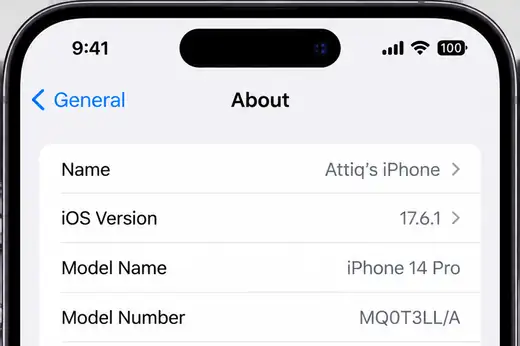
Go to Settings > General > About to find your iPhone model and iOS version. Compare them with the developer’s published requirements.
Find a Verified iOS Build
Check the Tachiyomi iOS GitHub Releases for available build and installation instructions. If no compatible release is available, avoid downloading files from unverified websites.
Understand IPA Files and Sideloading
An IPA file is an iOS app package, while sideloading means installing an app outside the App Store. Tools such as AltStore support certain IPA files without jailbreaking, but compatibility depends on the app and its build.
Step by step
Step-by-Step Guide to Tachiyomi iOS Download and Installation (No Jailbreak)
You can install compatible third-party iOS apps without jailbreaking your iPhone or iPad. However, the original Tachiyomi app was developed for Android, and a working, official iOS release has not been verified. Before downloading anything, check the Tachiyomi iOS GitHub repository for available releases and installation instructions.
Step 1: Check Whether an iOS Build Is Available
Before starting the installation, confirm that the project provides an iOS build you can actually install.
- Open the Tachiyomi iOS GitHub repository.
- Check the Releases section for an available IPA file or installation instructions.
- Read the release notes to confirm compatibility with your iOS version.
- Avoid download pages that promise an official iPhone version without linking to a verifiable release.
If no compatible release is available, do not proceed with an unrelated installer.
Step 2: Choose a Supported Installation Method
If you have a compatible IPA file, you will need a supported method to install and sign it on your iPhone.
Common sideloading options include:
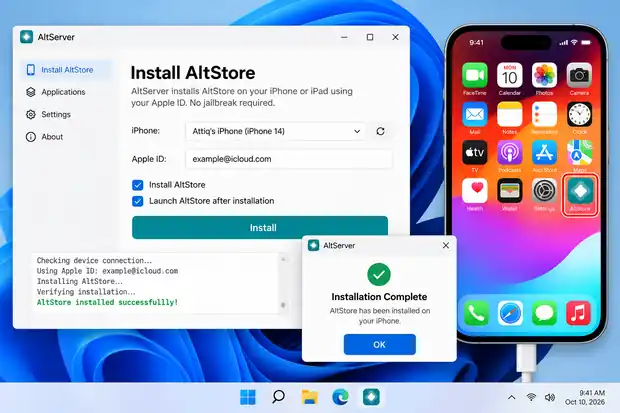
- AltStore: Uses a computer-based setup to install compatible IPA files.
- Sideloadly: Offers another computer-based method for signing and installing compatible iOS apps.
Check the official AltStore guide or the relevant tool’s official documentation before proceeding. These tools cannot make an Android APK run on iOS, and they do not guarantee that every IPA will work.
Step 3: Install the App Using the Selected Tool
Once you have confirmed that the IPA is compatible, follow the installation tool’s instructions.
- Download the installation tool from its official website.
- Complete its required setup on your computer or iPhone.
- Select the compatible Tachiyomi iOS IPA file, if one is available.
- Follow the tool’s instructions to sign and install the app.
- Wait for the installation to finish before opening it.
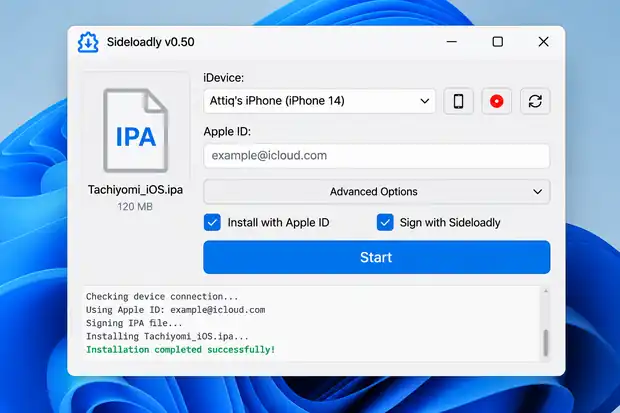
The exact process depends on the tool, your device, and the available app build.
Step 4: Approve the App If iOS Requires It
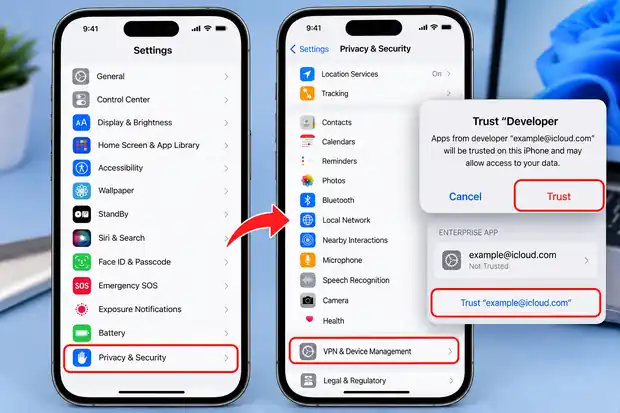
Some sideloaded apps require developer approval before they can open.
- Open Settings on your iPhone.
- Look for the relevant option under General or VPN & Device Management, if it appears.
- Follow Apple’s instructions for verifying the developer or profile.
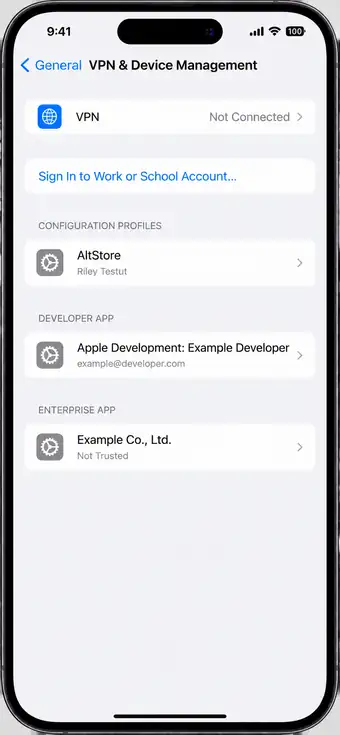
The exact settings may vary by iOS version and signing method. Never trust an unknown developer profile simply to make an app open.
Step 5: Open the App and Check Its Features
After installation, open the app and check whether its main features work correctly.
- Confirm that the app launches without errors.
- Test manga browsing and reading, if supported.
- Check whether chapter downloads and library management are available.
- Review the project’s documentation for source and feature compatibility.
Important: Tachiyomi iOS may not offer the same features as the original Android app. If no verified, compatible build is available, consider an iOS manga reader such as MANGA Plus or Aidoku instead.
Troubleshooting
How to Fix Common Tachiyomi iOS Problems
Installation problems can have different causes, so identify the error before trying random fixes.
Tachiyomi iOS Will Not Install
First, confirm that you have a genuine, compatible iOS package. An Android APK cannot be installed as a native iPhone app. If the IPA is missing, corrupted, or incompatible, obtain a valid build from the developer rather than changing unrelated settings.
Untrusted Developer or Signing Error
A signing or trust message may appear when installing certain apps outside the App Store. Follow the official instructions for your installation tool, and verify the developer before approving any trust request. Never trust an unknown certificate simply because a website tells you to do so.
The App Crashes or Will Not Open
Check whether the app supports your iOS version and whether the installation completed successfully. If the problem started after an update, check the developer’s issue tracker for a relevant fix. Reinstalling the app without checking compatibility may not solve the problem.
Manga Chapters or Sources Do Not Load
The app may be working while a content source is unavailable. Check your internet connection, the source’s status, and the app’s error message. Also confirm that the source is supported by the particular build you installed.
The App Stops Working After an iOS Update
Check the app’s compatibility notes and signing status before reinstalling it. An operating-system update, an expired signing period, and an unavailable content source are different problems that require different solutions.
Compatibility
Does Tachiyomi iOS Work on Every iPhone?
No single compatibility list can cover every unofficial iOS build. Support depends on the application’s requirements, the iOS version, and the installation method.
To check your device, open Settings, select General, and tap About. Note your iPhone model and iOS version, then compare them with the developer’s documented requirements.
Do not trust a compatibility table that lists every recent iPhone as supported without showing evidence. If the project has not published requirements or a usable build, its compatibility remains unconfirmed.
Features
Top Features of Tachiyomi iOS for Manga Reading
Tachiyomi iOS is a community-developed alternative for iPhone users who want a manga reading experience similar to the original Android app. However, its available features depend on the specific build you install.
Features Available in Tachiyomi iOS
Tachiyomi iOS offers several manga reading features, depending on the version you install. You may be able to read manga, download chapters for offline access, and organise your library. However, available features can vary between community builds.
- Manga Reading: Read manga using the features supported by your installed build.
- Offline Reading: Download chapters if the build supports downloads.
- Library Management: Organise your manga collection when library features are available.
- Reader Settings: Adjust reading options based on the settings included in the build.
Feature availability can vary between community builds, so check the project’s documentation before installing.
Major Limitations of Tachiyomi on iOS
Tachiyomi iOS has some limitations compared with the original Android app. Since it relies on a separate community-developed project, features, compatibility, and stability may vary between builds. Check the latest release details before installing it on your iPhone.
- No Official App Store Release: The original Tachiyomi project was developed for Android, not iOS.
- Limited Compatibility: An iOS port may not include every feature available in the Android version.
- Build Stability: Updates or changes to manga sources may affect how some features work.
- Installation Requirements: Depending on the build, you may need a supported sideloading method instead of a standard App Store installation.
Because Tachiyomi iOS is a separate, unofficial project, check its GitHub repository for current releases and installation instructions before proceeding.
Safety
Is Tachiyomi iOS Safe to Install?
The safety of an application depends on its source, the package you install, and the permissions or access you grant it.
How to Identify a Trustworthy Download
Start with the developer’s repository and published release information. Check whether the download matches the documented project and whether the developer explains how to install it.
Be cautious of websites that demand surveys, unrelated downloads, or personal information before providing an app file. Avoid packages whose origin cannot be established.
Privacy, Signing Certificates, and Configuration Profiles
Some third-party installation methods require signing or trusting an app. These steps do not prove that the application is safe. Never install an unknown configuration profile or share your Apple Account password with an unfamiliar download website.
Copyright and Manga Sources
A manga reader is software, while the material it displays comes from content sources. The legality of reading or downloading a title depends on the source, its permissions, and applicable laws. Prefer authorized sources when they are available.
Alternatives
Best Tachiyomi Alternatives for iOS
If Tachiyomi iOS is unavailable or does not meet your needs, several manga apps offer a reliable reading experience on iPhone and iPad. These alternatives provide licensed manga, regular updates, and features designed for iOS.
| App | Catalog | Access |
|---|---|---|
| MANGA Plus | Official manga from Shueisha | Free access to selected chapters |
| VIZ Manga | Licensed manga from popular Japanese publishers | Subscription required for much of the library |
| Shonen Jump | Popular shonen manga series | Free chapter previews, paid subscription for expanded access |
Manga Plus
MANGA Plus by Shueisha lets readers access official manga chapters, including new releases of popular series.
- Free access to selected chapters
- Official manga from Shueisha
- New chapters released regularly
- Available for iPhone and iPad
VIZ Manga
VIZ Manga offers a collection of licensed manga from popular Japanese publishers, with access depending on your region and subscription.
- Licensed manga titles
- Popular and classic series
- Clean reading experience
- Subscription required for much of the library
Shonen Jump
The Shonen Jump app focuses on popular manga series, including major shonen titles. It offers free chapter previews and a paid subscription for access to a larger digital library.
- Popular shonen manga series
- Access to a large digital library
- Free chapter previews
- Paid subscription for expanded access
Choose a licensed manga service if you want an established catalog and straightforward access. If you prefer managing your own library and sources, compare Aidoku and Paperback based on their current features and installation requirements.
FAQ
Frequently Asked Questions
1. Can I Download Tachiyomi on iOS?
The original Tachiyomi app is an Android application. A separate iOS project exists, but you should check its current releases before assuming a usable build is available.
2. Can I Install Tachiyomi on iPhone Without Jailbreak?
Sideloading can install compatible iOS apps without a jailbreak. You still need a valid iOS build and a supported installation method.
3. Does Tachiyomi iOS Require AltStore?
Not necessarily. The required method depends on the specific iOS build and the distribution options its developer supports.
4. Do I Need a Computer to Install Tachiyomi iOS?
Some installation methods require a computer, while others may use TestFlight or a compatible alternative. Check the method available for the actual app.
5. Why Does My Sideloaded App Stop Working?
Some sideloaded apps expire when their signing period ends. Other failures may result from compatibility problems or app bugs, so check the error before reinstalling.
6. What Is the Best Alternative to Tachiyomi for iPhone?
Aidoku, Paperback, and licensed manga services are options worth comparing. Your choice depends on source support, available titles, installation requirements, and your reading preferences.
7. Can I Transfer My Tachiyomi Library to iOS?
Do not assume that Android backups will import directly into an iOS reader. Check whether the destination app supports your backup format and test the process before deleting your original library.
Final verdict
Final Verdict
The original Tachiyomi app was built for Android, and the original developers did not release an official iOS version. A separate project exists, but its current release status and installation requirements must be checked before following a tutorial. If a compatible build becomes available, use a supported sideloading method and verify the download source. Otherwise, consider an established iOS reader such as Aidoku or a licensed manga service rather than trusting an unverified installer.