
Released January 8, 2024 · Android 6.0+
Download Tachiyomi Version 0.15.2 | Android 6.0+ | Jan 8, 2024
Tachiyomi 0.15.2 is the build of the free, open-source Tachiyomi manga reader app that arkon tagged on January 8, 2024, and it runs on any phone with Android 6.0 Marshmallow or newer. It came out five days before the Tachiyomi shutdown on January 13, 2024, near the very end of the app’s life. Below you will find the real APK details, the full list of changes, install and repo steps, and an honest look at what still works today. If your phone is stuck on Android 6 or 7, Tachiyomi 0.15.2 is one of the last builds you can still install for offline reading.
- v0.15.2 APK
- Android 6.0+
- Jan 8, 2024
- 6 FAQs
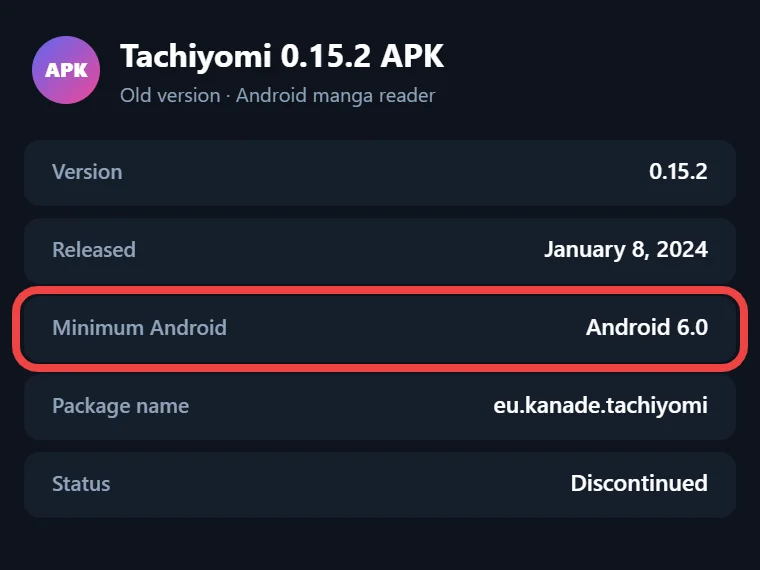
Tachiyomi 0.15.2 APK
Old version · open-source manga reader for Android
- Version
- 0.15.2
- Released
- January 8, 2024
- Minimum Android
- Android 6.0
- Package name
- eu.kanade.tachiyomi
- Status
- Discontinued
APK details
Tachiyomi 0.15.2 APK Information
The details below come from the app’s own source code rather than a store listing, because Tachiyomi never had a Google Play Store page. That is also why you won’t see a rating or download count here.
| Detail | Value |
|---|---|
| Version | 0.15.2 (version code 118) |
| Package name | eu.kanade.tachiyomi |
| Release date | January 8, 2024 |
| Developer | Tachiyomi team (created by inorichi, released by arkon) |
| Minimum Android | 6.0 Marshmallow (API 23) |
| Target Android | Android 14 (API 34) |
| APK types | armeabi-v7a, arm64-v8a, x86, x86_64, universal |
| License | Apache License 2.0 (free) |
| Backup format | .tachibk |
| Status | Discontinued since January 13, 2024 |
Download
Download Tachiyomi 0.15.2 for Android 6.0+
You can download Tachiyomi 0.15.2 below in five APK builds, one for each processor type plus a universal file that covers all of them. Every build needs Android 6.0 or newer, which is the main reason people still look for Tachiyomi for Android 6.0, since Mihon, the app that replaced it, only installs on Android 8.0 and up. Pick the file that matches your phone’s processor, and if you are not sure which one that is, the next part explains how to choose without guessing.
Which APK File Should You Pick?
Each APK is built for one processor type, and the matching file is smaller than the universal one.
| APK | Best for |
|---|---|
| arm64-v8a | Most modern 64-bit phones |
| armeabi-v7a | Older 32-bit phones |
| x86 / x86_64 | Emulators, some Chromebooks and Intel devices |
| Universal | Every device, with a bigger file size |
Most phones sold in recent years use a 64-bit chip, so the arm64-v8a APK is the safe first choice for them. If an install fails or you can’t find your processor type, the universal APK works on every device, and the only cost is the extra file size.
Changelog
What’s New in Tachiyomi 0.15.2 (Changelog)
The Tachiyomi 0.15.2 changelog matters more than its size suggests, because this release arrived just one day after 0.15.1 and changed how the app gets extensions. Most of the work went into extension repos and trust settings, while the rest fixed small problems in the reader, the trackers and the download queue, with several fixes tracked by number on GitHub.
Extension Repo and Trust Changes
The biggest change in this build is that the built-in official extension repo was removed, so the app no longer came with a ready source list. From this version on, you had to add a Tachiyomi extension repo yourself, and a new tachiyomi://add-repo link let a website add one for you with a single tap. Trust settings also changed in ways that save you extra taps:
- Unofficial extensions can now be trusted permanently, matched by their version code and signature, so updates don’t ask you again.
- Trusting a new extension no longer cancels the trust you gave to other ones.
- A new advanced setting called “Revoke trusted unknown extensions” clears every trusted unofficial extension at once.
- The extension list stops stuttering when install permission is already granted, and the external repo banner on the details screen now shows correctly.
Reader, Tracker and Download Fixes
Outside of extensions, this release cleaned up several small problems that readers ran into every day:
- In webtoon mode, you can now scroll all the way to the bottom of the last chapter, which used to get stuck before (#10291).
- Tracker search got a long-press menu that lets you copy a title or open it on the web (#10352).
- Score conversion between trackers no longer suffers from floating-point rounding errors.
- Download-ahead now checks properly whether the next chapter is already saved before queuing it.
- A custom fetch interval that sometimes failed to save now stays in place.
Translations were also refreshed through Hosted Weblate, so menus in other languages read more clearly.
Features
Key Features of Tachiyomi 0.15.2
This version keeps the core tools that made the app popular, and most still work offline:
- Extension repos: add your own source list with a URL that ends in index.min.json.
- Library and categories: sort your manga into shelves that you name yourself.
- Reader modes: read page by page, or switch to webtoon mode for long vertical comics.
- Offline downloads: save chapters to your phone and read them without internet.
- Nine trackers: AniList, MyAnimeList, Kitsu, MangaUpdates, Shikimori, Bangumi, Komga, Kavita and Suwayomi.
- Eleven themes: including Yotsuba, Tako, Midnight Dusk, Tidal Wave and Dynamic (Monet).
- Backups: save your library as a .tachibk file to restore later.
The Nord theme shows up in the code from this period, but it was hidden in the stable build, so you won’t find it in the theme list.
Install guide
How to Install Tachiyomi 0.15.2 on Android
Installing takes about a minute, since the APK goes straight onto your phone:
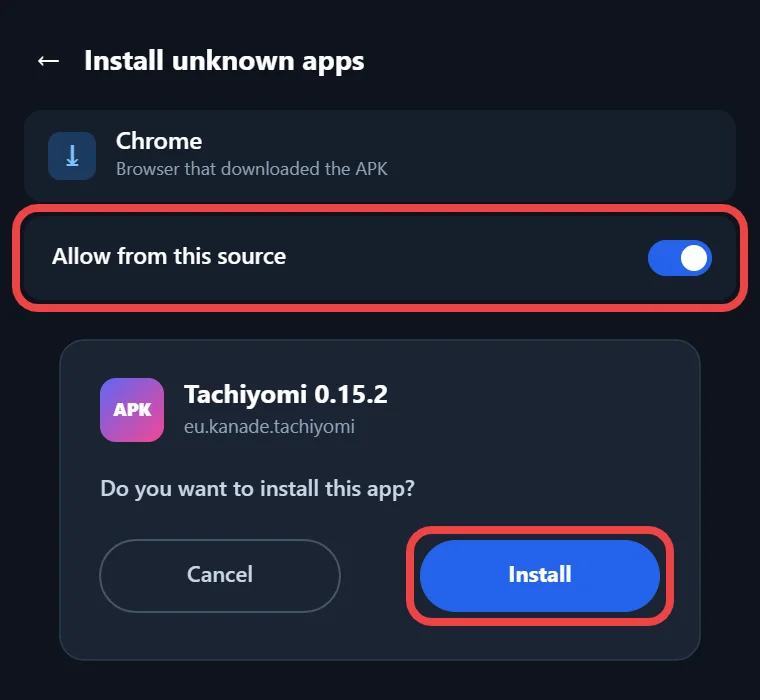
- Download the APK that matches your phone from the section above.
- Allow installs from outside the Play Store on your phone. On Android 6.0 and 7.x, turn on “Unknown sources” in Settings → Security, and on Android 8.0 or newer, allow “Install unknown apps” for your browser when it asks.
- Open the downloaded APK file from your Downloads folder and tap Install.
- Launch Tachiyomi and allow storage access so it can save chapters and backups.
- Turn “Unknown sources” back off afterward if you want to keep your phone locked down.
When the app opens, the Browse tab will look empty, because this build ships without a built-in source list.
Extensions
How to Add an Extension Repo in Tachiyomi 0.15.2
Adding a repo takes a few taps, but you need a repo URL that ends in index.min.json before you start:
- Open More → Settings → Browse → Extension repos.
- Tap Add repo, paste the URL and confirm it.
- Go back to Browse, open the Extensions tab, pick a source and install it.
- When the “Untrusted extension” warning appears, read it before you tap Trust.
That warning says malicious extensions can read any stored login credentials or execute arbitrary code, so only add repos from people you trust. After you trust an untrusted extension once, the app remembers that choice for future updates that carry the same signature.
2026 status
Does Tachiyomi 0.15.2 Still Work in 2026?
Tachiyomi 0.15.2 still opens and reads manga in 2026, but it can no longer get working extensions from the main community repo. The Tachiyomi shutdown on January 13, 2024 ended all updates, and tachiyomi.org now just sends visitors to the project’s GitHub page. Keiyoushi, the repo most people use today, only supports Mihon 0.20.1+, TachiyomiSY 1.13.2+ and Komikku 1.14.1+, and its store link ends in index.pb, a format this old build was never made to read. Old Tachiyomi apps that try to use it only see “Outdated App” and “Update to Mihon 0.20.1+” placeholders instead of real sources. Chapters you already downloaded still open offline, along with your library, categories and themes, so the app works best today as an offline reader for manga you saved earlier.
Who it’s for
Why Choose This Version (and When Not To)
This version makes sense for a small group of readers, so check which group you fit. It fits well if your phone runs Android 6.0 or 7.x and can’t install Mihon, if you want to open an old .tachibk backup on the same device, or if you mostly read chapters you downloaded before. It is the wrong choice if your phone runs Android 8.0 or newer, because Mihon installs there, keeps getting updates and works with Keiyoushi extensions. If you simply want a Tachiyomi old version for its look and layout, 0.15.3 is the better download because it carries a few later bug fixes.
Compare
Tachiyomi 0.15.2 vs 0.15.3 vs Mihon
Version 0.15.3 fixes a few bugs that Tachiyomi 0.15.2 still has, while Mihon is the only one of the three that still gets updates and works with today’s extension stores.
| 0.15.2 | 0.15.3 | Mihon | |
|---|---|---|---|
| Release date | Jan 8, 2024 | Jan 13, 2024 | v0.21.2 on Oct 13, 2026 |
| Minimum Android | 6.0 | 6.0 | 8.0 |
| Keiyoushi extensions | No | No | Yes (0.20.1+) |
| Updates | Ended | Final release | Active |
| Restores .tachibk | Yes | Yes | Yes, up to v0.21.2 |
The 0.15.3 update fixed tap controls that stopped working when zoomed in, made backup restore faster, fixed extension interceptors that received compressed responses, and repaired the download cache start-up logic, which is why it is the better pick between the two old builds.
Move to Mihon
How to Move from Tachiyomi 0.15.2 to Mihon
Moving from Tachiyomi to Mihon keeps your library, categories and tracker links, as long as you follow the steps in the right order:
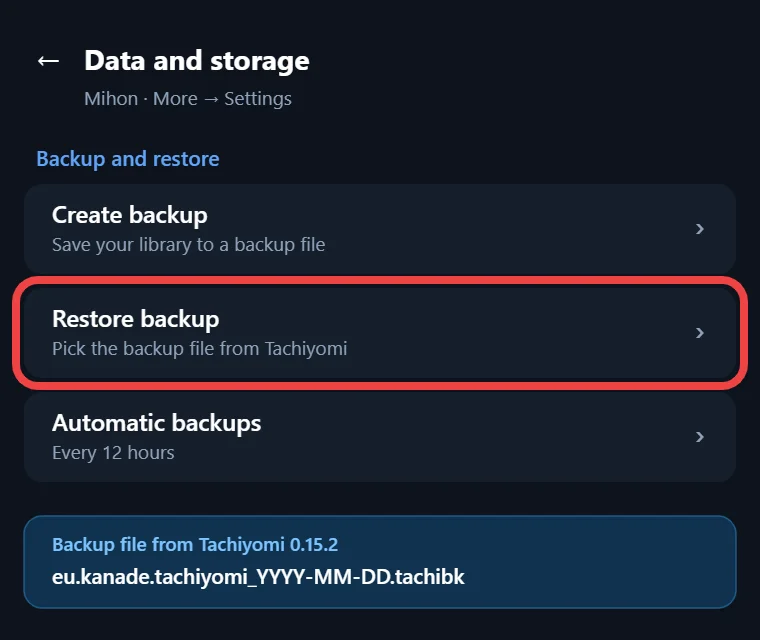
- In Tachiyomi, create a backup so you get a file named like eu.kanade.tachiyomi_YYYY-MM-DD_HH-MM.tachibk.
- Install Mihon v0.21.2 first, because it is the last Mihon version that can restore a tachibk backup.
- Log into your trackers and install your extensions before you restore anything.
- Go to More → Data and storage → Restore, then pick your backup file.
- Update Mihon to a newer version only after the restore has fully finished.
Backups don’t include extensions or downloaded chapters, so move your old chapters into Mihon’s “downloads” folder and then tap More → Settings → Advanced → “Reindex downloads” to make them show up again.
More versions
Other Tachiyomi Versions
These are the Tachiyomi releases just before and after this one, so you can compare dates before you pick a download:
- Tachiyomi 0.14.7 (October 25, 2023): the last release of the 0.14 line.
- Tachiyomi 0.15.0 (January 6, 2024): the release that added extension repos.
- Tachiyomi 0.15.1 (January 7, 2024): a quick follow-up release.
- Tachiyomi 0.15.3 (January 13, 2024): the final Tachiyomi release.
FAQ
FAQs
1. Is version 0.15.2 safe to download?
The app is open source under the Apache License 2.0, with its code public on GitHub. The real risk comes from where you get the APK and from unofficial extensions, which can read stored logins.
2. Does this version work on Android 6.0 and 7.0?
It does, because its minimum is API 23, which is Android 6.0 Marshmallow, so it installs on Android 6.0, 7.0 and newer, while Mihon needs Android 8.0 or newer.
3. Why are there no extensions in this build?
This build removed the built-in official repo, so the extension list stays empty until you add one yourself. Keiyoushi, the main repo today, no longer supports old Tachiyomi builds and shows only placeholders.
4. What is the difference between 0.15.2 and 0.15.3?
Version 0.15.3 came out on January 13, 2024 and fixed zoomed-in tap controls, slow backup restores and a download cache bug. Both need Android 6.0, and neither gets updates.
5. Can I restore a backup from this version in Mihon?
Yes, Mihon v0.21.2 can restore a .tachibk file made by this version. Restore it on v0.21.2 first, because later Mihon versions drop support for the old Tachiyomi backup format.
6. Is this version on the Google Play Store?
No, Tachiyomi was never listed on the Google Play Store, and neither is Mihon. Any Play Store ratings or download counts shown for this app are made up.
Final thoughts
Final Thoughts
Tachiyomi 0.15.2 is worth installing if your phone is stuck on Android 6.0 or 7.x and you mostly read manga that you have already saved offline. If your phone runs Android 8.0 or newer, install Mihon v0.21.2 instead, restore your .tachibk backup there, and add the Keiyoushi store so your sources start working again. Either way, make a fresh .tachibk backup before you change anything, since it holds your library and tracker links.