
Mihon 0.21 · Keiyoushi index.pb · Updated October 2026
How to Use Tachiyomi After the Extension 2026 Update
An empty extension list or a strange entry called “Outdated App” is what thousands of manga readers now see when they open their app, and the reason is a big change that most old guides never mention. This guide explains how to use Tachiyomi after the extension update with steps that still work in October 2026, instead of the old 2025 tricks that stopped working in July.
- 1,420 extensions
- 2,393 sources
- Mihon 0.20.1+
- 6 FAQs
The new Keiyoushi store link
Mihon → More → Settings → Browse → Extension store → Add
- Old link (stopped working)
- index.min.json
- Needs
- Mihon 0.20.1+, TachiyomiSY 1.13.2+ or Komikku 1.14.1+
- Last version that restores .tachibk
- Mihon 0.21.0
Introduction
What This Guide Covers
You will learn why the extensions vanished, which apps still support them, how to protect your library, and how to add the new Keiyoushi store inside Mihon. By the end, you will know exactly how to use Tachiyomi after the extension update and get back to reading without losing a single chapter.
Background
Why Were Tachiyomi Extensions Removed?
Tachiyomi extensions were removed because the Tachiyomi project shut down in January 2024 after legal pressure from the anti-piracy team of Kakao Entertainment, the South Korean company behind many popular webtoons. Rather than face a long legal fight, the developers archived the official extensions repo on GitHub and stopped working on the app, and the main Tachiyomi app repo was later removed as well.
The good news is that the community did not let the app die. Its work continued under a new name, Mihon, which is now the official successor of Tachiyomi and feels almost the same when you open it. Since Mihon does not host or offer any extensions itself, a volunteer group called Keiyoushi took over that job, and today it maintains about 1,420 extensions covering 2,393 sources, including popular ones like MangaDex. In other words, the extensions never truly disappeared, because they simply moved to a new home, and that move is the root of every Tachiyomi extension update since then.
What changed
What Changed in the 2026 Extension Update?
June 27, 2026: Mihon 0.20.0
The 2026 Tachiyomi extension update changed both the format of the extensions and the link your app uses to find them, which is why so many 2025 guides stopped working. On June 27, 2026, Mihon 0.20.0 added support for a new 1.6 extension format and a new index file, and it also renamed “Extension repos” to “Extension store” and the “Obsolete” label to “Orphaned.”
July 2026: Keiyoushi moves to index.pb
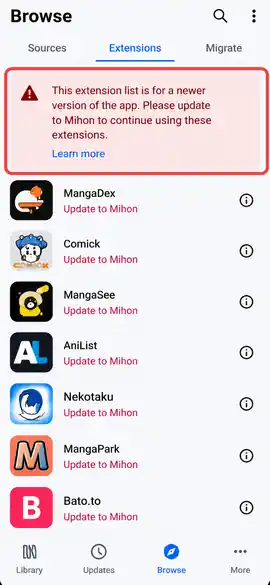
A few weeks later, in July 2026, Keiyoushi moved every extension to the new format and replaced its old index.min.json link with a new index.pb link. If your app still uses the old link, it now shows only two fake entries named “Outdated App” and “Update to Mihon 0.20.1+,” which is Keiyoushi’s way of telling you that your setup needs to change.
Compatible apps
Which Apps Still Work With Tachiyomi Extensions
Picking the right app is the first real choice you make when you use Tachiyomi after the update, because only three apps work with the current Tachiyomi extensions, and each of them needs a recent version. The table below shows which apps you can use today and which ones will leave you with a blank or broken list.
| App | Works with Keiyoushi extensions? | Minimum version |
|---|---|---|
| Mihon | Yes | 0.20.1 |
| TachiyomiSY | Yes | 1.13.2 |
| Komikku | Yes | 1.14.1 |
| Tachiyomi (original) | No | Stuck on 0.15.x |
| TachiyomiJ2K | No | Not supported |
| Yokai | No | Not supported |
If you want the closest feel to the old app, Mihon is the best Tachiyomi alternative because it keeps the same layout, while TachiyomiSY and Komikku add extra features on top of it.
Before you start
Before You Start: Back Up Your Tachiyomi Library
Before you use Tachiyomi after the update, make a Tachiyomi backup so your library, categories, and reading progress move with you. Open your old app, go to More > Settings > Data and storage (some older builds call this section Backup and restore), and tap Create backup to save a .tachibk file on your phone.
Keep that file in a safe place, such as your Downloads folder or a cloud drive, because it holds every series you follow. Timing matters here, since Mihon 0.21.0, released on October 11, 2026, is the last version that can restore a .tachibk backup. Later versions drop this support, so if you wait too long, you will have to install 0.21 first, restore your file there, and only then update to the newest Mihon.
Step by step
Step-by-Step Guide to Use Tachiyomi With External Extensions
Using Tachiyomi with external extensions today really means using Mihon with the Keiyoushi extension store, since the original app can no longer load the new extensions. The six steps below are the full Tachiyomi extension update fix, and all you need is your Android phone, your backup file, and a working internet connection.
Install or Reinstall Tachiyomi (Switch to Mihon)
Reinstalling the old Tachiyomi APK won’t bring your extensions back, so replace it with Mihon, the app that carries Tachiyomi forward.
- Download the latest APK from the official Mihon releases page on GitHub. If you’re unsure which file to pick, choose
mihon-v0.21.x.apk. - Open the file and allow Install unknown apps when Android asks.
- Launch Mihon, pick a theme, choose a storage folder and grant the permissions it asks for.
- Go to More > Settings > Data and storage > Restore backup and select your .tachibk file.
Accessing the Extensions Tab
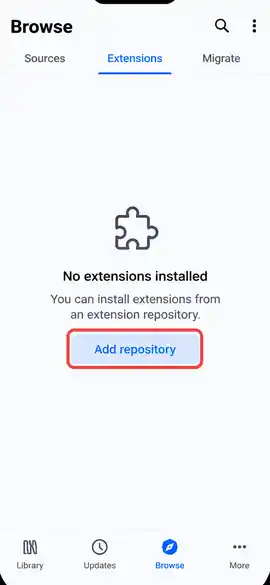
Tap Browse at the bottom of the screen, then open the Extensions tab. On a fresh install, this list will be empty. If you restored a backup, your old extensions may show as orphaned or obsolete, which is normal until you connect the new store.
Add a Custom Extension Repository
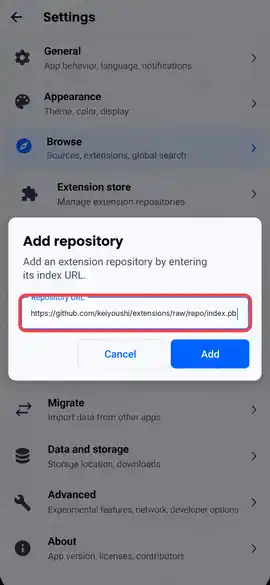
The quickest way is to open the Keiyoushi website on your phone and tap Add store, which adds the store to Mihon automatically. If that doesn’t work, add it manually:
- Go to More > Settings > Browse > Extension store.
- Remove any old repo links, especially ones ending in
index.min.json. - Tap Add and paste:
https://github.com/keiyoushi/extensions/raw/repo/index.pb - Confirm, then close and reopen Mihon to reload the list.
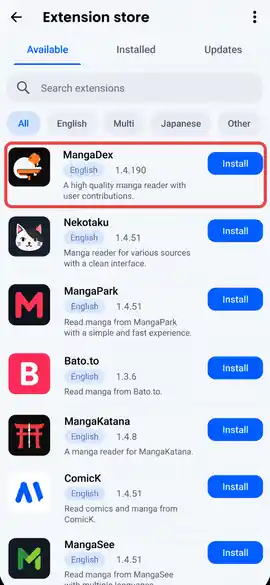
The Extensions tab will now fill with hundreds of sources sorted by language, and you can use the search icon to find a site by name.
Installing Extensions
Uninstall your old extensions first, because Keiyoushi warns they won’t receive updates. Then find the source you want, such as MangaDex, tap the download button and confirm the install. It will appear under Browse > Sources.
If a source is missing, check your content preference (Safe, Mixed or 18+), which replaced the old NSFW toggle in Mihon 0.21.
Fixing the Download Error
If an extension won’t install, try these fixes in order:
- Restart Mihon, since it sometimes misses a newly updated extension until it reopens.
- Install the extension APK with Split APK Installer from GitHub, which shows clearer error messages.
- INSTALL_FAILED_UPDATE_INCOMPATIBLE: The same extension is installed from another source, so uninstall it and reinstall it. Your library and settings stay safe.
- “DISPLAY_NAME column is null”: The APK is corrupted, so download it again.
Trusting the Extension
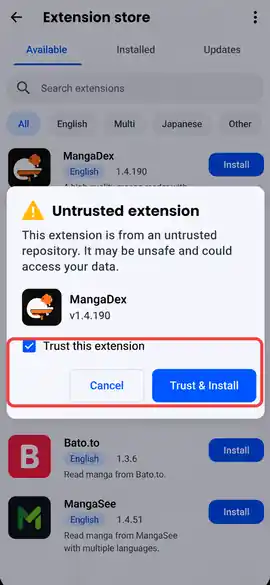
Extensions from the Keiyoushi store are trusted automatically. If you install an APK manually and it shows Untrusted, tap it and press Trust. Mihon 0.21 also installs and updates each extension only from its original repo, which blocks tampered copies.
Migrate Your Library to the New Sources
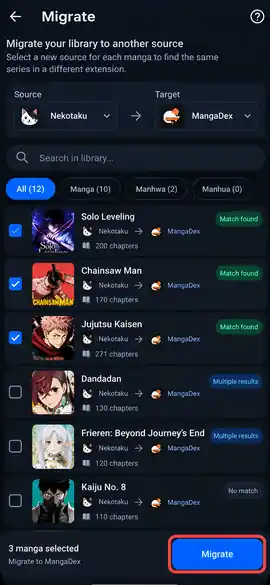
Your restored library may still point to dead sources. Go to Browse > Migrate, pick a source, select the series to move, and let Mihon find matching titles on the new source. Chapters, categories and AniList or MyAnimeList tracking carry over. Mass migration also lets you move many series at once, which helps a lot with large libraries.
Proof That It Works
To be sure you can use Tachiyomi after the update, run a quick test instead of guessing. Open Browse > Sources, tap the extension you just installed, and open any series from its Popular or Latest list. Then open a chapter, read a few pages, and download one chapter to confirm that saving works too. If the pages load and the download finishes, your setup is complete and ready for daily reading. This short check proves that the Tachiyomi extension update fix worked on your own phone, and it is also a good habit to repeat whenever you install a new source, so a broken extension never catches you in the middle of a chapter.

Troubleshooting
Common Errors After the Extension Update and How to Fix Them
Most problems after the Tachiyomi extension update come from old links, old apps or protected websites, and each one has a simple fix.
“Outdated App” Message
The outdated app error means your app is too old or your store still uses the old index.min.json link. To fix it, update to Mihon 0.20.1 or newer, remove the old link, and add the index.pb link instead.
Obsolete or Orphaned Extensions
Obsolete extensions show up when your app version is too old, while orphaned extensions were removed from the store or replaced by newer ones. If every extension says Orphaned, remove all extension stores, add only Keiyoushi again, and then reinstall your extensions.
Cloudflare and WebView Errors
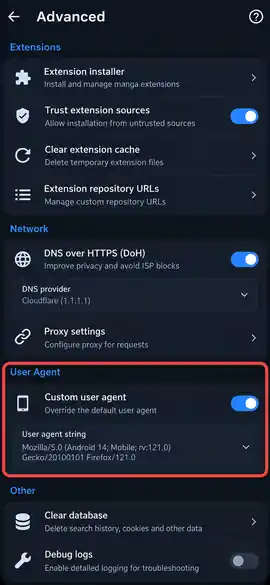
Some sources use Cloudflare to stop apps from loading them, so open the source in WebView and solve the check first. If that fails, clear cookies and WebView data under More > Settings > Advanced, or change the default user agent there and restart Mihon.
HTTP 403, 404, 429 and 1020 Errors
A 403 error points to Cloudflare or an IP ban, 404 means the series or site is gone, 429 means you sent too many requests, 5xx means server trouble, and 1020 means the site’s firewall blocked you.
FAQ
FAQs
1. Can I still use the original Tachiyomi app?
You can still open it, but it cannot load the current Keiyoushi extensions, because Tachiyomi stopped at version 0.15.x, while the new extensions need Mihon 0.20.1 or newer, so only local files and old sources keep working.
2. Which app replaced Tachiyomi?
Mihon replaced Tachiyomi as its official successor, and it keeps the same look and features. TachiyomiSY and Komikku are popular forks of Mihon if you want extra options, and both of them support Mihon extensions from Keiyoushi.
3. Will I lose my manga library when switching to Mihon?
You will not lose your library as long as you create a .tachibk backup in Tachiyomi and restore it in Mihon 0.21. Your series, categories, and reading progress come with you, although some titles may need source migration afterward.
4. Why does my extension list say “Outdated App”?
Your list says “Outdated App” because your app or store link is too old for the new 1.6 extensions that came with the Tachiyomi extension update. Update to Mihon 0.20.1 or newer and replace the index.min.json link with the index.pb link.
5. Is there a Tachiyomi or Mihon app for iOS?
There is no official Tachiyomi or Mihon app for iOS, because Mihon is built only for Android. Be careful with websites that offer an iPhone version, since Mihon has publicly warned about sites that pretend to be official.
6. Is Keiyoushi safe to use?
Keiyoushi is the volunteer team that maintains the extensions most Mihon users rely on, and its code is public on GitHub. Even so, any extension gets full access to the app, so only add stores from sources you trust.
Final thoughts
Final Thoughts
Now you know how to use Tachiyomi after the extension update, from the real reason the extensions disappeared to the exact link that brings them back. The whole process comes down to five moves, which are backing up your library, switching to Mihon, adding the Keiyoushi index.pb store, reinstalling your extensions, and migrating any series that lost its source.
Make that backup today rather than later, because Mihon 0.21 is the last version that can read a .tachibk file, and once newer versions take over, restoring it will take extra steps. If something still breaks, check the error section above or ask for help in the Keiyoushi Discord.