
Last updated: October 23, 2026 · 483 English sources
English Manga Extensions for Tachiyomi – Complete Guide 2026
Tachiyomi stopped getting updates in January 2024, which is why so many readers now open the app and find an empty extension list or an “Outdated App” message where their English sources used to be. Mihon took its place, and English manga extensions for Tachiyomi now come from the Keiyoushi repo instead of the old official list, so the old setup steps no longer work. This guide covers the English manga extensions for Tachiyomi that still work, the ones that changed, and the exact steps to add the repo, install sources and fix the errors you will run into.
- 483 English sources
- 1,420 extensions
- Mihon v0.21.2
- 6 FAQs
Keiyoushi repo URL
Mihon → More → Settings → Browse → Extension store → Add
- English sources
- 483 in the Keiyoushi repo
- Needs
- Mihon 0.20.1+ or an updated fork
- Latest Mihon
- v0.21.2 (October 13, 2026)
Basics
What Are English Manga Extensions for Tachiyomi?
English manga extensions for Tachiyomi are small add-ons that connect the app to English manga websites, so each extension works as one source, such as MangaDex or MANGA Plus by Shueisha. The app itself holds no manga, which means your library stays empty until you add a repo and install at least one source.
Because every extension is a separate APK, you can install only the sites you like and remove the rest at any time. The same Tachiyomi extensions also work in Mihon and in forks like TachiyomiSY, Komikku and TachiyomiJ2K, since they share one extension format. When one source goes down, the others keep working, which is why most readers keep a few English manga extensions for Tachiyomi installed.
2026 status
Does Tachiyomi Still Work in 2026?
The original Tachiyomi app no longer gets updates, because its developers shut the project down on January 13, 2024, and said it “will no longer be actively developed.” Their official extensions repo on GitHub was archived after its last update on January 8, 2024.
This matters for English manga extensions for Tachiyomi because the Keiyoushi repo has moved to a newer format. When an old Tachiyomi build reads the repo, it only sees two placeholder entries called “Outdated App” and “Update to Mihon 0.20.1+”, while all 1,420 real extensions stay hidden because they are built on extension library 1.6.
To use these extensions in 2026, you need Mihon 0.20.1 or newer, or a fork that is kept up to date, such as TachiyomiSY, Komikku, TachiyomiJ2K or Yokai. Mihon v0.21.2 is the latest stable release from October 13, 2026, and since v0.20.0 the app calls the repo section the “extension store” instead of “extension repo.”
Best extensions
Best English Manga Extensions for Tachiyomi
The Keiyoushi repo lists 483 English sources, which is more than any other language, so the hard part is not finding English manga extensions for Tachiyomi but picking the ones that load well and stay online. The table below covers the sources most readers start with, along with their current status in the repo, because a few popular names from older guides no longer work the way they used to, and installing a dead source only fills your Browse tab with errors.
| Extension | Content Type | Best For | Status |
|---|---|---|---|
| MangaDex | Fan translations | Large library in many languages | Working |
| MANGA Plus by Shueisha | Official, free | Shonen Jump series | Working |
| Webtoons | Official | Vertical-scroll comics | Working |
| Weeb Central | Aggregator | Former MangaSee and MangaLife readers | Working |
| Asura Scans | Scanlation | Manhwa | Working |
| Mangakakalot and Manganato | Aggregator | Popular ongoing series | Working |
| ComicK | Aggregator | Not recommended | Mirror only |
| Bato.to | Community uploads | Not recommended | Mirror only |
MangaDex
MangaDex is the first of the English manga extensions for Tachiyomi that most people install, since scanlation groups upload fan translations there in many languages. That wide mix makes it a good place to find older or less popular titles that official platforms never picked up.
The extension is rated “mixed” in the Keiyoushi repo, which means it carries both safe and adult titles, so check the source settings before you browse. Among the best English manga extensions, MangaDex also works well as a backup, because when a smaller site breaks, the same series is often available here.
Best for: Readers who want a large fan-translated library in English and other languages.
MANGA Plus by Shueisha
MANGA Plus by Shueisha is the official home of Shonen Jump series in English, and it is free to read, which makes it one of the few popular sources here with full publisher backing. Since the chapters come straight from Shueisha, the translation and image quality stay consistent from one chapter to the next.
The same Keiyoushi listing also includes MANGA Plus Creators, a separate source that loads Shueisha’s creator site. If you want English manga extensions for Tachiyomi that support the people who make the series, this one should sit near the top of your list.
Best for: Shonen Jump fans who want free, official English chapters.
Webtoons
Webtoons.com is an official platform, and it is the official pick among English manga extensions for Tachiyomi for vertical-scroll comics, so long episodes read smoothly from top to bottom. Many series there are Korean manhwa and comics made for phones, which gives you a different style from the Japanese manga on other sources.
For the best result, set the reader to long-strip mode, because page-by-page reading cuts these panels awkwardly.
Best for: Readers who enjoy vertical comics and official webtoon series.
Weeb Central (MangaSee and MangaLife Replacement)
MangaSee and MangaLife were two of the most popular English sources for years, but neither one is listed in the Keiyoushi index anymore, so old guides that still recommend them send readers to a dead end. Weeb Central is the replacement for both, and the Weeb Central extension is live in the repo today.
If your library still has series from MangaSee or MangaLife, you can use the migrate option in Mihon to move them to Weeb Central and keep your chapter progress in one place.
Best for: Readers coming from MangaSee or MangaLife who want a similar general library.
Asura Scans
Asura Scans focuses on manhwa, the Korean comics that have built a large English readership, and the Asura Scans extension in the current repo points to asurascans.com. Because it is a scanlation group, it translates its own releases instead of copying chapters from other sites.
If you mostly read Korean action series, pairing Asura Scans with a general source like MangaDex gives you a backup whenever one site is slow.
Best for: Manhwa readers who want releases straight from a scanlation group.
Mangakakalot and Manganato
Mangakakalot and Manganato are aggregator sites with large catalogs of ongoing manga, manhwa and manhua, and both are still working English manga extensions for Tachiyomi in the Keiyoushi repo. Manganato has moved to the natomanga.com address, while Mangakakalot now runs on mangakakalot.gg, so old bookmarks and outdated extensions will not load them.
Installing the current versions from the repo fixes this, because the extensions already point to the new addresses.
Best for: Readers who follow popular ongoing manga, manhwa and manhua.
What Happened to ComicK and Bato.to?
ComicK and Bato.to were favorites in older lists of English manga extensions for Tachiyomi, but the official extensions for both are gone from the Keiyoushi repo. What remains are unofficial copies, since “Comick (Unoriginal)” points to comick.live, “ComicK Fanmade” points to a separate fan-made site, and Bato.to only has a clone called “Bbato” that loads bato1.com.
These mirrors may work for a while, yet they are not the original sites, so their libraries and safety can differ. MangaPark is in the same position, because only “MangaPark.tv (unoriginal)” remains, and it is flagged as adult content. If you followed a series on one of these sites, moving it to MangaDex or Weeb Central is safer.
Official sources
Official and Legal English Manga Extensions
Fan translations fill most of the 483 English sources, but a solid group of official manga extensions comes from publishers and licensed platforms, and these are the safest English manga extensions for Tachiyomi to keep in your library. They load licensed chapters, so the publisher, not a fan group, provides what you read.
| Extension | What It Offers |
|---|---|
| VIZ Shonen Jump | Licensed Shonen Jump series from VIZ |
| VIZ Manga | VIZ’s wider licensed manga catalog |
| Kodansha | Licensed manga from the Kodansha catalog |
| Tapas | Official webcomics from the Tapas platform |
| Tappytoon | Licensed manhwa in English |
| Comikey | Licensed manga and webtoons |
| GlobalComix | Comics from creators and publishers |
Some of these platforms may keep certain chapters behind an account or payment, so the extension can only show what the website itself offers. J-Novel is in the repo as well, which helps if you read light novels alongside your manga.
Add the repo
How to Add External Repositories (Keiyoushi Repo)
Mihon ships with no extensions at all, and the Mihon FAQ states that the app “does not have, associate, or provide any repositories or extensions.” That is why your Browse tab looks empty on a fresh install, and why adding the Keiyoushi repo comes before any of the English manga extensions for Tachiyomi can be installed.
- Open keiyoushi.github.io/add-repo in your phone’s browser and follow the add option for Mihon, which hands the repo over to the app.
- If that link does not open the app, copy this URL:
https://github.com/keiyoushi/extensions/raw/repo/index.pb - In Mihon, go to More → Settings → Browse and open the Extension store section.
- Tap Add, paste the URL, and confirm.
- Go back to Browse → Extensions and pull down to refresh the list.
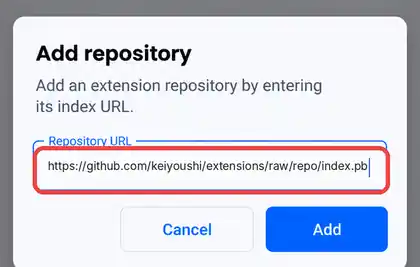
Older guides call this menu “Tachiyomi extension repos,” so if your app still shows that name, it is out of date and you should update it before going further. The Keiyoushi repo is a community project and not part of Mihon, which is also why Mihon warns that third-party extensions “may contain malware” and asks you to trust each one before it runs.
Step by step
How to Install Extensions — Step by Step
Once the repo is in place, you can install extensions in Tachiyomi forks or Mihon with a few taps, although Android adds one extra permission step the first time because each extension is installed as its own APK.
- Download the latest Mihon APK from mihon.app or its GitHub releases page and install it on your Android phone.
- When Android asks, allow your browser or file manager to install unknown apps, since Mihon and its extensions come from outside the Play Store.
- Add the Keiyoushi repo using the steps in the previous section.
- Open Browse, then the Extensions tab, and let the list load.
- Use the language filter to show only the English manga extensions for Tachiyomi out of all 1,420.
- Tap Install next to each source you want, and confirm the Android prompt.
- Tap Trust when Mihon asks you to verify the new extension.
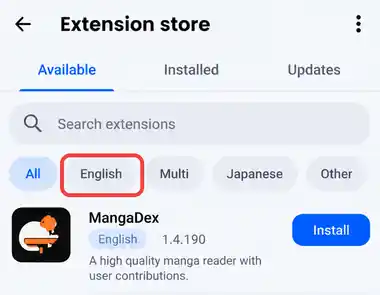
After that, open your new extension from the Sources tab and search for a series to test it. You can add as many Mihon extensions as you like, and each one updates from the Extensions tab whenever a new version reaches the Mihon extension store.
Troubleshooting
Common Problems and Quick Fixes
Most errors with English manga extensions for Tachiyomi come from the source website rather than the app, so the error code tells you what went wrong.
| Problem | Cause | Fix |
|---|---|---|
| HTTP 403 | Cloudflare protection, or the site banned your IP | Open the source in WebView to check |
| HTTP 404 | The source is down or the series was removed | Check in WebView, then try another source |
| HTTP 429 | You read or downloaded too fast | Pause downloads and wait a few hours |
| HTTP 5xx (500, 502, 520, 521) | A problem on the site’s server | Wait, then check the site in WebView |
| Error 1006 or 1020 | A temporary IP ban, or a firewall rule set by the site owner | Wait, or switch to another source |
| Unable to resolve host or timeout | A network or DNS problem | Switch network or VPN, or turn on DNS over HTTPS in Settings → Advanced |
| INSTALL_FAILED_UPDATE_INCOMPATIBLE | The old version conflicts with the new one | Back up, uninstall, then reinstall |
| INSTALL_FAILED_NO_MATCHING_ABIS | The APK does not match your phone | Download the universal APK |
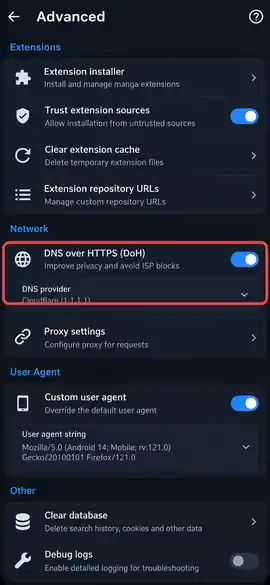
When a source keeps failing for days, migrate those series to a working extension.
How to Fix the Cloudflare Error
The Tachiyomi Cloudflare error is a common problem with English manga extensions for Tachiyomi, because many manga sites use Cloudflare to block bots, and an extension cannot pass that check on its own. The fix starts with WebView, which loads the site inside Mihon like a normal browser.
- Open Browse, tap the source, and tap the WebView icon at the top.
- Complete the Cloudflare check or CAPTCHA, then close WebView with the X button.
- If the loop continues, go to More → Settings → Advanced and clear cookies and WebView data.
- In the same menu, change the default user agent string, then restart the app.
- Use Android System WebView or Google Chrome as your WebView provider, since Firefox WebView can make Mihon crash.
How to Fix “Outdated App” and Missing Extensions
The Tachiyomi outdated app message appears when your app reads the old repo format, so the list only shows “Outdated App” or “Update to Mihon 0.20.1+” instead of real sources. Updating to Mihon 0.20.1 or newer, or to a current fork, fixes this, and after the update you should remove the repo and add the Keiyoushi URL again so the app loads the full list.
Extensions that were removed from the repo now show as “orphaned,” which older versions called “obsolete.” An orphaned extension will not get fixes anymore, so it is better to uninstall it and move your series to a working source.
Tips
Quick Tips for Better Reading
A few small habits make English manga extensions for Tachiyomi far more reliable, and most of them come down to spreading your reading across several sites.
- Install three to five extensions, so a single dead site never stops your reading.
- Use Global Search to look for a title across all of your installed sources at once.
- Download chapters for offline reading before a trip or whenever your connection is weak.
- Read and download at a normal pace, because fast bulk downloads can trigger 429 bans.
- Make a backup before you switch apps, such as moving from TachiyomiJ2K to Mihon or Komikku, so your library and progress come with you.
- Yokai users should keep their backups current as well, since its developer has said they are stepping back from the project.
Legal and safety
Legal and Safety Note
Whether Tachiyomi is legal to use depends on the sources you add, because the app itself is only a reader. Official English manga extensions for Tachiyomi, like MANGA Plus by Shueisha, VIZ, Kodansha and Webtoons, carry licensed chapters, while most other English sources host scanlation and fan translations, which sit in a legal gray area since the rights holders never approved them.
DMCA claims do remove sources from time to time, and in 2026 six adult sources were taken out of the Keiyoushi repo after DMCA takedowns, along with a note that they “will not be added back.”
When people ask “is Tachiyomi safe,” they usually mean the extensions, and Mihon itself warns that third-party extensions “may contain malware.” Install extensions only from a repo you trust, avoid random APK files shared on forums, and support the creators by buying official volumes or reading on licensed platforms whenever you can.
FAQ
FAQs
1. Do Tachiyomi extensions still work in 2026?
Yes, English manga extensions for Tachiyomi still work, but only on current apps, because the Keiyoushi repo now uses a newer format. You need Mihon 0.20.1 or newer, or an updated fork like TachiyomiSY or Komikku, since the original app only sees an “Outdated App” placeholder.
2. What is the Keiyoushi repo URL?
The Keiyoushi repo URL is https://github.com/keiyoushi/extensions/raw/repo/index.pb, and you paste it into the Extension store section under More → Settings → Browse in Mihon. You can also open keiyoushi.github.io/add-repo in your phone’s browser, which passes the repo to the app for you, so you do not have to type anything.
3. Why are no extensions showing in Mihon?
Mihon ships with no extensions and provides no repositories, so the Extensions tab stays empty until you add a repo yourself. If you already added one and still see only “Outdated App,” your app is older than version 0.20.1 and needs an update before the list appears.
4. Is MangaDex better than Weeb Central?
They suit different needs, so most readers simply keep both of them installed. MangaDex has fan translations in many languages and is a good place for rare titles, while Weeb Central replaced MangaSee and MangaLife as a general English library for popular ongoing series.
5. Are Tachiyomi extensions safe?
Extensions from a well-known community repo like Keiyoushi are widely used, but Mihon itself warns that third-party extensions “may contain malware.” Stick to one trusted repo, skip random APK files shared on forums, and remove any orphaned extensions that no longer receive updates.
6. Is ComicK still on Tachiyomi?
The official ComicK extension is no longer in the Keiyoushi repo, and only unofficial copies called “Comick (Unoriginal)” and “ComicK Fanmade” remain, which point to different sites. For a stable replacement, move your ComicK series to MangaDex or Weeb Central using the migrate option.
Conclusion
Conclusion
Reading English manga on Android still works well in 2026, as long as you use Mihon or an updated fork, add the Keiyoushi repo first, and pick sources that are still alive. Start with MANGA Plus by Shueisha and MangaDex, add Weeb Central and Asura Scans for wider coverage, and keep WebView ready for Cloudflare checks. Come back to this list whenever a source stops loading, because English manga extensions for Tachiyomi change often, and a site that works today may move to a new address next month.