
Released October 31, 2022 · Android 6.0+
Download Tachiyomi Version 0.14.2 | Android 6.0+ | Oct 31, 2022
Tachiyomi 0.14.2 is a small update to the free, open-source manga reader for Android, and it came out on October 31, 2022, only three days after the big v0.14.0 release and two days after v0.14.1. The Tachiyomi team, led by developer arkon, shipped it to fix the bugs that showed up during that busy week, and it also added two handy library features. Today, many readers look for Tachiyomi 0.14.2 because it still runs on Android 6.0 Marshmallow, while Mihon, the app that replaced Tachiyomi, needs Android 8.0 or newer. Below are the official APK files, checksums, install steps and what still works today.
- v0.14.2 APK
- Android 6.0+
- Oct 31, 2022
- 5 FAQs
Tachiyomi 0.14.2 APK
Old version · open-source manga reader for Android
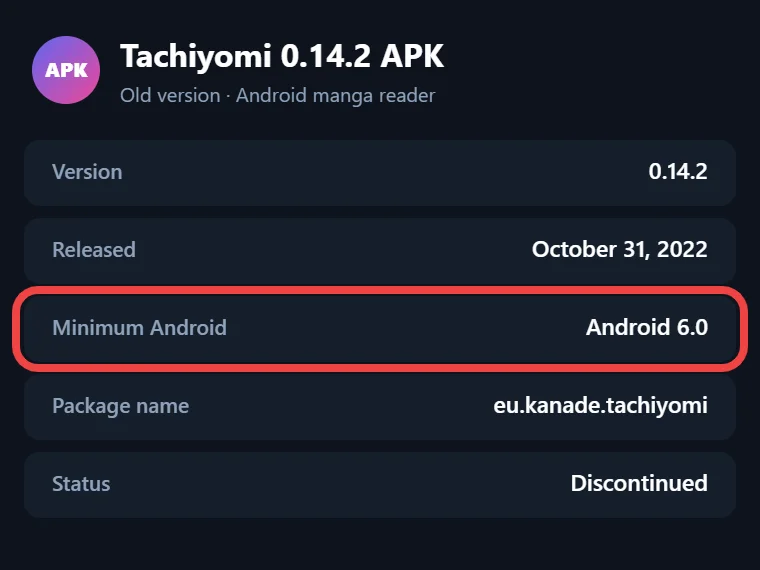
- Version
- 0.14.2
- Released
- October 31, 2022
- Minimum Android
- Android 6.0
- Package name
- eu.kanade.tachiyomi
- Status
- Discontinued
APK details
Tachiyomi 0.14.2 at a Glance
The table below puts the key details of Tachiyomi version 0.14.2 in one place, so you can check that it fits your phone and your needs before you download anything.
| Detail | Information |
|---|---|
| Version | 0.14.2 (version code 91) |
| Release date | October 31, 2022 |
| Minimum Android | Android 6.0 Marshmallow (API 23) |
| Target Android | Android 10 (API 29) |
| Developer | arkon and the Tachiyomi team |
| APK size | 21 MB to 65.5 MB, based on the variant |
| Previous and next version | v0.14.1 and v0.14.3 |
| Project status | Discontinued on January 13, 2024 |
Download
Download Tachiyomi 0.14.2 for Android 6.0+
Before you download Tachiyomi 0.14.2, make a manual backup of your current library, because the official release notes start with the line “A manual backup before updating is highly recommended!” That advice still matters if you are moving from another version, so save the backup file somewhere outside the app, such as your computer or a cloud folder.
The original Tachiyomi page on GitHub no longer exists, since the project shut down in January 2024, which means every copy you find today is a mirror. For that reason, this page lists the official file sizes and SHA-256 checksums from the original release, and they let you confirm that the APK you downloaded is the real file and has not been changed.
Which APK Should You Choose?
The Tachiyomi team released this version as five APK files, and each one is built for a different type of phone processor, so picking the right one saves you storage space and download time.
| Variant | File name | Size | Best for |
|---|---|---|---|
| arm64-v8a | tachiyomi-arm64-v8a-v0.14.2.apk | 24.5 MB | Most phones made after about 2017 |
| armeabi-v7a | tachiyomi-armeabi-v7a-v0.14.2.apk | 21 MB | Older 32-bit phones |
| x86 | tachiyomi-x86-v0.14.2.apk | 27.2 MB | Emulators |
| x86_64 | tachiyomi-x86_64-v0.14.2.apk | 29.2 MB | Emulators and Chromebooks |
| Universal | tachiyomi-v0.14.2.apk | 65.5 MB | Any device |
Most people should grab the arm64-v8a Tachiyomi APK, but if you are not sure which processor your phone uses, the universal file is the safe pick because it works on every Android device.
Verify the APK with SHA-256 Checksums
A SHA-256 checksum is a long code that works like a fingerprint for a file, and if even one byte of the APK changes, the code changes with it. After the download finishes, open the file in any SHA-256 hash checker app or computer tool, and then compare the result with the matching line below.
| Variant | SHA-256 checksum |
|---|---|
| Universal | 57978c2d23a1cd96183866897f76416598b5e0aa38a80fc1b9737f443c73bb9d |
| arm64-v8a | 6fb07edb854190983400864f3917ce9ecfa285d753ea134aa4f112cfee222aee |
| armeabi-v7a | 688df72d2ed68bba0ce31c5ab16279ef85b91abab21a1db2cb732a40dbdf5441 |
| x86 | 5a80a9420595e0ddf6215f0a5be07be5a06a73f5487339557a15bd667959bfac |
| x86_64 | 5e224dee3c50c7d8c68e6c459223555d288f474f63ca0b4345ca514932fdb1bf |
When the codes match, you have the same file the Tachiyomi team published on GitHub, but when they don’t match, delete the file and get it from another source.
Install guide
How to Install Tachiyomi 0.14.2 on Android 6.0+
Installing the APK takes only a few minutes, and the steps below keep your library safe while you do it:
- Create a Tachiyomi backup of your current library first, and keep that file outside the app so it stays safe if anything goes wrong during the install.
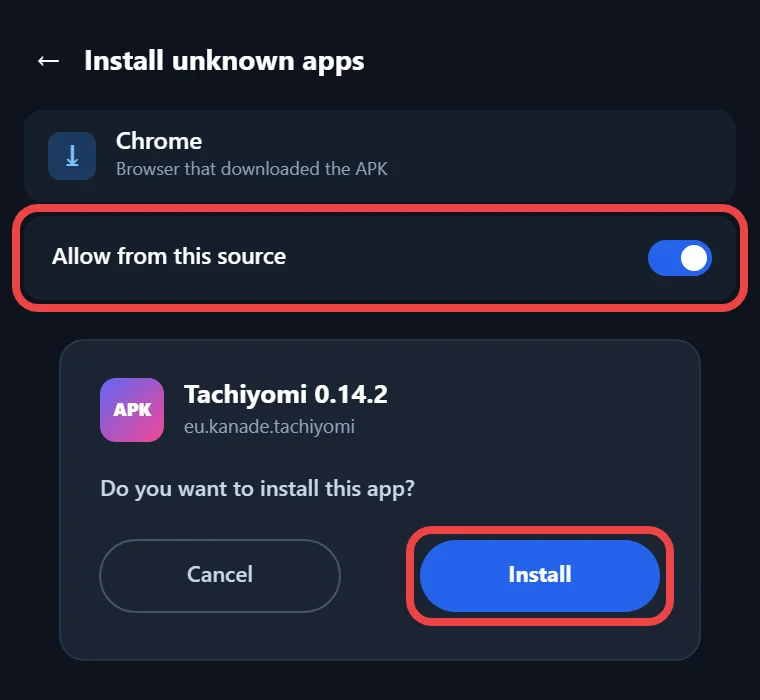
- Allow app installs from unknown sources, which is a single switch in the security settings on Android 6.0 and 7.x, while Android 8.0 and newer ask you to allow your browser or file manager instead.
- Open the APK you downloaded, tap Install, and wait for Android to finish the setup.
- Open the app and restore your backup from the backup settings if you are coming from another phone or another build.
- If some entries show a “Source not installed” error, remove them and add them again, because that is the fix the official release notes asked users to apply after this update.
Features
Key Features of Version 0.14.2
Since this version arrived only three days after v0.14.0, most of the work went into fixing bugs, yet the update still added two new options to the Library screen. It also kept every feature from the two releases that came just before it, so you get the whole 0.14 package in a single install without needing any of the earlier files.
Open a Random Entry from Your Library
The first new feature, added by contributor zbue, lets you open a random manga from any library category, and you can find it under Library → 3-dot overflow menu → Open random entry. It helps a lot when your library holds hundreds of saved series in different categories and you can’t decide what to read next, because the app picks one for you and takes you straight to its page.
Chapter Download Options in the Library
The second addition, built by SleepySwords, brings chapter download options straight into the Library screen, so you no longer have to open each manga page one by one to start a download. You can select entries in your library and choose what to download from there, which saves many taps when you want to prepare several series for offline reading before a trip or a long day without internet access.
Features Carried Over from 0.14.0 and 0.14.1
Because this release sits on top of v0.14.0 and v0.14.1, you also get every feature those two versions introduced, and these are the ones you will notice most in daily use:
- A rebuilt interface made with Jetpack Compose and a new SQLDelight database layer
- The MangaUpdates tracker for keeping your reading progress in sync
- Download ahead while reading (Settings → Downloads → Download ahead) and an option to split tall images
- An Updates widget for the home screen, plus the last library update time at the top of Updates
- A filter for bookmarked chapters and ComicInfo.xml support in the local source
- The app language setting, the Tidal Wave theme, and DNS-over-HTTPS options from Mullvad, Control D and Njalla
- Automatic backups turned on by default, although legacy JSON backups can no longer be restored
- A reader shortcut that opens the current chapter in WebView, which arrived in v0.14.1
Fixes
Bug Fixes and Behavior Changes in 0.14.2
Most of the 38 commits in this release were fixes, and the official Tachiyomi changelog lists these as the main ones:
- The reader no longer lags when Download ahead is turned on
- The Share option now appears for entries that are not in your library
- Some “Source not installed” errors and “cannot be cast to” errors in certain sources are fixed
- Resetting a filter no longer resets your source search results, a fix by AntsyLich
- Several crashes are gone, including one linked to the reverse portrait setting in the reader
The GitHub commit log adds a few more changes, including a new page system for the reader by Ivan Iskandar, haptic feedback, a warning about F-Droid builds on the More screen, and translations from Hosted Weblate. One behavior change arrived, since the chapter header and download icon no longer respond to taps while you select chapters.
Who it’s for
Why Choose This Version
The biggest reason to pick this build is the Android version on your phone. Mihon, the official successor made by the same team, needs Android 8.0 Oreo or newer, so anyone still using a phone on Android 6.0 Marshmallow or Android 7.x can’t install it at all. For those readers, Tachiyomi for Android 6.0 remains a working option, and this Tachiyomi old version is a sensible place to stay because it already fixed the bugs that came with the large v0.14.0 update. It also works well as a manga reader for Android 6.0 phones used mainly offline, since your downloaded chapters, your local source folder and your automatic backups keep working without any extension at all.
2026 status
Does Tachiyomi 0.14.2 Still Work in 2026?
The app still opens and reads manga in 2026, but you should know its limits before you depend on Tachiyomi 0.14.2 for daily reading. The project was discontinued on January 13, 2024, which means it gets no updates or bug fixes, and the original GitHub repository has been removed for good, so its history now lives in the Mihon repository and in Wayback Machine snapshots. Extensions are the biggest problem, because Keiyoushi, the main extension store today, only supports Mihon 0.20.1+, TachiyomiSY 1.13.2+ and Komikku 1.14.1+. If you add Keiyoushi to this old build, you will only see placeholders that say “Outdated App” and “Update to Mihon 0.20.1+” instead of real sources. Your downloaded chapters, the local source and offline reading still work, but adding new online sources such as MangaDex does not work.
Tachiyomi 0.14.2 vs Mihon
This comparison shows where each app fits, so you can see quickly which one your phone can actually run.
| Feature | Tachiyomi 0.14.2 | Mihon v0.21.2 |
|---|---|---|
| Minimum Android | 6.0 Marshmallow | 8.0 Oreo |
| Updates | None since January 2024 | Active, latest on October 13, 2026 |
| Keiyoushi extensions | Placeholders only | Supported |
| Developer | Tachiyomi team | Same team under a new name |
| Price | Free and open source | Free and open source |
| Best for | Old phones and offline reading | Most users today |
Phones on Android 8.0 or newer should use Mihon, while older phones can stay on this build.
FAQ
FAQs
1. Does Tachiyomi 0.14.2 still work in 2026?
Yes, it still reads your downloaded chapters and local files, but it gets no updates, and Keiyoushi extensions show only “Outdated App” placeholders.
2. Why can’t I install new extensions on Tachiyomi 0.14.2?
Keiyoushi supports only Mihon 0.20.1+, TachiyomiSY 1.13.2+ and Komikku 1.14.1+, so older Tachiyomi builds get placeholders instead of working Keiyoushi extensions.
3. Is it safe to download the Tachiyomi 0.14.2 APK?
Yes, when the file matches the official SHA-256 checksum above, because a matching code proves nobody changed the APK after release.
4. Can I move my Tachiyomi library to Mihon?
You can back up in Tachiyomi and restore in Mihon, but test it first, because very old backups may not carry over perfectly.
5. Which Tachiyomi version should I use on Android 6.0?
Android 6.0 can’t run Mihon, so this build or TachiyomiJ2K 1.7.4 is the realistic choice, though Keiyoushi supports neither officially.
Final thoughts
Final Thoughts
Tachiyomi 0.14.2 is the right download if your phone is stuck on Android 6.0 or 7.x and you mostly read manga you have already saved, as long as you check the SHA-256 checksum before you install it. If your phone runs Android 8.0 or newer, move your library to Mihon instead, because it still gets regular updates and works with Keiyoushi extensions, something this old version will never do.