
Released January 7, 2024 · Android 6.0+
Download Tachiyomi Version 0.15.1 | Android 6.0+ | Jan 7, 2024
Tachiyomi 0.15.1 is a small fix release of the open-source manga reader for Android, and arkon, the app’s lead developer, published it on GitHub on January 7, 2024, one day after the big 0.15.0 update. Because it still runs on Android 6.0 Marshmallow, readers with older phones keep looking for it, even though the project ended on January 13, 2024, after legal threats from Kakao Entertainment. This page gives you the real details that other sites get wrong, including the correct release date, all five official APK files with their SHA-256 checksums, the full changelog and clear install steps, so you can set up Tachiyomi 0.15.1 safely and know what to expect from it today.
- v0.15.1 APK
- Android 6.0+
- Jan 7, 2024
- 5 FAQs
Tachiyomi 0.15.1 APK
Old version · open-source manga reader for Android
- Version
- 0.15.1
- Released
- January 7, 2024
- Minimum Android
- Android 6.0
- Package name
- eu.kanade.tachiyomi
- Status
- Discontinued
At a glance
| Detail | Information |
|---|---|
| App name | Tachiyomi |
| Version | 0.15.1 (version code 116) |
| Release date | January 7, 2024 |
| Released by | arkon, lead developer (app created by inorichi) |
| Package name | eu.kanade.tachiyomi |
| Minimum Android | Android 6.0 Marshmallow (API 23) |
| Target Android | Android 14 (API 34) |
| Universal APK size | 50.6 MB |
| CPU builds | arm64-v8a, armeabi-v7a, x86, x86_64 |
| License | Apache 2.0, open source |
| Price | Free to download and use |
| Status | Discontinued since January 13, 2024, final version is 0.15.3 |
Download
Download Tachiyomi 0.15.1 for Android 6.0+
You can get the universal APK below, and it installs on any phone or tablet running Android 6.0 or newer, no matter which chip is inside.
The original GitHub page that hosted this release was taken down after the shutdown, so the official files now survive only as copies, while the release history itself lives on in the Mihon repository and on the Internet Archive. For that reason, you should never trust a file just because a website calls it safe. Instead, compare the checksum of the file you get with the official SHA-256 values listed further down this page before you install anything on your device.
Which Tachiyomi 0.15.1 APK Should You Pick?
Most people should pick the arm64-v8a build, because almost every Android phone sold in recent years uses a 64-bit ARM chip, and this file is less than half the size of the universal one.
| APK file | Best for | Size |
|---|---|---|
| tachiyomi-v0.15.1.apk | Universal, any device | 50.6 MB |
| tachiyomi-arm64-v8a-v0.15.1.apk | Modern 64-bit phones | 22.1 MB |
| tachiyomi-armeabi-v7a-v0.15.1.apk | Older 32-bit phones | 19.6 MB |
| tachiyomi-x86-v0.15.1.apk | 32-bit Intel devices | 23.6 MB |
| tachiyomi-x86_64-v0.15.1.apk | 64-bit Intel devices | 24.4 MB |
If you are not sure which chip your phone uses, a device info app such as CPU-Z lists its supported ABI, and when you still have doubts, the universal file works on all of them.
Verify the APK With SHA-256 Checksums
A SHA-256 checksum proves that your file is the exact same one arkon published, so nobody has added malware or changed a single byte along the way.
| Variant | Official SHA-256 |
|---|---|
| Universal | e851bebdf44dc5aaed3618290bedf7f6846f81d274a23046a42efe979a1af1f9 |
| arm64-v8a | a5b8a406e72641fef7682c3a01a6fecea65d995bba885c29e3ffc39c11c5a114 |
| armeabi-v7a | bd526f3f1dfc13371992dac8a218a1bc48cf3dc8cbab45e557c5fc51ac054f79 |
| x86 | 9a99353e9a83edf7dbc69eb0a2c88c04792266ffb4d7a552e7c7389221d09575 |
| x86_64 | 63e8c45e363c21a3fac9947e1111dc61d460ffdde4ee042e4f78ba4cbbcf5a13 |
A free hash checker app can read the APK and show its value, and if even one character differs from this table, you should delete the file instead of installing it.
Install guide
How to Install Tachiyomi 0.15.1 on Android
Before you install Tachiyomi APK files, you have to let Android accept apps from outside the Play Store, and then setup takes a few minutes.
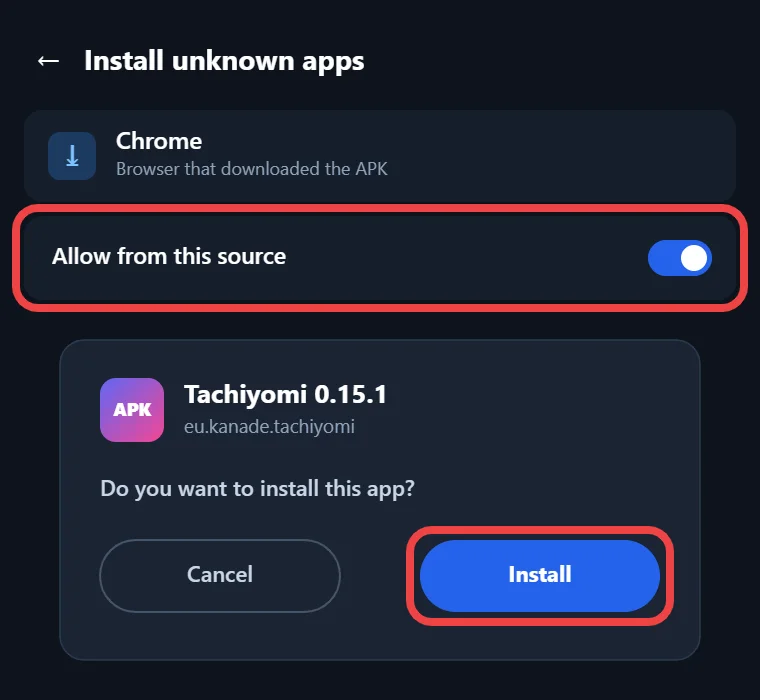
- Open the downloaded APK from your browser or your file manager.
- When Android warns you, turn on “Unknown sources” under Security on Android 6.0 and Android 7 Nougat, or allow installs from that app on Android 8.0 and newer.
- Go back, tap Install, and open Tachiyomi once the install finishes.
- During the first setup, pick a storage folder, because since 0.15.0 the app no longer asks for access to all your files.
- If you used Tachiyomi before, select your old Tachiyomi folder so the app can find your downloads, backups and Local source files.
- Log in to trackers such as AniList or MyAnimeList again if the app asks, since the storage change can sign you out.
Features
Key Features of Version 0.15.1
The Tachiyomi 0.15.1 changelog is short, because arkon pushed this build one day after 0.15.0 to clean up problems that people reported in the first hours. It brings one new feature for backups and a set of fixes for the Local source, the reader and the image cache, which are explained below.
Open .tachibk Backup Files Directly
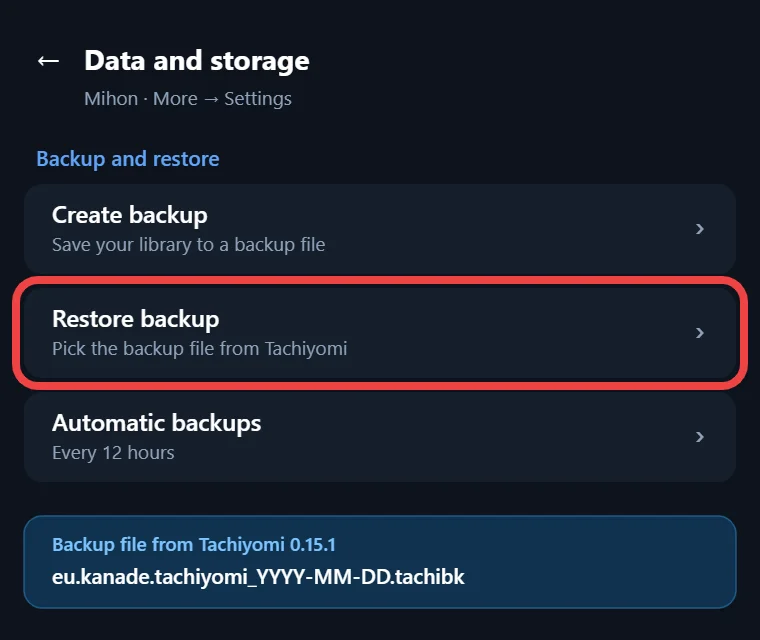
The only new feature in this build lets you open a .tachibk backup file straight from outside the app. Before this change, you had to start Tachiyomi, go into the Data and storage settings and look for the file there. Now you can tap the backup in your file manager or a chat app, choose Tachiyomi, and the restore starts.
Bug Fixes in 0.15.1
The fixes in this release deal with problems that appeared right after the 0.15.0 update. RAR archives in the Local source would not load, so manga saved as RAR files could not be opened at all on the phone. The reader also showed a WebView button on error screens even when the page came from a local file, and the app crashed when a cached image was deleted while you were still reading. Smaller changes include clearer onboarding text, links to the storage guide and new translations from Hosted Weblate.
What 0.15.1 Carries Over From 0.15.0
Because 0.15.1 sits on top of 0.15.0, you also get everything from that large update. The biggest change is storage, since the app now keeps an autobackup folder, a downloads folder and a local folder inside one location that you choose. Backups use the eu.kanade.tachiyomi_yyyy-mm-dd_hh-mm.tachibk name format and now include app and source settings, with the option of partial restores. In the library, you get a scanlator filter, chapter swipe actions, alphabetical chapter sorting and markers for missing chapters. The reader adds a “Rotate wide pages to fit” setting and a white flash between pages for e-ink screens, while downloads create ComicInfo.xml files automatically.
Compare
Tachiyomi 0.15.1 vs 0.15.0, 0.15.2 and 0.15.3
All four 0.15 builds came out within a single week, so the gaps between them are small, but they still change how the app behaves with extensions and backups.
| Version | Release date | What changed |
|---|---|---|
| 0.15.0 | Jan 6, 2024 | New storage system, scanlator filter, swipe actions, Android 14 target |
| 0.15.1 | Jan 7, 2024 | Opens .tachibk files directly, fixes RAR, WebView button and cache crash |
| 0.15.2 | Jan 8, 2024 | No extensions out of the box, extension trust kept until an update |
| 0.15.3 | Jan 13, 2024 | Final release with faster restores and no crash reporting or analytics |
You can read the full details on our 0.15.0, 0.15.2 and 0.15.3 pages, and if you need a Tachiyomi old version from before this series, our 0.14.7 page covers the last build of 2023.
Who it’s for
Why Choose This Version
When people compare Tachiyomi vs Mihon, the biggest difference is Android support, and that is the main reason this version still matters. Mihon, the community app that carries on Tachiyomi’s work, needs Android 8.0 Oreo or newer, so anyone with a phone stuck on Android 6.0 Marshmallow or Android 7 Nougat cannot install it, which is why people still look for Tachiyomi for Android 6.0 devices. This build also suits readers who mainly open their own CBZ or RAR files through the Local source, or who need to open an old .tachibk backup. Still, if you only want an old build, 0.15.3 is the better pick, because it keeps extension trust after a restart and restores backups faster.
2026 status
Does Tachiyomi 0.15.1 Still Work in 2026?
This build still opens and reads files on supported phones, but it no longer works the way it did in 2023. The official extensions list was removed on January 9, 2024, leaving only a few extensions for personal servers like Komga, and on January 13 arkon announced that development had stopped for good. If you add the Keiyoushi extension store, you will only see placeholders named “Outdated App” and “Update to Mihon 0.20.1+”, because Keiyoushi supports only Mihon 0.20.1, TachiyomiSY 1.13.2 and Komikku 1.14.1 or newer. The app also makes you trust unofficial extensions again on every cold start, a problem that 0.15.2 fixed, and it will never get another update, so any new bug or broken feature stays broken.
Move to Mihon
Moving Your 0.15.1 Library to Mihon
If your phone runs Android 8.0 or newer, moving your library to Mihon is the safer long-term choice, and a Tachiyomi backup carries your manga, categories and reading history across. First, open More, then Settings, then Data and storage in Tachiyomi 0.15.1, and create a backup, which saves a .tachibk file inside your storage folder. Next, install Mihon v0.21.2 and choose that same storage folder during setup. Finally, restore the backup from the Data and storage settings in Mihon and wait until it finishes. Do this soon, because Mihon v0.21 is the last major version that still accepts .tachibk backups.
FAQ
FAQs
1. Is Tachiyomi 0.15.1 safe to download?
It is safe only when your file matches the official SHA-256 checksum, because the original GitHub release page was taken down and anyone can now share a modified copy. Check the hash first, and delete any file that does not match it.
2. Why are there no extensions in Tachiyomi 0.15.1?
The Tachiyomi team removed the official extensions list on January 9, 2024, and the newer Keiyoushi store supports only Mihon 0.20.1 and later, so this build shows outdated placeholders instead of working sources when you try to add them.
3. Can Tachiyomi 0.15.1 run on Android 5?
It cannot run there, because the lowest supported version is Android 6.0 Marshmallow, which is API level 23. Android blocks the install on any Android 5 Lollipop device, so phones on that version need a different reader or an Android upgrade.
4. Can I restore a Tachiyomi 0.15.1 backup in Mihon?
Mihon can restore it as long as you create a .tachibk backup in Tachiyomi first and install Mihon v0.21.2 on a phone with Android 8.0 or newer. Mihon v0.21 is the last major version that accepts these backup files.
5. Why don’t my downloaded chapters show after restoring?
Your chapters are still on the phone, but the app only looks inside the storage folder picked during setup. Open the Data and storage settings, choose the same folder you used before the restore, and your downloaded chapters will appear again.
Final thoughts
Final Thoughts
Tachiyomi 0.15.1 is worth installing only if your phone is stuck on Android 6.0 or 7.x, or if you mainly read your own files and want a build that still runs well. Pick the arm64-v8a APK for most phones, match its SHA-256 checksum before you install it, and select your old storage folder during setup. If your device runs Android 8.0 or newer, move your library to Mihon instead, because it still gets updates and works with Keiyoushi extensions today.