
Released October 25, 2023 · Android 6.0+
Download Tachiyomi Version 0.14.7 | Android 6.0+ | Oct 25, 2023
Tachiyomi 0.14.7 is the last release of the 0.14 line of Tachiyomi, the free and open-source manga reader for Android, and it came out on October 25, 2023. The lead developer, arkon (Eugene Cheung), shipped it as a small maintenance update, so it brought fixes for trackers, WebView and help links instead of big new features. Since the app needs only Android 6.0 Marshmallow, Tachiyomi 0.14.7 still runs on older phones that cannot install newer manga apps. This page gives you the real changelog, the full APK details and simple install steps. It also explains why extensions no longer load in this build and how you can move your library to Mihon when you are ready.
- v0.14.7 APK
- Android 6.0+
- Oct 25, 2023
- 5 FAQs
Tachiyomi 0.14.7 APK
Old version · open-source manga reader for Android
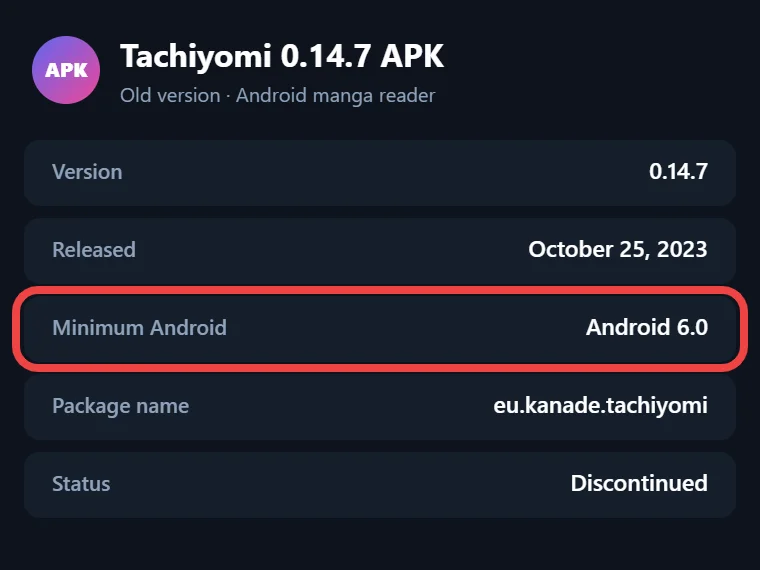
- Version
- 0.14.7
- Released
- October 25, 2023
- Minimum Android
- Android 6.0
- Package name
- eu.kanade.tachiyomi
- Status
- Discontinued
Download
Download Tachiyomi 0.14.7 for Android 6.0+
The button above gives you the APK file for version 0.14.7, which is the build most people want when they need an old Tachiyomi version on a phone running Android 6.0 or Android 7. Before you install it, you should know about one change that affects what it can do today. The Tachiyomi project was officially discontinued on January 13, 2024, and the extension list built into this version now points to a server that no longer exists. Your library, downloaded chapters and the Local source still work, but you cannot add new online sources. If your phone runs Android 8.0 or newer, Mihon is the better choice.
Tachiyomi 0.14.7 APK Details
| Detail | Value |
|---|---|
| App version | 0.14.7 (versionCode 102) |
| Release date | October 25, 2023 |
| Minimum Android | Android 6.0 Marshmallow (minSdk 23) |
| Target Android | Android 10 (targetSdk 29) |
| Package name | eu.kanade.tachiyomi |
| Developer | arkon (Eugene Cheung) and contributors |
| License | Apache 2.0, open source |
| APK builds | arm64-v8a, armeabi-v7a, x86, x86_64, universal |
The full source code of this release is written in Kotlin, and its complete history now lives in the Mihon repository on GitHub, where anyone can read the exact changes that went into this build.
Which APK File Should You Pick?
Tachiyomi was published as several APK files, and each one is built for a different type of phone processor. Most phones from recent years use an arm64-v8a chip, so that file suits nearly everyone. Older and cheaper phones from the Android 6.0 era often use armeabi-v7a, while x86 and x86_64 builds are made for Android emulators and a few Intel tablets. If you are not sure which chip your phone has, pick the universal APK, since it holds code for all four types and installs on every supported device.
Install guide
How to Install Tachiyomi 0.14.7 on Android
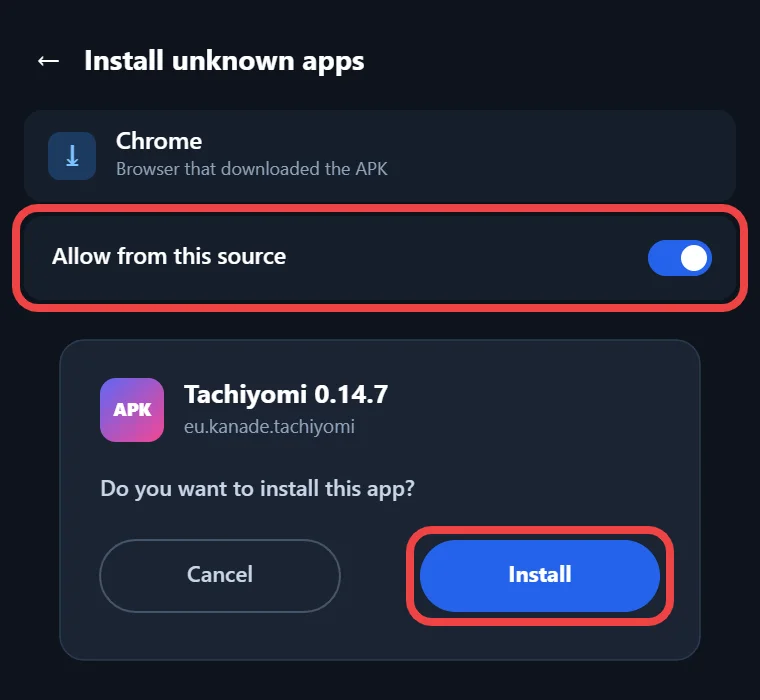
Android blocks apps from outside the Google Play Store by default, so you need to allow the install once. On Android 6.0 and Android 7, go to Settings, then Security, and turn on Unknown sources. On Android 8.0 and newer, Android asks for this permission per app, so you allow the browser or file manager that opened the file. After that, tap the downloaded APK and press Install. Google Play Protect may show a warning because the app targets an older Android version, and you can choose to install anyway. When the app opens, allow storage access, because Tachiyomi saves downloads, backups and Local source files in a folder on your phone.
Changelog
What’s New in Tachiyomi 0.14.7 (Full Changelog)
This release was small, with 7 commits, 21 changed files and 3 contributors, and it arrived six months after version 0.14.6 from April 16, 2023. One commit only connected a Netlify build hook to the project website and another only raised the version number, so the Tachiyomi 0.14.7 changelog below lists the five changes that you can actually notice.
Better Extension Icon Caching
Extension icons in the Browse tab now use the extension’s package name in their file link instead of the APK file name. Because the package name stays the same between extension updates, the app could keep icons it had already saved, so it downloaded the same images less often after every update.
Shikimori Tracker Domain Fix
Shikimori, a Russian anime and manga tracking site, moved its address from shikimori.me to shikimori.one during 2023. Vlasov Roman sent pull request #10027 to update the address inside the app, so syncing your chapter progress to Shikimori kept working for readers who had linked their account to it.
Updated User Agent and WebView 114 Minimum
A user agent is a short line of text that tells a website which browser is asking for a page. This release changed the default user agent from Firefox 110 to Firefox 118, so sources saw the app as a newer browser, and sites behind Cloudflare checks were less likely to block it. The minimum WebView version was also raised from 108 to 114, so if the app shows a WebView warning, update Android System WebView from the Play Store.
WebView Blob Link Fix
Some websites use special blob links to show pictures or files that were created inside the page itself. Earlier builds tried to open these links as normal webpages, which caused errors in the built-in browser, so this release skips them. The change fixed issue #10060 for users who opened sources through WebView.
New Help and Documentation Links
The Tachiyomi team rebuilt its website in 2023, and old help addresses under tachiyomi.org/help stopped matching the new page layout. This update pointed every help button in the app to the new tachiyomi.org/docs pages, which covered the FAQ, tracking, the Local source, source migration, getting started and troubleshooting.
Features
Key Features of Version 0.14.7
Version 0.14.7 includes the full feature set that made Tachiyomi popular, even though this release did not add new tools. Your library sits on the main screen, and you can sort titles into categories such as Reading, On Hold or Completed. The reader offers paged mode from left to right and from right to left for Japanese manga, a vertical mode, and a long-strip webtoon mode for Korean manhwa. You can download chapters for offline reading, which helps when you travel or have a weak data plan. The Local source reads CBZ files, ZIP files and image folders that you place on your phone, so you can read your own collection without any online source. Tracking works with MyAnimeList, AniList, Kitsu, MangaUpdates and Shikimori, so your reading progress updates on those sites automatically. Backup and restore saves your library, categories, chapters and tracking links into one file, and the built-in WebView lets you open a source’s website when a page needs a login or a Cloudflare check.
2026 status
Do Extensions Still Work in Tachiyomi 0.14.7?
This is the biggest thing to understand before you use this build, because other download pages still claim that it supports many extensions. Version 0.14.7 has only one extension repo written into its code, which is the official tachiyomiorg/tachiyomi-extensions list on GitHub, with a backup copy loaded through jsDelivr. The app gives you no setting to add your own repo, because custom repos only arrived later in the 0.15 builds. When the project shut down on January 13, 2024, that official list was taken offline, and today it returns a 404 error. As a result, a fresh install shows an empty extension list, and you cannot add Keiyoushi either, since Keiyoushi supports only Mihon 0.20.1 and newer, TachiyomiSY 1.13.2 and newer, and Komikku 1.14.1 and newer. Several parts of the app still work, which is why some people keep it. Extensions already installed keep running until their source websites change, and chapters you downloaded earlier stay readable. Your library, your categories, your backups and the Local source with your own CBZ and ZIP files also work without any server.
Who it’s for
Why Choose This Version
The main reason to pick this build is an old phone, because Mihon needs Android 8.0 or newer, while Tachiyomi 0.14.7 runs on Android 6.0 and Android 7, where very few full manga readers still install. Some users also stayed on it by choice after version 0.15 changed how storage works. In GitHub issues #13, #107, #261 and #377, readers reported that downloaded chapters worked on 0.14.7 but went missing or failed after the move to the new storage-location system. Other reports were about design, as one reader in issue #19 asked Mihon to bring back the bigger Continue reading button from 0.14.7, and another in issue #172 wanted its library update notification back. On a Poco X3 Pro running MIUI 14 on Android 13, issue #34 showed that the back gesture worked in 0.14.7 but broke in 0.15.
Compare
Tachiyomi 0.14.7 vs 0.15.x vs Mihon
| Feature | 0.14.7 | 0.15.x | Mihon |
|---|---|---|---|
| Minimum Android | 6.0 | 6.0 | 8.0 |
| Custom extension repo | No | Yes | Yes |
| Keiyoushi support | No | No | Yes, 0.20.1+ |
| Backup format | .proto.gz | .tachibk | .tachibk |
| Updates | Ended | Ended | Active |
The table shows that the 0.15 builds kept support for Android 6.0 and added custom repos, but they still cannot use Keiyoushi today. The 0.15 line also brought the .tachibk backup format and the new storage folder system that some readers disliked. Mihon is the only one of the three that still gets updates, and its latest version is 0.21.2 from October 13, 2026. However, it needs Android 8.0, and it ships without any extensions, so you add the Keiyoushi extension store yourself after you install it. For a phone stuck on Android 6.0 or Android 7, the choice is between 0.14.7 and the 0.15 builds.
Move to Mihon
How to Move from Tachiyomi 0.14.7 to Mihon
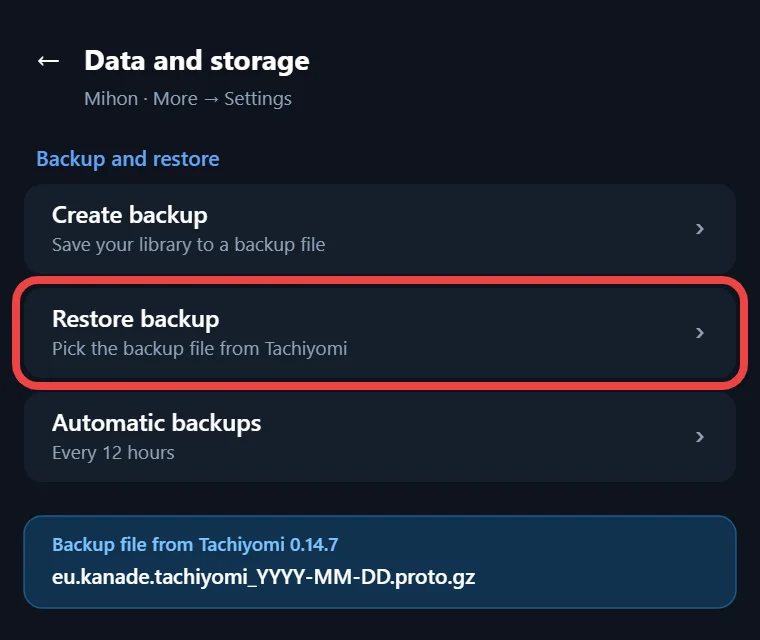
Moving to Mihon makes sense once your phone runs Android 8.0 or newer, and the process starts inside the old app. Open More, then Settings, then Backup and restore, and create a backup that includes your categories, chapters and tracking data. This version saves the backup as a .proto.gz file, while newer apps use the .tachibk format, so keep your old app installed until the restore works. Next, install Mihon and use its restore option to load your backup file. After that, open More, then Settings, then Browse, then Extension store, tap Add, and paste https://github.com/keiyoushi/extensions/raw/repo/index.pb as the address. Mihon 0.21.2 and newer can also add the Keiyoushi store with a one-tap Add store button. Then install the extensions you used before, and open Browse, then Migrate, to move titles to sources that still work. Mihon 0.21.0 is the last major version that accepts .tachibk backups, so move sooner rather than later.
Safety
Is It Safe to Download the Tachiyomi 0.14.7 APK?
The original GitHub release page for this version has been removed, so there is no official download link left, and every copy online comes from a mirror. A bad mirror could add unwanted code, so download only from a site you trust and let Google Play Protect scan the file. If you still have an older Tachiyomi install, there is one more check, because Android only lets an app update when both files carry the same developer signature, so a fake build will refuse to install over a real one. The app also needs no root access, so never grant it extra system permissions.
More versions
Other Tachiyomi Versions
| Version | Release date |
|---|---|
| 0.14.3 | January 7, 2023 |
| 0.14.4 | February 5, 2023 |
| 0.14.5 | February 19, 2023 |
| 0.14.6 | April 16, 2023 |
| 0.15.1 | January 7, 2024 |
| 0.15.2 | January 8, 2024 |
| 0.15.3 | January 13, 2024 |
Every Tachiyomi Android 6.0 build in this table has its own download page with the correct release date and its real list of changes, so you can compare them before choosing.
FAQ
FAQs
1. Why does Tachiyomi 0.14.7 show no extensions?
The extension list in this version comes from one fixed repo on GitHub, and the Tachiyomi team took that repo offline after the shutdown in January 2024. Because the app cannot load any other repo, the Extensions tab stays empty on every fresh install.
2. Can I add Keiyoushi to Tachiyomi 0.14.7?
No, because this build has no setting that lets you add a custom extension repo. Keiyoushi also supports only Mihon 0.20.1 or newer, TachiyomiSY 1.13.2 or newer, and Komikku 1.14.1 or newer, so you need one of those apps to use its extension store.
3. Why do downloads work in 0.14.7 but not in 0.15?
Version 0.15 changed how the app picks and reads its storage folder. After this change, some users in Mihon GitHub issues said their downloaded chapters disappeared or failed to load, even though the same files worked fine in 0.14.7 with the older folder system.
4. Is Tachiyomi 0.14.7 still updated?
No, because the whole Tachiyomi project ended on January 13, 2024, and no new builds or fixes will come. The community carried the app forward as Mihon, which still gets regular updates, so new features, source fixes and security patches only reach Mihon today.
5. What is the minimum Android version for Tachiyomi 0.14.7?
The app needs Android 6.0 Marshmallow or newer, which matches minSdk 23 in its build settings. It targets Android 10, so it also installs on newer phones, although Google Play Protect may show a warning during the install because that target version is quite old.
Final thoughts
Final Thoughts
An old phone on Android 6.0 or Android 7 is the best reason to keep this release, since it gives you a full library, a good reader, trackers and the Local source on hardware that newer apps leave behind. Just plan for the missing extension list, because online sources will not come back to this build. If your phone can run Android 8.0, make a backup and move to Mihon with the Keiyoushi store. If it cannot, Tachiyomi 0.14.7 is a solid offline manga reader for your own CBZ and ZIP files.