
Released January 6, 2024 · Android 6.0+
Download Tachiyomi Version 0.15.0 | Android 6.0+ | Jan 6, 2024
Tachiyomi 0.15.0 is the free, open-source manga reader for Android that arkon released on January 6, 2024, and it was the largest update the app received before the project shut down one week later. It runs on any phone with Android 6.0 Marshmallow or newer, it targets Android 14, and it replaced the old “all files” permission with a single storage folder that you choose yourself. This guide gives you the official APK details, the SHA-256 checksums you need to check a mirror, the full Tachiyomi 0.15.0 changelog in plain words, and an honest look at how the app behaves in 2026. Because 0.15.3 became the final Tachiyomi release on January 13, 2024, we also show you how to move your library to Mihon.
- v0.15.0 APK
- Android 6.0+
- Jan 6, 2024
- 6 FAQs
Tachiyomi 0.15.0 APK
Old version · open-source manga reader for Android
- Version
- 0.15.0
- Released
- January 6, 2024
- Minimum Android
- Android 6.0
- Package name
- eu.kanade.tachiyomi
- Status
- Discontinued
Download
Download Tachiyomi 0.15.0 for Android 6.0+
The original GitHub page for this release has been taken down, so every copy you find today comes from a mirror or an Internet Archive snapshot. That is why we list the exact file names and hashes below, since a matching SHA-256 checksum proves that your Tachiyomi 0.15.0 APK is the same file arkon uploaded. For most people the Universal APK is the safest pick, because it carries code for every processor type. You will not find this app on the Google Play Store, because its APK-based extensions go against Play policy, and there is no iOS version either, so any “Tachiyomi for iOS” app is a scam.
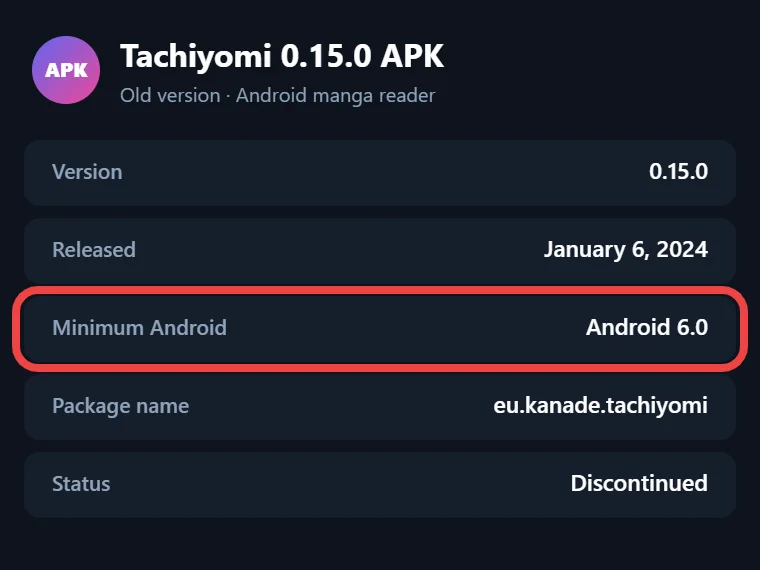
Tachiyomi 0.15.0 APK Details
The table below shows the real build details from the app’s source code at the release commit, so none of these numbers are guesses or copied ratings. Use it to confirm that the file you install matches the official build before you trust it with your library.
| Detail | Information |
|---|---|
| App name | Tachiyomi |
| Version | 0.15.0 (version code 115) |
| Release date | January 6, 2024 |
| Released by | arkon, Tachiyomi maintainer |
| Package name | eu.kanade.tachiyomi |
| Minimum Android | Android 6.0 Marshmallow |
| Target Android | Android 14 |
| License | Apache License 2.0 |
| Price | Free, with no ads |
| File size | 19.5 MB to 50.5 MB, based on the build |
| Extensions | extension-lib 1.4 only |
Which APK Variant Should You Pick?
Five official builds were uploaded on release day, and each one matches a different processor type, so the right file depends on the device in your hand. After you download a file, compare its hash with the matching row in this table, because any change in the string means the file was altered.
| File | Size | Best for | SHA-256 |
|---|---|---|---|
| tachiyomi-v0.15.0.apk (Universal) | 50.5 MB | Any device | 3979edbac3ca838d523fa411764cd44b7e91a3b5a9a07aa936bd8156da1316f8 |
| tachiyomi-arm64-v8a-v0.15.0.apk | 22.1 MB | Most modern phones | 855402664d830f42068845c90e2536c7a024a5000c89990aad03a10e9917aa56 |
| tachiyomi-armeabi-v7a-v0.15.0.apk | 19.5 MB | Older 32-bit phones | 1e42d45a9bb2797ba9311aced65ab91edb096a0cc87fa3d6d73500a112fd831e |
| tachiyomi-x86-v0.15.0.apk | 23.6 MB | x86 tablets and emulators | 6ca317de3f6c22d8f2241d9ac527f7a34553e3da232f4207352dc1f86eb2b254 |
| tachiyomi-x86_64-v0.15.0.apk | 24.4 MB | 64-bit emulators and PCs | 400aee22662c36de27819ff0f647626f5db97aa30e9d85cb6ff3b6c828333678 |
The small armeabi-v7a file is the one many mirror sites share, but it holds only 32-bit code, so it may refuse to install on newer phones that run 64-bit apps only. If you do not know which processor your phone uses, take the Universal APK and accept the bigger download, because it works everywhere.
Install guide
How to Install Tachiyomi 0.15.0 on Android
Installing Tachiyomi 0.15.0 takes only a few minutes, and the steps below also cover the folder choice that confuses many people after updating.
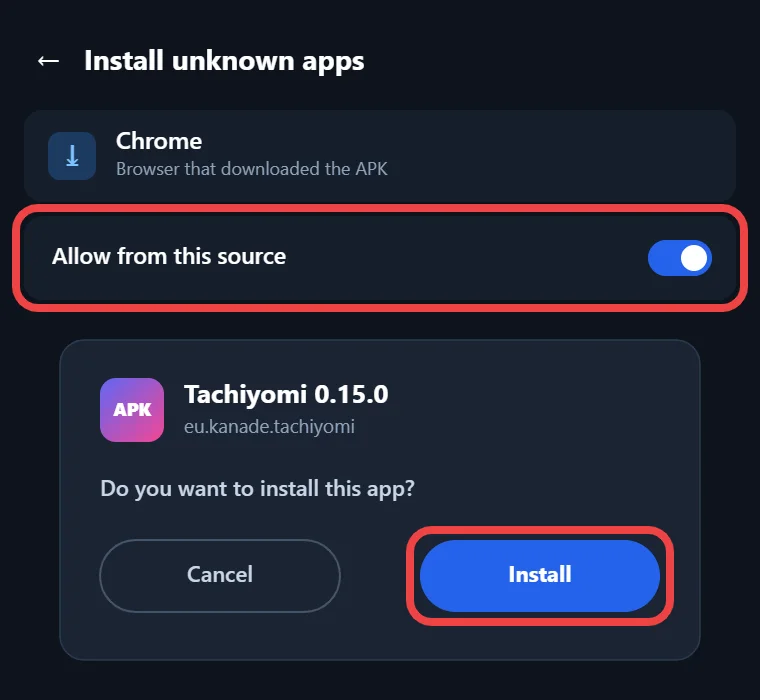
- Download the APK that fits your phone from a mirror you trust.
- Check the file’s SHA-256 checksum with a hash checker app and compare it with the table above, and delete the file if even one character is different.
- Open the APK and allow your browser or file manager to install unknown apps when Android asks for permission.
- Tap Install, wait for Android to finish, and then open the app.
- On the first launch, pick the folder where the app will keep downloads, backups and the Local source, and if you used Tachiyomi before, select your old Tachiyomi folder so nothing goes missing.
- Open the tracking settings and log in to AniList, MyAnimeList or any other tracker again, because the update may sign you out.
Features
Key Features of Version 0.15.0
This version was not a small patch, because about 850 commits went into the code after the v0.14.x base, which makes it the biggest Tachiyomi update in years. The changes touch almost every screen, so the sections below group them by area, starting with the storage change that every user meets on the very first launch of the app.
New Storage Location System
Older builds asked for access to all files on the device, a permission that reached every photo and document on the phone, but this version asks you to choose one folder, and that folder becomes your Tachiyomi storage location for everything the app saves. Inside it, the autobackup folder holds backup files with names like eu.kanade.tachiyomi_yyyy-mm-dd_hh-mm.tachibk, and this new naming stops your backups from clashing with forks such as TachiyomiSY. The downloads folder sorts chapters by source name and language, then by series title, and it saves each chapter as a CBZ file such as Chapter01.cbz. The local folder is where the Local source looks for your own manga, and it now reads only this one place instead of merging every mounted storage on the phone. If you used the default location before, you only need to select your existing Tachiyomi folder, and your old downloads and backups will show up again without any manual copying or renaming.
Library Improvements
The library and chapter list picked up many small tools that save taps every day. You can now use a scanlator filter in any chapter list, swipe on chapters for quick actions, and sort chapters in alphabetical order, while missing chapters are marked so you can spot gaps. Unread chapters get a dot beside their names, tags can be copied to the clipboard, and the library can be sorted by mean tracker score. Categories can also be put in alphabetical order with one shortcut, and chapter filters can be reset to their defaults.
Download and Browse Upgrades
Downloads now create ComicInfo.xml metadata files on their own, which helps other comic readers understand your CBZ files, and the download queue has a “Move series to bottom” option. On the Browse tab, tapping Browse twice opens Global Search, which gained quick filters for pinned or all sources and for sources that have results. You can also hide entries that are already in your library while you browse a source, jump to source settings from the menu, and open an extension’s website in WebView when a source needs a check.
Reader Updates
The reader added a “Rotate wide pages to fit” setting for wide spreads and an option to turn off double-tap zoom in long strip modes, which helps webtoon readers who zoom in by accident. People who read on e-ink displays can turn on a white flash at each page change, and anyone can share a chapter’s URL from the menu. Long chapter names now scroll across the top bar as well, so you can read the full title.
Tracking, Backups and Widget
When you unlink a tracker, the app can now delete the entry on the tracker service too, and it sets the start date by itself if you have already read a chapter, while tracker search results now show average scores. Backups include app and source settings, the app records when the last automatic backup ran, and you can restore only the library or only the settings. Owners of the Galaxy Z Flip5 can also place the updates widget on the small cover screen and check new chapters without opening the phone.
Changes
Behavior Changes and Removed Settings
Some changes alter how the app behaves, and they can surprise you if you come from an older build. Library updates are now limited to the 500 most recent chapters, the custom download amount became a button that downloads the next 25 unread chapters, and download ahead works even for series outside your library. Unofficial extensions must be trusted again after every cold start, and Incognito Mode no longer updates trackers or your reading progress. The app also checks for updates only when you open it, and it skips backups and library updates when the battery is low. On the removal side, the confirm-exit option, per-category display mode, the General settings section, the “Download all chapters” menu item and the max automatic backups setting are gone. Support for extension-lib 1.3 was dropped as well, and “Backup and restore” is now called “Data and storage”.
Who it’s for
Why Choose This Version
This build makes sense for a small group of readers, so it helps to check if you belong to that group before you install it. Mihon needs Android 8.0 Oreo or newer, which means a phone stuck on Android 6.0 or Android 7 cannot run it, while Tachiyomi 0.15.0 still installs on that phone and gives it the folder-based storage and newer reader tools. It is also one of the two builds released before 0.15.2 removed the built-in extension list, which matters to people who keep old releases for archiving or testing. Keeping the exact file that arkon shipped, together with its checksum, also protects you from fake mirrors of old APKs, which are easy to make. If your phone runs Android 8.0 or newer, skip this Tachiyomi old version and install Mihon instead, because Mihon still gets updates and this release never will.
Compare
Tachiyomi 0.15.0 vs 0.15.1, 0.15.2 and 0.15.3
The three updates that followed came out within one week, and each one changed something you should know about before you choose a build. The table sums up the main change in each release, using the dates from the archived GitHub release pages.
| Version | Release date | What changed |
|---|---|---|
| 0.15.0 | January 6, 2024 | Huge feature release and the new storage system |
| 0.15.1 | January 7, 2024 | Opens .tachibk files directly and fixes RAR files in the Local source |
| 0.15.2 | January 8, 2024 | Extensions no longer included out of the box |
| 0.15.3 | January 13, 2024 | Final release with faster restores and no update checks |
If you want this version for its features, 0.15.1 gives you the same app with a few crash fixes, while 0.15.2 and 0.15.3 changed how extensions reach the app. Version 0.15.3 also removed crash reporting, analytics and app update checks, which is why it never tells you about newer releases or Mihon.
2026 status
Does Tachiyomi 0.15.0 Still Work in 2026?
It still works for reading, but not for finding new sources. Tachiyomi shut down on January 13, 2024, and the official extension repo under tachiyomiorg/extensions is now archived on GitHub, so Tachiyomi 0.15.0 receives no new or fixed extensions from it. Keiyoushi, the main community extension store, supports only Mihon 0.20.1+, TachiyomiSY 1.13.2+ and Komikku 1.14.1+. If you add it to an old Tachiyomi build, you will only see placeholders named “Outdated App” and “Update to Mihon 0.20.1+”. The app also gets no security updates, so it works best for chapters you already saved and for your own CBZ files in the Local source. Anyone who wants working sources and regular fixes should treat this build as a backup reader and move the main library to Mihon, which the next section explains step by step.
Moving Your Library to Mihon
Moving to Mihon keeps your library safe as long as you make a backup first. In Tachiyomi, open More, then Settings, then Data and storage, create a backup, and save the .tachibk file somewhere you can find it later. Next, install Mihon v0.21.2 or newer on a phone running Android 8.0 or above, open its restore option, and pick that file. After that, add the Keiyoushi extension store under More, Settings, Browse and Extension store, and reinstall the extensions you used. Mihon 0.21.x is the last major line that reads .tachibk backups, so plan your move soon.
More versions
Other Tachiyomi Versions
If you need a different build, these pages cover the rest of the 0.15 line and the release that came right before it, each with correct dates.
- Download Tachiyomi Version 0.15.3 (January 13, 2024), the final release
- Download Tachiyomi Version 0.15.2 (January 8, 2024)
- Download Tachiyomi Version 0.15.1 (January 7, 2024)
- Download Tachiyomi Version 0.14.7, the last 0.14 release
FAQ
FAQs
1. When was Tachiyomi 0.15.0 released?
Arkon published it on GitHub on January 6, 2024, at 15:47 UTC. Some sites list January 11, 2024, but the release page and the release commit both show January 6, and version 0.15.1 followed only one day later.
2. Does Tachiyomi 0.15.0 work on Android 6.0?
Yes, because its minimum is Android 6.0 Marshmallow, and it targets Android 14, so Tachiyomi Android 6.0 support covers every newer version too. That makes it useful for older phones that cannot run Mihon, which needs Android 8.0 Oreo or newer.
3. Why does Tachiyomi 0.15.0 ask me to choose a folder?
This version stopped asking for access to all files, so you pick one folder instead. The app keeps its autobackup, downloads and local folders inside it, and returning users should select their old Tachiyomi folder to keep their downloads and backups.
4. Which Tachiyomi 0.15.0 APK is right for my phone?
Most modern phones use arm64-v8a, older 32-bit phones use armeabi-v7a, and emulators use x86 or x86_64. If you are unsure, the 50.5 MB Universal APK works on every supported device, so it is the safest download for most readers.
5. Why can’t I find extensions in Tachiyomi 0.15.0 anymore?
The official repo behind this version’s extension list is archived, so nothing new arrives there. Keiyoushi now hosts most extensions, but it supports only Mihon and a few forks, so old Tachiyomi builds see only “Outdated App” placeholders in that list.
6. Can I move my Tachiyomi 0.15.0 library to Mihon?
Yes, create a .tachibk backup in Data and storage, install Mihon on a phone with Android 8.0 or newer, and restore the file there. After that, add the Keiyoushi store and reinstall your extensions so you can keep reading your saved series.
Final thoughts
Final Thoughts
Tachiyomi 0.15.0 brought the folder-based storage system, the scanlator filter, partial restores and many reader and tracker fixes, which is why it still interests people who keep older Android phones in use. Grab the Universal APK if you are unsure, check its SHA-256 hash before you install, and pick your storage folder with care on the first launch. For daily reading on a phone with Android 8.0 or newer, Mihon is the better home for your library, because it still receives updates and works with Keiyoushi extensions.