
Final version · Released January 13, 2024 · Android 6.0+
Tachiyomi Latest Version v0.15.3: Safe Download Guide (Updated 2026)
Released on January 13, 2024, the Tachiyomi latest version v0.15.3 is also the last version the original team ever made, since it came out on the same day they announced the end of the project. No newer build has come out since then, so any page that shows a Tachiyomi 2026 release is only putting a new date on an old file. Many readers still look for the Tachiyomi latest version v0.15.3 for a good reason, since it runs on Android 6.0 and 7.0 phones that newer manga, manhwa and webtoon apps no longer support. This guide walks through the real changelog, the app details, the checks you should run on any APK before you install it, what happens with extensions now, and how to move your library to Mihon if your phone can run it.
Quick download info: Version 0.15.3 (final build), package name eu.kanade.tachiyomi, Android 6.0 or newer, free and open source for everyone. Please read the safety section before any Tachiyomi APK download, because no official host for this file exists anymore.
- v0.15.3 final
- Android 6.0+
- 7 FAQs
In this guide
The final official Tachiyomi build
Updated October 2026Version
Tachiyomi Latest Version v0.15.3 at a Glance
These are the key details of the Tachiyomi latest version v0.15.3, taken from its source code on GitHub, so you can compare them with any file you find.
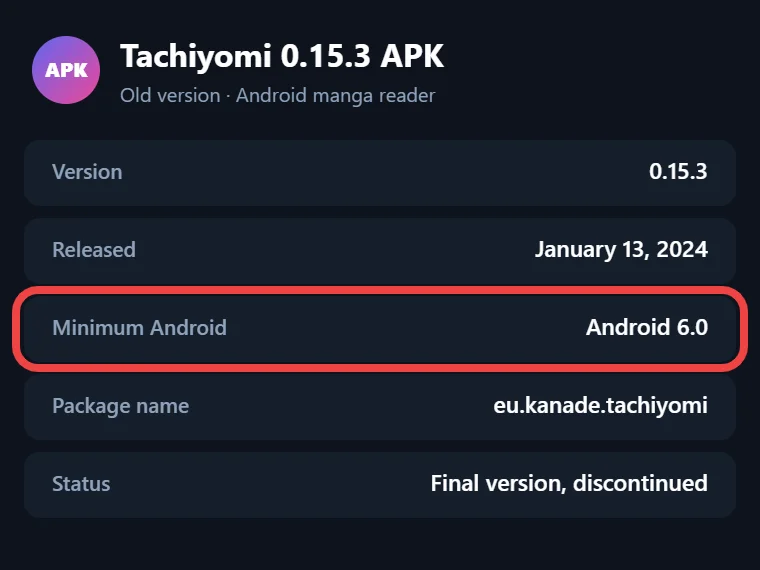
| Detail | Value |
|---|---|
| App | Tachiyomi |
| Version | 0.15.3 |
| Version code | 119 |
| Package name | eu.kanade.tachiyomi |
| Release date | January 13, 2024 |
| Minimum Android | Android 6.0 |
| Built for | Android 14 |
| Developers | inorichi (creator), arkon (final release) |
| License | Open source |
| Status | Discontinued, no updates |
| Price | Free |
You will not find a file size or download count in this table, because no official page lists those numbers today and the figures shown on other sites cannot be checked. If a download page lists details for the Tachiyomi latest version v0.15.3 that do not match this table, skip that file and look elsewhere.
Guide
Tachiyomi 0.15.3: The Final Official Build
On January 13, 2024, the Tachiyomi team posted a short notice saying the app “will no longer be actively developed.” The notice ended support for both the app and its official extensions, and it also said the main GitHub repositories would come down, the social accounts would close and the Discord server would get a new use. On that same day, the developer arkon released the Tachiyomi latest version v0.15.3, which turned it into the Tachiyomi final version of a project that inorichi had started years earlier.
When Tachiyomi discontinued all work on the app, the notice still gave users two points that matter today. Apps that were already installed keep working, so nobody lost a library overnight. Any new app that calls itself Tachiyomi or “the successor” has nothing to do with the original developers, which is a useful warning whenever a site promises a Tachiyomi 2026 update. That is why the Tachiyomi latest version in 2026 is still the same build from January 2024. The old tachiyomi.org address now opens the tachiyomiorg page on GitHub, where the notice still sits above a list of archived repositories.
Version
What Changed in v0.15.3 (Real Changelog)
The Tachiyomi shutdown explains most of what changed in this last release, because arkon used the 12 commits after v0.15.2 to clean up and close the app rather than add big features. Here is what the Tachiyomi latest version v0.15.3 actually changed:
- Analytics and crash reporting were removed, so the app no longer sends usage or crash data anywhere.
- The in-app update check was removed, which means the app will never tell you that something newer exists.
- The F-Droid warning and the links to the old Discord server were taken out.
- Backup restores became faster because the whole restore now runs inside one database transaction.
- Tap controls that stopped working when you zoomed into a page were fixed.
- Extensions no longer receive compressed responses from websites, which had broken some sources.
- The download cache now starts properly even when its cache file is missing.
- The Extensions tab got a shortcut to its settings, an option to copy the extension repo URL and a clearer message when the list is empty, and it stopped showing an error when nothing had loaded.
The release also pulled in new translations from Weblate and updated the Compose compiler and Kotlin, which are the tools the app is built with.
What Changed Just Before It (v0.15.1 and v0.15.2)
The two releases before it explain why extensions feel so different on this version. Version 0.15.1 came out on January 7, 2024, and v0.15.2 followed a day later on January 8. The v0.15.2 update removed the built-in official extension repo, so from then on users had to add an outside repo by themselves. To help with that change, it added links that add a repo in one tap, a way to always trust an unofficial extension by its version code and signature, and a setting that removes that trust from every unknown extension, along with a Nord theme and a library filter by update frequency.
Overview
Why Version 0.15.3 Is Significant
This release matters because it is the last code the original team ever shipped, and it is also the last manga reader app from the original team, one that still installs on Android 6.0 and 7.0 phones. Mihon needs Android 8.0 or newer, so owners of older phones cannot move to it, and anyone who searched for Tachiyomi Android 6 support will end up at this build. The same code also became the starting point for the community, since Mihon took over the project after the shutdown and kept building on it. That makes the Tachiyomi latest version v0.15.3 a bridge between the old app and the apps most readers use today, which is why people still keep a copy of the Tachiyomi final version on older devices.
Download
Is the Tachiyomi Latest Version v0.15.3 Safe to Download?
The app was safe when the team built it, but the real question in 2026 is where your copy comes from. The original GitHub repository was taken down, so no official place to download the Tachiyomi latest version v0.15.3 APK exists anymore. The v0.15.3 tag that still lives in the Mihon repository on GitHub only holds the source code as .zip and .tar.gz files, and it does not include a ready-to-install APK.
That means every Tachiyomi APK download you find today was uploaded by someone outside the original team. Some of those uploads are probably clean copies of the old file, but you cannot tell that from a download button, and a page that calls itself a Tachiyomi safe download is only making a claim. A familiar name and logo on a download page tell you very little about what is really inside a file labeled Tachiyomi latest version v0.15.3, since anyone can copy a name and an icon. Because this version also has no update checker, a changed copy would never warn you about anything, and the app will never point you to a fix later.
So is Tachiyomi safe? The original code is, but every file needs to be checked before it goes on your phone, and the next section shows you how to do that in a few minutes.
How to Check the APK Before Installing
A Tachiyomi safe download depends on a few simple checks that catch most bad files before they reach your phone. Start with the package name, which must read eu.kanade.tachiyomi, and the version, which must read 0.15.3, since you can see both in an app like App Manager before you tap install. Next, upload the file to VirusTotal, which scans it with many antivirus engines at once and shows the results in about a minute. Be careful with pages that make you wait through a countdown, send you to a Google Drive mirror or hand you a file with a generic name and no version number, because none of them tell you what is inside. If you can, check the signature with apksigner or App Manager and compare it with an older copy you trust. Finally, look at the permissions, because a manga reader has no reason to ask for your contacts, messages or call logs.
Install guide
How to Install Tachiyomi v0.15.3 on Android
Once your file passes those checks, installing the Tachiyomi latest version v0.15.3 takes only a few minutes on any phone running Android 6.0 or newer.
- Open your phone’s Settings, find the option to install unknown apps, and allow it for the browser or file manager you used to download the APK.
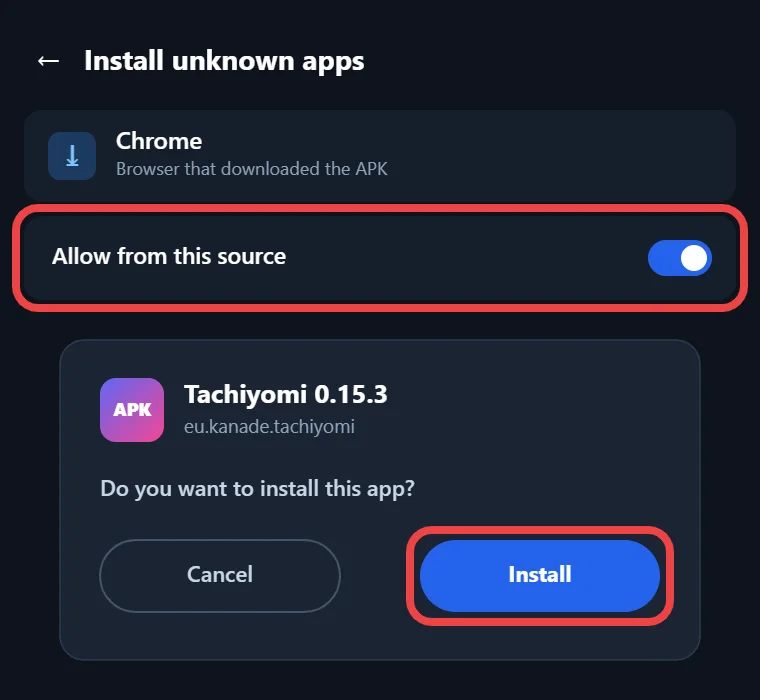
- Open the downloaded file from your Downloads folder and tap Install.
- If Google Play Protect shows a warning about an unknown app, read it, and only choose to install anyway if the file passed your earlier checks.
- Open the app, choose a storage location when it asks, and set up your library.
After the first launch, turn the unknown apps permission off again so no other app can install files without asking you. Keep in mind that the Tachiyomi latest version v0.15.3 starts with an empty extension list, and the next section explains why.
Extensions
Do Extensions Still Work on v0.15.3?
Extensions are where most people get stuck, and if you have searched for Tachiyomi extensions not working, the reason is simple. The built-in official extension repo was removed in v0.15.2, so a fresh install of the Tachiyomi latest version v0.15.3 shows no sources until you add a repo yourself.
The main community repo today is Keiyoushi, but it only supports Mihon 0.20.1 or newer, SY 1.13.2 or newer and Komikku 1.14.1 or newer. When you add it to old Tachiyomi, you will only see placeholder entries named “Outdated App” and “Update to Mihon 0.20.1+” instead of real manga sources. Other forks such as J2K and Yōkai may still work with extensions, but they get no support from that repo.
If you installed extensions before the shutdown, they may keep working until the websites behind them change or start blocking requests through Cloudflare, and after that there is no official fix.
Alternatives
Want More? Try the Forks
Mihon is not a fork of Tachiyomi 0.15.3 in the usual sense, because it is the community successor that took over the code and kept it alive. Mihon’s website also lists five endorsed forks, which are TachiyomiJ2K, TachiyomiSY, TachiyomiAZ, Yōkai and Komikku, and each one changes the app in its own way for different kinds of readers. If you are comparing Tachiyomi forks, the sections below cover the apps most readers pick instead of the Tachiyomi latest version v0.15.3.
Mihon (Recommended Successor)
Mihon is the app most former Tachiyomi users moved to, and its latest stable release is v0.21.2 from October 13, 2026. It needs Android 8.0 or newer, so it will not run on the older phones that still depend on the Tachiyomi latest version v0.15.3. You can get the Mihon APK from mihon.app/download, where the Stable build is the one most people should pick, while the FOSS and Nightly builds serve special cases. Mihon uses the package name app.mihon, so it installs next to Tachiyomi instead of replacing it. It is open source under the Apache License and is not on Google Play or iOS. Version 0.21.0 also replaced the old NSFW switch with Safe, Mixed and 18+ content settings and added Comick tracking.
TachiyomiSY
This fork stays close to Mihon’s updates while adding extra features on top, which makes it popular with readers who want more control over their library. The main community extension repo supports SY from version 1.13.2 onward, so sources keep working. One catch is that SY-only settings, such as saved searches, do not carry over if you later move a backup into Mihon, so think about that before you switch apps.
TachiyomiJ2K
This fork comes from the developer Jays2Kings and gives the app a different design along with a number of smaller improvements to reading and library tools. It still works with extensions, but it gets no support from the main community extension repo, so you may need to find and update sources on your own. Readers who like how J2K looks often stay with it, but they should expect a little more manual work.
Yōkai and Komikku
Yōkai builds on the best parts of J2K and pushes its design further, so it suits readers who like that style but want more recent work. Komikku mixes features from SY and Mihon with a few personal touches of its own, and the main extension repo supports it from version 1.14.1 onward. Both apps appear on Mihon’s list of endorsed forks, which tells you they are real projects and not copycat apps.
Mihon
Move Your Library from Tachiyomi to Mihon
Moving from Tachiyomi to Mihon keeps your library, reading history and trackers, as long as you follow the steps in the right order.
- In Tachiyomi, open the Backup and restore option in Settings and create a backup, which saves a .tachibk file to your phone.
- Install Mihon from mihon.app.
- In Mihon, add an extension repo, install the extensions you used before and log into trackers like MyAnimeList, AniList or Kitsu.
- Go to More, then Data and storage, choose Restore backup and pick your Tachiyomi backup file, and the restore screen will list any trackers or extensions you still need.
A backup carries your library entries, chapters, tracking, history, categories and settings, but it leaves out extensions, downloaded chapter files and custom covers, so you will have to download chapters again. Timing matters too, because Mihon v0.21.2 is the last major version that can restore these backups or run Tachiyomi 1.4 extensions, so restore on v0.21.2 before you update to anything newer. If your library still lives in the Tachiyomi latest version v0.15.3, make that backup now while the path is open.
Guide
Summary & Recommendation
This table puts the Tachiyomi latest version v0.15.3 side by side with the three apps most readers move to, so you can pick the one that fits your phone.
| Tachiyomi v0.15.3 | Mihon | SY | Komikku | |
|---|---|---|---|---|
| Android | 6.0+ | 8.0+ | Check the fork | Check the fork |
| Updates | None since Jan 2024 | Active (v0.21.2) | Active | Active |
| Main extension repo | Placeholders only | Yes (0.20.1+) | Yes (1.13.2+) | Yes (1.14.1+) |
| Restores old backups | Yes | Yes, up to v0.21.2 | Yes | Yes |
| Best for | Android 6–7 phones | Most readers | Extra features | SY and Mihon mix |
For most people the answer is Mihon, since it gets regular updates and works with the main extension repo, while the old app only makes sense when your phone cannot run anything newer.
FAQ
FAQs
1. Is Tachiyomi really dead in 2026?
Development stopped on January 13, 2024, which means the Tachiyomi latest version will stay at v0.15.3 for good, but installed copies still open and Mihon carries the project forward with regular updates.
2. Is Tachiyomi safe?
The app’s code was open source and safe, but every copy of the Tachiyomi latest version v0.15.3 online today is a third-party upload, so check the package name, VirusTotal results and permissions first.
3. Are Tachiyomi APK download sites safe?
None of them are official, because the original team took its repository down, so treat every site as a third-party source and run the checks above, or install Mihon from mihon.app instead.
4. Will an Android update stop Tachiyomi from working?
Installed copies keep working after the shutdown, but the app never gets fixes, so if a future Android change or a broken manga source causes problems, nobody will release an update to solve them.
5. Why does Tachiyomi show “Outdated App” instead of extensions?
The main community repo only supports Mihon 0.20.1 or newer, SY 1.13.2 or newer and Komikku 1.14.1 or newer, so old Tachiyomi builds see placeholder entries instead of real manga sources.
6. Does a Tachiyomi backup work on Mihon?
Yes, if you restore it on Mihon v0.21.2 or an older release, because later major versions drop support for these files, and fork-only settings such as SY saved searches will not carry across.
7. Should I move to Mihon or keep using Tachiyomi?
Move to Mihon if your phone runs Android 8.0 or newer, since it gets updates and works with current extensions, and keep Tachiyomi only on Android 6.0 or 7.0 phones that cannot run it.
Final Take
Final Take
The Tachiyomi latest version v0.15.3 is the final release of the original app, and it still has a clear place on phones running Android 6.0 or 7.0 or in an old setup you do not want to change. If you do install it, take the file through the checks above and accept that extensions and sources will be limited, since the main repo no longer supports this build. For everyone else, Mihon is the better choice because it gets updates, works with current extensions and can still restore your old library if you move before the v0.21.2 cutoff.