
Tachiyomi APK older versions · 2022 to 2026
Tachiyomi APK Older Versions 2022 to 2026 Download
Some download sites still call Tachiyomi 0.15.5 the latest build, yet that version was never released, because the real Tachiyomi story ended with 0.15.3 on January 13, 2024. That gap between what mirror sites claim and what actually shipped is why I checked every release date against the official commits in the Mihon repository on GitHub before putting together this list of Tachiyomi APK older versions. Below you will find every real Tachiyomi build from 2022 up to its final release in January 2024, followed by the Mihon versions that carry the same app into 2026. I also explain which build fits your Android version, how to install Tachiyomi APK older versions without losing your library, and what to do when your extensions stop showing up.
- 10 version guides
- Android 6.0+
- 6 FAQs
In this guide
Every real release with dates and safe install tips
Updated October 2026Downloads
Tachiyomi Version Guides on This Site
Every version below has its own page with APK details, install steps, the changelog where it is known and a short guide on moving your library to Mihon. Newer builds are listed first.
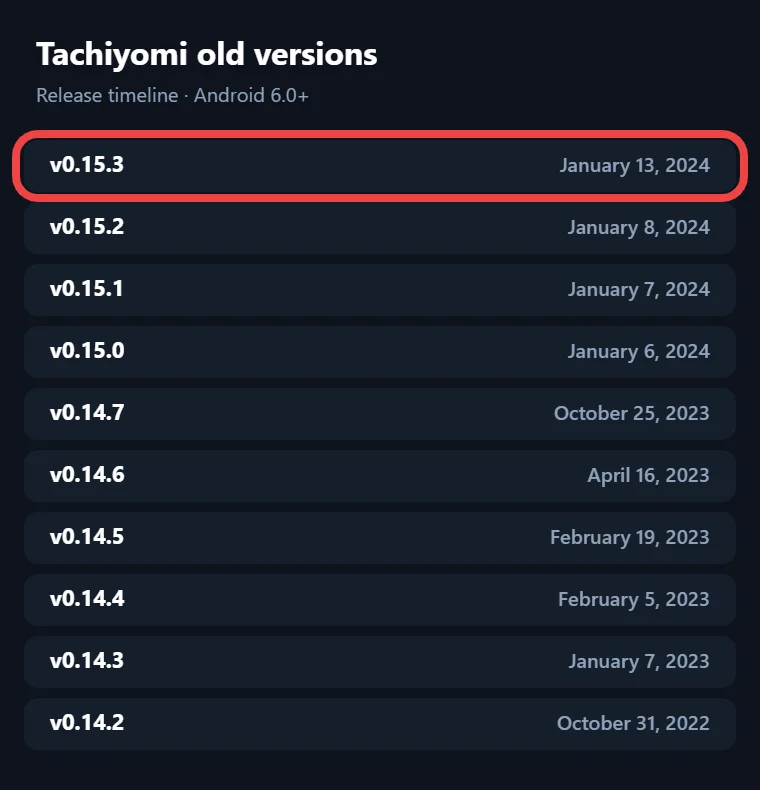
Tachiyomi 0.15.3
Released: January 13, 2024 · Android 6.0+
The final Tachiyomi release, published the day the project shut down.
Tachiyomi 0.15.2
Released: January 8, 2024 · Android 6.0+
A follow-up build released two days after 0.15.0.
Tachiyomi 0.15.1
Released: January 7, 2024 · Android 6.0+
A small fix release, one day after the big 0.15.0 update.
Tachiyomi 0.15.0
Released: January 6, 2024 · Android 6.0+
The largest update before the shutdown, and the release that added extension repos.
Tachiyomi 0.14.7
Released: October 25, 2023 · Android 6.0+
The last release of the 0.14 line.
Tachiyomi 0.14.6
Released: April 16, 2023 · Android 6.0+
A bug-fix release in the 0.14 line.
Tachiyomi 0.14.5
Released: February 19, 2023 · Android 6.0+
A February 2023 update to the 0.14 line.
Tachiyomi 0.14.4
Released: February 5, 2023 · Android 6.0+
An early February 2023 update to the 0.14 line.
Tachiyomi 0.14.3
Released: January 7, 2023 · Android 6.0+
A big update with 209 commits of work since v0.14.2.
Tachiyomi 0.14.2
Released: October 31, 2022 · Android 6.0+
A small update released in October 2022.
Overview
What Is Tachiyomi?
Tachiyomi is a free, open source manga reader app for Android that a developer known as Inorichi first released in 2014 under the Apache-2.0 license. Instead of hosting manga itself, the app reads chapters through source extensions, which are add-on APK files that connect it to manga websites and personal servers. Its package name is eu.kanade.tachiyomi, and that name matters later because Android uses it to decide whether a new APK file can replace the one already installed. The app also syncs your reading progress with trackers like AniList and MyAnimeList, which is a big reason readers stayed with it for years.
Overview
What Happened to Tachiyomi in 2024?
Everything changed for Tachiyomi in January 2024, starting on January 9, when the team removed its official extensions list and warned users that extensions from unknown repositories could carry malware. Four days later, on January 13, the core developers announced that Tachiyomi would no longer be developed, citing threats from Kakao Entertainment Corp. against its contributors. They took down the core GitHub repositories, closed the official social accounts and turned Discord into a general community. Their notice said existing installs would keep working without support or official extensions, and it warned that any new app calling itself Tachiyomi or its successor had nothing to do with the original team. Because those official releases are gone, every Tachiyomi APK download you find today comes from a third-party mirror, while Mihon carries the code forward.
Download
Why People Still Download Older Tachiyomi Versions
Most people who look for older Tachiyomi versions have a practical reason rather than plain nostalgia. Mihon, the successor app, needs Android 8.0 or newer, so readers with Android 6 or Android 7 phones can only run the original builds, which work from Android 6.0 upward. Others want the layout they used for years, or they need a matching build to open a backup made on an old phone before moving to something newer. The catch is that Tachiyomi APK older versions will never receive fixes again, so an old build works best as a short-term tool for a spare phone or tablet rather than a permanent home for your library.
Version
Tachiyomi APK Older Versions: Full List (2022–2026)
The tables below cover the Tachiyomi version history, starting with Tachiyomi APK older versions from 2022 to the final release and then moving to the Mihon builds from 2024 to 2026. Every date comes from the official release commit, so you can trust it more than random mirror pages, and I added versionCode values wherever I could confirm them from the build files.
Tachiyomi 2022 Versions (v0.13.0 – v0.14.2)
Tachiyomi had a busy 2022, with ten releases that moved the app from the 0.13 line to the 0.14 line. All of these Tachiyomi APK older versions need Android 6.0 or newer, and the 0.13.0 build targeted Android 10 (targetSdk 29), so it runs well on phones from that time.
| Version | Release date | Notes |
|---|---|---|
| 0.13.0 | Jan 31, 2022 | First 0.13 build |
| 0.13.1 | Feb 1, 2022 | Patch release |
| 0.13.2 | Apr 10, 2022 | Patch release |
| 0.13.3 | Apr 15, 2022 | Patch release |
| 0.13.4 | Apr 22, 2022 | Patch release |
| 0.13.5 | Jul 8, 2022 | Patch release |
| 0.13.6 | Aug 14, 2022 | versionCode 82, sources fix |
| 0.14.0 | Oct 28, 2022 | First 0.14 build |
| 0.14.1 | Oct 29, 2022 | Patch release |
| 0.14.2 | Oct 31, 2022 | Last 2022 build |
If you only want one build from this year, 0.14.2 is the newest of the Tachiyomi 2022 versions, since it came out just three days after 0.14.0.
Tachiyomi 2023 Versions (v0.14.3 – v0.14.7)
The Tachiyomi 2023 versions are fewer and easier to follow, because the whole year stayed on the 0.14 line. These Tachiyomi APK older versions also need Android 6.0 or newer, so they run on the same phones as the 2022 builds.
| Version | Release date | Notes |
|---|---|---|
| 0.14.3 | Jan 7, 2023 | Patch release |
| 0.14.4 | Feb 5, 2023 | Patch release |
| 0.14.5 | Feb 19, 2023 | Patch release |
| 0.14.6 | Apr 16, 2023 | Patch release |
| 0.14.7 | Oct 25, 2023 | versionCode 102 |
The six-month gap between 0.14.6 and 0.14.7 is the longest in this list, and that is why many readers hunting for a Tachiyomi 0.14.7 APK want it as the final build before the 0.15 line arrived.
Tachiyomi 2024 Final Versions (v0.15.0 – v0.15.3)
The last Tachiyomi APK older versions all landed in the first two weeks of January 2024, right before the shutdown.
| Version | Release date | Notes |
|---|---|---|
| 0.15.0 | Early January 2024 | Extension repos screen |
| 0.15.1 | Jan 7, 2024 | Patch release |
| 0.15.2 | Jan 8, 2024 | Patch release |
| 0.15.3 | Jan 13, 2024 | versionCode 119, final build |
The 0.15 line let users add their own extension repos, and the Tachiyomi 0.15.3 APK, which targets Android 14 (targetSdk 34), is the last version of Tachiyomi ever released in arm64-v8a, armeabi-v7a, x86, x86_64 and universal APK files. You may also see 0.14.9 or 0.15.5 on some sites, but neither appears in the official tags.
Mihon 2024–2026 Versions (v0.16.0 – v0.21.2)
After the shutdown, Mihon picked up the same code and kept releasing updates, which is why any honest 2022 to 2026 list has to include it. The first Mihon release also raised the minimum requirement to Android 8.0.
| Version | Release date | Key change |
|---|---|---|
| 0.16.0 | Jan 16, 2024 | Android 8.0 or newer required |
| 0.17.0 | Oct 26, 2024 | 7Zip and RAR5 archive support |
| 0.18.0 | Mar 19, 2025 | Monochrome theme, private tracking |
| 0.19.0 | Aug 4, 2025 | Mass migration and manga notes |
| 0.20.0 | Jun 27, 2026 | Extension store, vertical chapter navigator |
| 0.21.0 | Oct 11, 2026 | Safe, Mixed and 18+ content preferences |
| 0.21.2 | Oct 13, 2026 | Latest build, last line reading .tachibk |
Smaller patch releases came between these, such as 0.16.5 in April 2024 and 0.20.4 in August 2026, and the newest Mihon APK is always on its GitHub releases page. If your phone runs Android 8.0 or newer, these Mihon versions are a safer pick than Tachiyomi APK older versions, because they still receive fixes.
Compare
Old vs New Tachiyomi: What Actually Changes
The biggest difference between old and new builds is the Android version each one supports, since every Tachiyomi build from 0.13.0 to 0.15.3 runs on Android 6.0, while Mihon has needed Android 8.0 since version 0.16.0. Extensions changed as well, because the 0.15 line added a screen for adding your own extension repo, which Mihon 0.20.0 later renamed the extension store. Mihon 0.21.0 then replaced the old adult content switch with Safe, Mixed and 18+ content preferences and added Comick as a tracker next to AniList, MyAnimeList, Kitsu and Bangumi. Mihon 0.19.0 also added mass migration, which moves many titles to a new source at once instead of one by one. Newer builds also read 7Zip and RAR5 archives and ComicInfo.xml details for local manga, so Tachiyomi APK older versions feel simpler but miss years of these improvements.
Compare
Old or Latest: Which Should You Use?
My own rule is to try the newest build my phone will accept and only step back one version when something breaks. On Android 8.0 or newer, Mihon 0.21.2 is the better pick since it still gets fixes and works with current extensions. On Android 6 or Android 7, the Tachiyomi 0.15.3 APK is the best choice among Tachiyomi APK older versions because it is the newest build those phones can install. For the file type, most modern phones need arm64-v8a, older 32-bit phones need armeabi-v7a, and emulators use x86 or x86_64, while the universal APK works everywhere at the cost of a larger file.
Download
How to Download Older Tachiyomi Safely
Since the official GitHub releases were taken down in 2024, there is no official place left to get Tachiyomi APK older versions, and that changes how careful you need to be. Every mirror is run by someone other than the original team, so treat each file as unchecked until you confirm what it is. An APK inspector app can show you the package name and versionCode before you install, and those should read eu.kanade.tachiyomi with the right number, such as 119 for 0.15.3 or 102 for 0.14.7. If the details do not match, delete the file, because a mismatch is the clearest sign that someone changed it. Skip anything labelled mod, patched or premium as well, since Tachiyomi was always free and those builds have no honest reason to exist. Finally, scan every APK file with an antivirus app, and ignore any app that claims to be a new Tachiyomi, because the original developers said such apps are not theirs.
Install guide
How to Install an Older Version (Step by Step)
Android will not install an APK with a lower versionCode or a different signature over an app that is already on your phone, so if you want to downgrade Tachiyomi, always start with a backup.
- Open your current app and create a backup from the Backup and restore section of Settings, which in Mihon sits under More → Data and storage.
- Copy the .tachibk backup file to a safe place, such as cloud storage or a computer, so it survives the next step.
- Uninstall the current app, because Android will not let the older build replace it.
- Allow your browser or file manager to install unknown apps when Android asks for that permission.
- Install the older APK file and open it so it can set up its folders.
- Restore your backup from the same settings section, then reinstall any extensions that are missing.
After that, your library, categories and reading history should return the way you left them on Tachiyomi APK older versions.
Extensions
Do Older Tachiyomi Versions Still Get Extensions?
Extensions are the area where old builds struggle the most, and the reason is the store that most readers now use. Keiyoushi, the main community extension store, supports Mihon 0.20.1 and newer, TachiyomiSY 1.13.2 and newer, and Komikku 1.14.1 and newer. When you add Keiyoushi to Tachiyomi APK older versions, you only see placeholder entries named “Outdated App” and “Update to Mihon” instead of real sources. Tachiyomi extensions you installed before the shutdown may keep working for a while, but nothing guarantees that, so browsing online sources really needs a supported app. In Mihon, you add the store under More → Settings → Browse → Extension store → Add, and version 0.21.2 also offers a one-tap “Add store” button. To add it, you paste the Keiyoushi store link, https://github.com/keiyoushi/extensions/raw/repo/index.pb, into that Add screen.
Mihon
Move Your Library from Old Tachiyomi to Mihon
If your phone runs Android 8.0 or newer, moving your library to Mihon is the safest long-term step for your reading list. Start by creating a backup in Tachiyomi, which saves it in the .tachibk format, also called .proto.gz, that Mihon and every Tachiyomi fork can read. Before restoring in Mihon, sign in to your trackers and install the extensions you used, and then restore the file from More → Data and storage. That Tachiyomi backup restore brings back your library, categories and reading history, so you do not need to add each title again. Settings that only existed in a fork such as TachiyomiSY will not carry over, so check those by hand afterwards. Timing matters with Tachiyomi APK older versions, because the Mihon changelog says 0.21.2 is the last version line that reads .tachibk backups.
Alternatives
Alternatives If Old Tachiyomi Builds Don’t Work
When Tachiyomi APK older versions stop doing what you need, a maintained app is the better route for your manga and manhwa library. Mihon 0.21.2 is the closest match, because it is the direct successor and keeps the same backup format. TachiyomiSY 1.13.2, released on July 13, 2026, is a fork that Keiyoushi supports officially, and the same goes for Komikku 1.14.1, which arrived on July 17, 2026. TachiyomiJ2K 1.8.1 came out on August 15, 2026, but Keiyoushi does not support it, so some extensions may not behave as expected. All three Tachiyomi forks ship arm64-v8a, armeabi-v7a, x86, x86_64 and universal APK files, so picking the right download works the same way it does with Mihon. Keep in mind that Mihon has no iOS version and is not on the Google Play Store, because APK extensions conflict with Play policy.
Fixes
Common Issues on Older Versions and Quick Fixes
Most problems with old builds come from a few repeat causes, and each one has a simple fix that you can try in a few minutes.
- “App not installed“: a newer or differently signed copy is already on your phone, so back it up, uninstall it and install again.
- INSTALL_FAILED_UPDATE_INCOMPATIBLE: the same app or extension came from another source, so uninstall the old copy first.
- “DISPLAY_NAME column is null”: the APK file is corrupted, so download it again from the same place.
- Cloudflare or HTTP 403, 429 and 1020 errors: the source site is blocking or limiting you, so open it in WebView, clear cookies and WebView data, or change the user agent.
- “Outdated App” in the extension list: Tachiyomi APK older versions are too old for Keiyoushi, so a supported app is the only fix.
- Missing downloads after a restore: Mihon users on GitHub reported downloaded chapters not showing after a Tachiyomi backup restore, so check the download folder setting first.
FAQ
FAQs
1. Is it safe to use Tachiyomi old versions?
An old build is only as safe as the file you download, so confirm the package name and versionCode, avoid modded APKs, and accept that no security fixes will ever arrive.
2. Where can I get Tachiyomi 2022 builds?
The official GitHub releases were taken down in January 2024, so 2022 builds such as 0.14.2, like all Tachiyomi APK older versions, now live only on third-party mirrors.
3. Can I restore an old backup of Tachiyomi on a new version?
In most cases you can, because Mihon and the Tachiyomi forks read .tachibk backups, although fork-only settings get lost and Mihon 0.21.2 is the last line reading that format.
4. Are older Tachiyomi app extensions still supported?
Official ones are not, since the team removed its extension list in January 2024, and Keiyoushi shows old builds only an “Outdated App” placeholder instead of real sources.
5. What is the last version of Tachiyomi?
The last version of Tachiyomi is 0.15.3, released on January 13, 2024, with versionCode 119, so any higher Tachiyomi number you see online, such as 0.15.5, is fake.
6. Does Tachiyomi work on Android 6 or 7?
It does, because every Tachiyomi build from 0.13.0 to 0.15.3 runs on Android 6.0 or newer, while Mihon needs Android 8.0, so older phones should stay on 0.15.3.
Conclusion
Conclusion
Tachiyomi APK older versions still have a place on Android 6 and Android 7 phones, and 0.15.3 is the build I would choose there because it is the final release. On any newer phone, Mihon 0.21.2 gives you the same app with current fixes, Keiyoushi support and a safe path for your old backups. Check every file before you install it, keep a fresh backup on hand, and move your library to Mihon while .tachibk support is still there.