
Tachiyomi APK guide · Updated October 2026
TachiyomiJ2K (With More Features): Complete Installation and User Guide 2026
TachiyomiJ2K is a free manga reader for Android that takes the classic Tachiyomi app and adds a cleaner library, a smarter Recents tab and plenty of small touches that make daily reading easier. Many readers thought the app was finished after the original Tachiyomi shut down in January 2024, but its developer, Jays2Kings, surprised everyone with version 1.8.0 in August 2026 and then shipped v1.8.1 on August 15, 2026. This guide takes you through every part of the setup, from picking the right APK file on GitHub to adding the Keiyoushi extension store, so your library fills up with manga, manhwa and manhua again. After that, you will learn how to search, read, download and track your series, and how to fix the problems people run into most often after they set up TachiyomiJ2K.
- Android guide
- Updated Oct 2026
- 8 FAQs
In this guide
Setup, features and fixes for 2026
- What Is TachiyomiJ2K and Is It Still Updated in 2026?
- Tachiyomi vs TachiyomiJ2K vs Mihon (Quick Comparison)
- Which APK File Should You Pick?
- Step 1: Check Requirements Before You Install
- Step 2: Download the TachiyomiJ2K APK
- Step 3: Install TachiyomiJ2K on Android
- Step 4: Add the Extension Store and Install Extensions
Updates
What Is TachiyomiJ2K and Is It Still Updated in 2026?
J2K is a fork of Tachiyomi, which means it started from the same code and then grew its own features on top of it. The project lives on GitHub under the developer name Jays2Kings, it is written in Kotlin, and it is released under the Apache-2.0 license, so anyone can read the code and nobody has to pay to use the app. Like the other apps in this family, it does not host any manga itself, because all reading happens through extensions that connect to outside websites.
The original Tachiyomi shut down on January 13, 2024, and its work now continues as Mihon, which is why the J2K README sends people to mihon.app and the Mihon Discord for general help. For about two and a half years J2K stayed on version 1.7.4, and many users believed it was abandoned until v1.8.0 arrived on August 9, 2026, with v1.8.1 following six days later. The app is still not on the Google Play Store, so GitHub Releases remains the only official place to get it.
What’s New in v1.8.0 and v1.8.1
The two Tachiyomi J2K 2026 releases came out six days apart, and 1.8.0 was the big one because it changed how the app works with extensions. It added support for tachiyomix 1.6 extensions and the new index.pb store format, which is the reason the Keiyoushi store works in TachiyomiJ2K again. The same release raised the minimum Android version to 8.0, gave the whole app a Material 3 Expressive redesign and added a Tokyo Night theme for people who like darker colors.
Library search also got much smarter, since you can now combine words with AND (&&), OR (||) and NOT (-), group them with brackets and filter by dates or chapter counts using a simple filter builder. On top of that, J2K now supports MangaBaka and Hikka as trackers, lets you track privately where the tracker allows it, and uses newer names, so “extension repos” are now “extension stores” and “Obsolete” extensions are now “Orphaned.”
Version 1.8.1 built on that base with gamepad support in the reader, a setting for concurrent downloads, a “Duplicate” badge for series you already saved from another extension, and 15 new languages that include Urdu. It also fixed the broken language picker, a Kitsu crash and the crashes that happened when people restored Mihon app settings.
Mihon
Tachiyomi vs TachiyomiJ2K vs Mihon (Quick Comparison)
The three apps share the same roots, but they sit in very different places today, and the table below shows where each one stands before you decide which one to install on your phone.
| Feature | Tachiyomi | TachiyomiJ2K | Mihon |
|---|---|---|---|
| Status | Shut down on January 13, 2024 | Active again since August 2026 | Active |
| Latest version | 0.15.3 | 1.8.1 (August 15, 2026) | 0.21.2 (October 13, 2026) |
| Minimum Android | 6.0 | 8.0 | 8.0 |
| Keiyoushi extension store | Shows only “Outdated App” placeholders | Works since 1.8.0, without official support | Officially supported |
| Design | Older Material design | Material 3 Expressive | Material 3 |
| Library layout | Category tabs | One list with collapsible categories | Category tabs |
| Dynamic Categories | No | Yes | No |
| Recent reading | Separate Updates and History tabs | One combined Recents tab | Separate Updates and History tabs |
In short, Tachiyomi is no longer a real option, Mihon is the safe main-line choice with official extension support, and J2K suits readers who want more control over how their library looks and how it groups their series, even if that means getting app help from GitHub instead of the Keiyoushi team.
Compare
Which APK File Should You Pick?
The release ships five TachiyomiJ2K APK files, and each one is built for a different type of phone processor.
| File | Size | Best for |
|---|---|---|
| tachiyomij2k-v1.8.1.apk (universal) | 60 MB | Any device |
| tachiyomij2k-arm64-v8a-v1.8.1.apk | 26.4 MB | Most modern phones |
| tachiyomij2k-armeabi-v7a-v1.8.1.apk | 23.4 MB | Older 32-bit phones |
| tachiyomij2k-x86-v1.8.1.apk | 27.6 MB | x86 devices and emulators |
| tachiyomij2k-x86_64-v1.8.1.apk | 28.6 MB | 64-bit x86 devices and emulators |
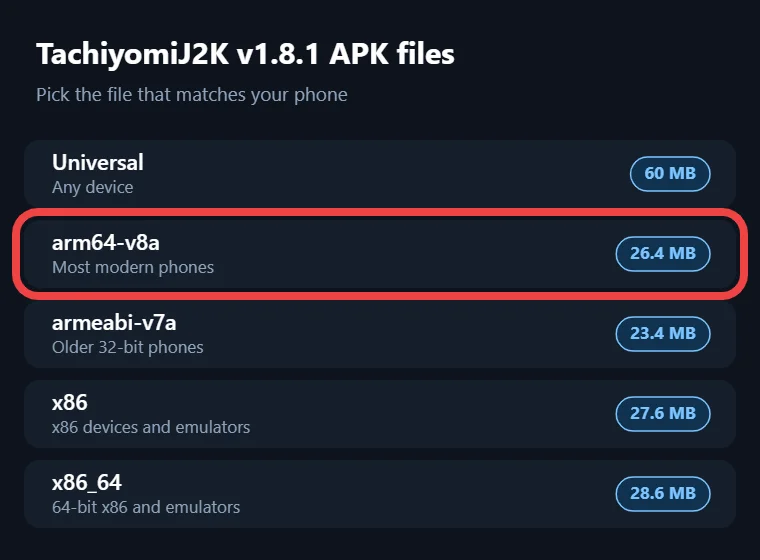
If you are not sure which one you need, the release notes say to pick the largest file, which is the universal APK, since it works on every device but takes more space. For extra safety, you can compare its SHA-256 checksum with the one listed on GitHub, which starts with 554e44cc and ends with 6317a4.
Install guide
Step 1: Check Requirements Before You Install
Check these three things before you start:
- Your phone must run Android 8.0 or newer, because TachiyomiJ2K 1.8.0 and later will not install on Android 6 or 7, and the older v1.7.4 cannot use the current extension store.
- Keep enough free space for the app, its updates and the chapters you plan to download.
- Be ready to allow installs from unknown sources, since the app comes from GitHub and not the Google Play Store.
Download
Step 2: Download the TachiyomiJ2K APK
Every safe TachiyomiJ2K download comes from the official GitHub page, so follow these steps:
- Open the Releases page of the Jays2Kings/tachiyomiJ2K repository on GitHub in Google Chrome or any other browser.
- Find v1.8.1 marked as “Latest” at the top and scroll down to its “Assets” section.
- Tap the APK that fits your phone from the table above, and Android will save it to your Downloads folder.
- Skip builds marked “Pre-release” unless you want to test new features and can live with a few bugs.
Stay away from tachiyomi.org, which went offline when Tachiyomi shut down, and from mirror or “mod” sites, because you cannot know what was changed inside their files.
Install guide
Step 3: Install TachiyomiJ2K on Android
When you install TachiyomiJ2K for the first time, it starts with an empty library and asks for permissions as you go, so follow these steps in order:
- Open the downloaded APK from your notification bar or the Files app.
- When Android blocks the install, tap Settings, turn on “Allow from this source” and go back.
- Tap Install, wait for the “App installed” message and then tap Open.
- Allow notifications when asked, which on Android 13 and newer happens the first time you add a series or start a download.
- Grant file access when the app asks, since it also turns on automatic backups.
- Set J2K to “Unrestricted” in your battery settings, because battery optimization can stop library updates and downloads in the background.
Install guide
Step 4: Add the Extension Store and Install Extensions
TachiyomiJ2K, just like Mihon, ships with no extensions, so you need to add the Keiyoushi store, which hosts more than a thousand of them:
- Uninstall any old extensions first, because Keiyoushi warns that extensions from an old source will not get updates.
- Copy this store link: https://github.com/keiyoushi/extensions/raw/repo/index.pb
- Open Settings, go to Browse, find Extension stores, tap Add, paste the link and confirm.
- Close the app fully and open it again so it loads the new list.
- Open the Extensions tab in Browse and install the sources you want.
- If you had series in your library before, open Browse → Migrate to see which sources are missing.
The one-tap “Add store” button on the Keiyoushi site needs Mihon 0.21.2 or newer, which is why J2K users add the link by hand. You will also see newer names here, since repos are now “extension stores” and removed extensions show as “Orphaned.” Keiyoushi officially supports only Mihon, TachiyomiSY and Komikku, so app questions belong on the J2K GitHub page or the Mihon Discord.
Storage and Extension Updates
By default, J2K saves downloaded chapters in its own folder, and you can pick a different location from the download settings if you want chapters on an SD card or in a folder your backup app watches. TachiyomiJ2K extensions update from inside the app, and a badge appears on the Extensions tab whenever a new version is ready. Tapping “Update All” now opens the extension sheet instead of updating quietly, because newer Android versions block install prompts that run in the background. Since version 1.8.0, J2K also trusts new extensions automatically when they share the same signature or store as ones you already trust, which saves you a few taps each time you add a source.
Guide
Step 5: Start Using TachiyomiJ2K
With the store added and your sources installed, the app is ready, and these are the everyday tasks you will use most.
Searching for Manga
Open the Browse tab and type a title in the search bar at the top, and J2K will run a global search across every installed source at once. That is handy for finding which source carries a series, but searching inside one source is faster and gives cleaner results, so tap a source first when you already know where the manga lives. The floating search bar also lets you search your own library from the same spot.
If a series does not show up, the title might be written in romanized Japanese instead of English, so a search for My Hero Academia could miss the entry while Boku no Hero Academia finds it. Checking the title on MangaUpdates first helps a lot, because it lists the other names a series goes by.
Adding Manga to Your Library and Categories
When you open a series, tap “Add to library” to save it, and J2K will ask once which category it should go in. After that first choice, new series go straight into the same categories, and you can change this later in the settings. The library shows all categories in one list that you can collapse or expand with a tap, and you can sort entries with drag and drop or switch to a staggered grid if you like covers of different heights. Most apps split categories into tabs, so TachiyomiJ2K feels different here at first.
Since v1.8.1, a “Duplicate” badge appears in Browse on series you already saved from another extension, which helps you avoid keeping the same manga twice under two sources.
Viewing Modes and Reader Settings
The J2K reader has paged modes for left-to-right and right-to-left reading, a vertical mode, and Webtoon mode for long-strip manhwa and manhua that you scroll down instead of swiping. You can set a default viewer for the whole app and then change it for each series, so a Japanese manga can stay right-to-left while a Korean webtoon scrolls down.
Tablet readers can combine two pages into one spread, which makes double-page art look the way the artist drew it. Version 1.8.0 added a vertical chapter progress bar that you can move and resize, and v1.8.1 added gamepad support, so a controller can turn pages, zoom and open menus. The reader menu also holds brightness and custom color filters, which make night reading easier on the eyes. You can change all of these without leaving the chapter you are on.
Downloading Manga for Offline Reading
Offline reading is where J2K saves a lot of time, because you can download a single chapter by tapping the arrow next to it, or open the download menu on a series and grab the next few chapters, all unread chapters or everything at once. Since v1.8.1, these downloads follow the filters you set on the chapter list, so if you hid a certain scanlator, those chapters stay out of your downloads too.
The same version added a setting for concurrent downloads and raised the default number of pages fetched at once, which makes big downloads finish faster on a good connection. Pausing works better as well, since downloads now run on a newer system inside the app. If space is tight, turn on the option to remove chapters after you read them, and exclude certain categories so your favorite series stay saved.
Tracking Your Reading (MyAnimeList, AniList and More)
Trackers keep your reading progress synced with your online lists, and J2K supports MyAnimeList, AniList, Kitsu, Shikimori and MangaUpdates, plus MangaBaka and Hikka since version 1.8.0. You log in to each service from the tracking settings, then open a series, tap the tracking button and link it to the right entry, and from then on J2K updates your chapter count when you finish a chapter. If you do not want others to see what you read, the private tracking option keeps entries hidden on trackers that support it. Kitsu users should update to v1.8.1, since it fixed a crash and reworked the Kitsu login screen.
Mihon
Features of TachiyomiJ2K That Mihon Doesn’t Have
The biggest reason people pick TachiyomiJ2K over Mihon is the library, because Dynamic Categories can group your series by tags, tracking status, source and more without you sorting anything by hand. That means you can see every series you are reading in one group, every title from a certain source in another, or all your romance manga together, and the groups update on their own as your library changes.
The Recents tab comes next, since it puts newly added series, new chapters and the series you were in the middle of on one page instead of spreading them across separate Updates and History screens. Manga details pages also take their colors from each cover, which gives every series its own look, and an expanded toolbar keeps buttons within reach for one-handed use.
A few smaller extras add up over time. Dynamic shortcuts let you long-press the app icon to jump straight into the latest chapter you were reading, and removing a series shows a snackbar with an Undo button in case you tapped by mistake. For users who need to move many series at once, batch auto-source migration, borrowed from TachiyomiEH, moves them to a new source in one go.
Mihon
Backup and Restore Your Library
Backups protect your library, categories, tracking links and reading history, and J2K turns automatic backups on as soon as you grant file access. You can also create a manual backup from the backup settings whenever you plan to update the app, which the developer has asked users to do before past major updates. To restore, open the same menu, choose Restore and pick your backup file. Since version 1.7.2, app and source settings are part of every backup, and v1.8.1 added scanlator filters as well. The same update fixed crashes that happened when restoring Mihon app settings inside J2K, but test a full Mihon library backup before you rely on it.
Fixes
Fix Common TachiyomiJ2K Problems
Some users found that TachiyomiJ2K crashed on launch after updating to 1.8.0, including one on Android 12 with a Mi 9T Pro, so the first step is updating to 1.8.1, which fixed many crashes. If the app still will not open, clear its cache from your Android settings, and reinstall only after checking that a recent backup exists.
When extensions do not appear after you add the store, restart the app, since a known bug can stop new or updated extensions from showing right away. An error that says INSTALL_FAILED_UPDATE_INCOMPATIBLE means the same extension is already installed from another source, so uninstall the old one first, while “DISPLAY_NAME column is null” points to a broken download that you should fetch again. Split APK Installer can show clearer error messages when an install keeps failing.
Sources protected by Cloudflare often need a quick CAPTCHA, so open the source in WebView, solve it and close the page with the X. If that loops, go to More → Settings → Advanced and tap Clear cookies and Clear WebView data, keep Android System WebView or Google Chrome updated, or try a different user agent.
FAQ
FAQs
1. What is the difference between TachiyomiJ2K and Mihon?
Both come from the original Tachiyomi code, but Mihon is the main successor with official Keiyoushi support. J2K is a separate fork with its own look and extra tools, adding Dynamic Categories, a combined Recents tab and cover-themed details pages.
2. Is TachiyomiJ2K dead or still updated?
Many Reddit users called it dead after it sat on version 1.7.4 for over two years. That changed in August 2026, when Jays2Kings released v1.8.0 and then v1.8.1, so the app is active again and works with the Keiyoushi store.
3. Why does TachiyomiJ2K crash after updating to 1.8?
Several users on Reddit and GitHub saw crashes on first launch, even with the universal APK. Install v1.8.1 over it first, since it fixed many crashes, and if that fails, reinstall the app and restore your latest automatic backup.
4. Why are extensions not showing up in J2K?
Most of the time, the app still points to an old store or has old extensions installed from another source. Uninstall those extensions, add the Keiyoushi index.pb link under Extension stores, restart the app and install your sources again.
5. Can I move my library between J2K and Mihon?
Reddit users move libraries by making a backup in J2K and restoring it in Mihon under Settings, Data and storage. Going the other way, v1.8.1 fixed crashes when restoring Mihon settings, but test your library backup in J2K before relying on it.
6. Why does J2K crash when restoring a backup?
Large backups can stop halfway if your phone sleeps or the app has old data. Reddit users suggest resetting the app first from its settings, then restoring while keeping the screen awake, and v1.8.1 also made restoring faster.
7. Is TachiyomiJ2K safe to use?
The app is open source, so anyone can check its code on GitHub, and it has been around for years. It stays safe as long as you download it only from GitHub Releases and add extensions only from trusted stores.
8. How do I download extensions in J2K?
Add the Keiyoushi store link in Settings, under Browse and Extension stores, then fully restart the app. Open the Extensions tab in Browse, tap Install next to each source you want, and allow the install prompt when Android asks.
Conclusion
Conclusion
J2K came back in 2026 with better extension support, a fresh design and a long list of fixes, and getting it running takes only a few steps. Download the right APK from GitHub Releases, install it on Android 8.0 or newer, add the Keiyoushi store by hand and reinstall your sources, then set up your library, reader and trackers the way you like. With Dynamic Categories, the Recents tab and offline downloads ready to go, TachiyomiJ2K gives you a reading setup that feels more personal than the standard apps.