
Extension guide · Checked 28 October 2026
Best Mihon Extension Repo List: GitHub Repositories & Fixes 2026
Mihon does not ship with a single extension, so the first thing every new user needs is a working store link, and that is exactly where a good Mihon extension repo list saves time. Tachiyomi shut down on 13 January 2024, and since then old guides, dead GitHub links and renamed menus have left many readers staring at an empty Browse tab.
This Mihon extension repo list was checked on 28 October 2026 against the Mihon release notes, the Keiyoushi index and each project’s README, so every URL below is one you can copy and paste with confidence. Along with the repos, you will find the steps to add a store, a table of which apps work with which repo, and fixes for the errors people run into most, from “Outdated App” to failed installs.
- 1,435 extensions
- 10 repos checked
- 12 FAQs
Keiyoushi store URL
Paste this in Browse → Extensions → Extension stores
- Works on
- Mihon 0.20.1+, TachiyomiSY 1.13.2+, Komikku 1.14.1+
- Catalog
- 1,435 extensions · 2,348 sources
- One-tap add
- keiyoushi.github.io/add-repo
- Checked
- 28 October 2026
2026 changes
What Changed for Mihon Extension Repos in 2026
Quick answer: Add Keiyoushi to Mihon with https://github.com/keiyoushi/extensions/raw/repo/index.pb. This link works on Mihon 0.20.1 and newer, and the latest Mihon release is v0.21.3, which came out on 25 October 2026.
Mihon changed how extension stores work twice in 2026, first with v0.20.0 and then with the v0.21 series. Version 0.20.0 renamed “extension repo” to “extension store” and “obsolete” to “orphaned”, which is why older tutorials and newer screenshots use different words for the same screen. That release also added support for tachiyomix 1.6 extensions and a new index format, and the new format is the reason Keiyoushi moved its main link to an index.pb file, so any Mihon extension repo list written before mid-2026 now shows a link that no longer works.
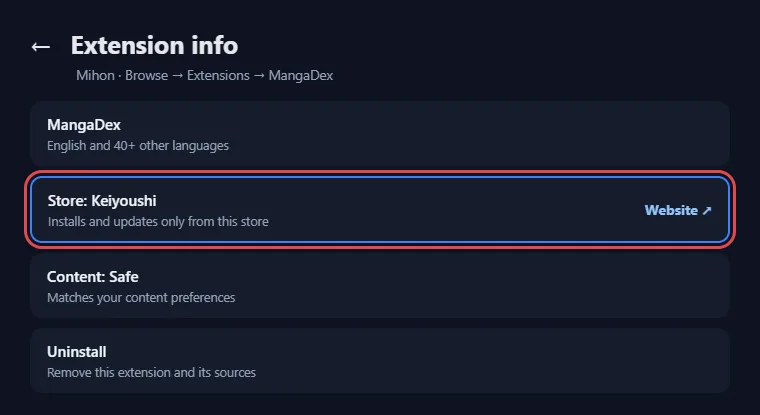
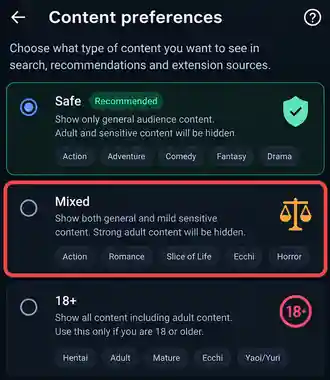
The Mihon v0.21 releases went further, and since v0.21.0 extensions only install and update from the repo they came from, which the release notes say keeps you “safe from tampered extensions”, and the details page of each extension now shows its store with a link to that store’s website. The old NSFW switch was replaced by content preferences with three levels, Safe, Mixed and 18+. The newest build, v0.21.3, also carries a warning, because the next version will drop extensions made for Tachiyomi, and v0.21.3 is the last major version that reads .tachibk backups.
Terms
Mihon Extension Repo List Terms: Repo vs Extension Store
A Mihon extension repo and a Mihon extension store are the same thing, and only the name changed in v0.20.0. A store is a link to an index file that lists extensions, while each extension is a small APK that adds one or more manga sources to the app. Keeping these words apart makes every README you read later much easier to follow, and it also explains why one Mihon extension repo list says “repo” while the app says “store”.
Eight Terms You Will See in Any Mihon Extension Repo List
These eight terms show up in every README and in this Mihon extension repo list, so the table explains each one first.
| Term | What it means |
|---|---|
| Extension repo / extension store | A link Mihon reads to show a catalog of extensions; “store” is the name used since v0.20.0 |
| Extension | An APK you install inside Mihon that connects the app to one or more websites |
| Source | One website inside an extension, so a single extension can hold several sources |
| Index file | The file a store URL points to, such as index.pb on new builds or index.min.json on old ones |
| Orphaned | An installed extension that its store no longer lists, formerly called “obsolete” |
| Signing key | A fingerprint that proves who built an extension, so a tampered copy can be spotted |
| Fork | A copy of another repo, often with sources added, removed or filtered |
| Content preference | The Safe, Mixed or 18+ filter that replaced the NSFW toggle in v0.21.0 |
The list
Mihon Extension Repo List for 2026: Verified GitHub Repositories
Keiyoushi is the best extension repo for Mihon for most readers, while the other entries cover self-hosted libraries, regional sources or filtered catalogs. Every row in this Mihon extension repo list was checked on 28 October 2026, and the stars come straight from each GitHub page. A dash means we did not record a star count, so read that project’s README before you trust it with your app.
| Repo | Add URL or link | GitHub stars | Best for | Status |
|---|---|---|---|---|
| Keiyoushi | https://github.com/keiyoushi/extensions/raw/repo/index.pb | 15.0k | Most readers | Active |
| Yuzono manga-repo | https://raw.githubusercontent.com/yuzono/manga-repo/repo/index.min.json | 462 (cuong-tran copy) | Komikku users | Active |
| Kavita | https://raw.githubusercontent.com/Kareadita/tach-extension/repo/index.min.json | 135 | Your Kavita server | Active |
| Suwayomi | https://raw.githubusercontent.com/suwayomi/tachiyomi-extension/repo/index.min.json | 335 | Your Suwayomi server | Updated July 2026 |
| Cursed Yūzōnō | github.com/mojuru/cursed-manga-repo | — | Extra sources | Listed on Wotaku |
| FelipeGFA | felipegfa.github.io | — | Portuguese | Listed on Wotaku |
| CopyManga | github.com/LittleSurvival/copymanga-copy20 | — | Chinese | Listed on Wotaku |
| extensions-no-nsfw | https://raw.githubusercontent.com/MO350AZ/extensions-no-nsfw/repo/repo.json | 2 | Safe-only mirror | Small project |
| amrkmn/x | x.noz.one | 41 | Mirror | Syncs every 4 hours |
| Mihonyomi | github.com/kitsumed/mihonyomi-extensions | — | Komga | Few new extensions |
Keiyoushi in the Mihon Extension Repo List
Keiyoushi is the main Mihon extension repository and the one most people add first. Its GitHub page describes it as an “Extension repository for Mihon and variants”, and with 15.0k stars and 1.3k forks it is by far the most followed project on this Mihon extension repo list. When we checked the Keiyoushi index on 28 October 2026, it held 1,435 extensions and 2,348 sources, and all 1,435 were built on extension lib 1.6, so they match current Mihon builds.
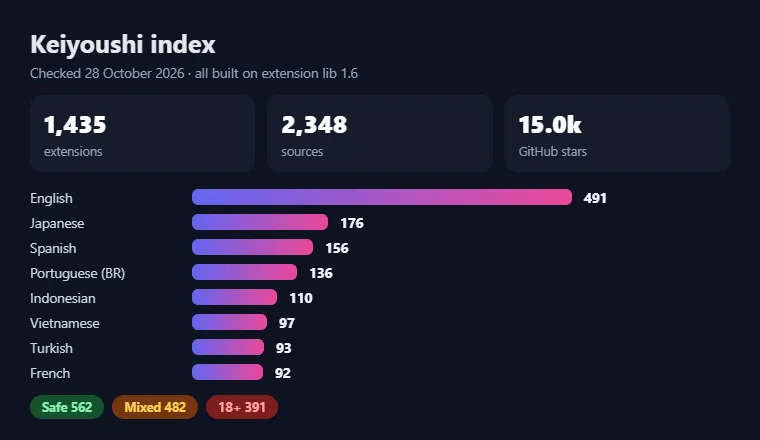
English readers get the largest share with 491 extensions, followed by Japanese with 176, Spanish with 156, Portuguese (Brazil) with 136, Indonesian with 110, Vietnamese with 97, Turkish with 93 and French with 92. The content split is 562 Safe, 482 Mixed and 391 18+ extensions, which lines up neatly with the content preferences in Mihon. Familiar names such as MangaDex, MangaFire, Asura Scans, Mangakakalot, Manganato and MangaPill are all part of the catalog, which is why Keiyoushi sits at the top of every serious Mihon extension repo list and why most readers never need a second store. Our English manga extensions guide covers the best English picks.
To add the Keiyoushi repo, paste the link below or open keiyoushi.github.io/add-repo on your phone. Keiyoushi states that it is not affiliated with Mihon or Tachiyomi, so questions about its extensions belong on its own Discord rather than in Mihon’s support channels.
How GitHub Sources Work in a Mihon Extension Repo
Most projects on GitHub come in two parts, one for the code and one for the catalog Mihon reads. Keiyoushi keeps its code in keiyoushi/extensions-source, which has 4.6k stars, 6,391 commits and 657 open issues, and it publishes the finished APK files and index files through keiyoushi/extensions. The catalog lives on a branch called repo, and that branch holds files such as index.pb and index.min.json, which is why so many store URLs contain “/repo/” in the middle.
This split matters because every link on a Mihon extension repo list is a catalog link, never a code page. A GitHub page full of source files is not an extension store on its own, and pasting its address will not load anything. Searches for Mihon extensions GitHub often lead to these code pages, so always look in the README for the exact index link before you add anything.
More repos
Mihon Extension Repos Beyond Keiyoushi
Keiyoushi covers most needs, but a second store makes sense when a source you want is missing, when you run your own manga server, when you want sources in a specific language, or when you prefer a filtered catalog. The repos below fill those gaps in the Mihon extension repo list, and each one keeps its own add URL, so you can add them next to Keiyoushi without removing anything.
Yuzono manga-repo and Cursed Yūzōnō
The Yuzono repo is a fork of Keiyoushi that merges its catalog and then adds a small set of its own extensions and changes. Its add URL is below, and the README asks users to keep this exact link “regardless where this actual GH repository is”, so the address stays the same even if the project moves, while the source code sits at github.com/yuzono/tachiyomi-extensions. Komikku developer cuong-tran also runs a manga-repo with 462 stars, described as “Extensions for Komikku / Mihon & forks”, and it points to the same Yuzono link, which makes this store a natural home for Komikku extensions.
Cursed Yūzōnō is a separate catalog at github.com/mojuru/cursed-manga-repo. Wotaku lists it as a Mihon repo, and amrkmn/x syncs it alongside Keiyoushi. Because the Yuzono repo copies Keiyoushi, install each extension from only one of these stores so that updates never clash, which is the main rule to follow when you mix stores from any Mihon extension repo list.
Self-Hosted Repos: Kavita and Suwayomi
Kavita and Suwayomi turn Mihon into a reader for a library you host yourself, which makes them the cleanest legal option on the Mihon extension repo list. The Kavita extension is described as the “Kavita Extension for Mihon”, has 135 stars, and its README marks it as “Recommended & Tested” with Mihon and Komikku. You add it with the link below and then connect it to your own Kavita server, so the books and comics you already store there show up inside Mihon.
The Suwayomi extension works in the same way for a Suwayomi server, which is a self-hosted server built around Tachiyomi-style extensions. Its README calls it the “Suwayomi Extension for Tachiyomi and variants”, it has 335 stars, and it was last updated on 4 July 2026. The add URL is below, and suwayomi.org/tachiyomi-extension offers the same link. Each of these stores holds a single extension, yet that one extension opens every series already sitting on your server. That makes both entries the safest picks on this Mihon extension repo list for readers who care about owning their files, and our Tachiyomi on PC guide shows how Suwayomi runs on a computer.
Regional Repos: FelipeGFA and CopyManga
Two smaller repos on the Mihon extension repo list focus on single languages, and both are listed on Wotaku. FelipeGFA, found at felipegfa.github.io, is a Portuguese-language repo, so it suits readers who want more sources next to the 136 Portuguese (Brazil) extensions that Keiyoushi already carries. LittleSurvival’s CopyManga repo, found at github.com/LittleSurvival/copymanga-copy20, carries Chinese CopyManga sources. We did not record star counts or update dates for either project, so read each README for the current add link and recent activity before you paste anything into the app. Both serve a narrow audience, which is why they sit lower on this Mihon extension repo list.
Mirrors and Filtered Forks
Mirrors and filtered forks copy another catalog and change it in some way, usually by removing adult content. MO350AZ’s extensions-no-nsfw is a Keiyoushi mirror with NSFW extensions removed, and it syncs every 30 minutes through https://raw.githubusercontent.com/MO350AZ/extensions-no-nsfw/repo/repo.json, but it has only 2 stars, so treat it with care. MiguelMA3’s mihon-extensions is another filtered Keiyoushi fork, and its owner describes it as modified and unofficial. The amrkmn/x project, with 41 stars, is an aggregator that pulls Keiyoushi and Yuzono Cursed every four hours and serves them from sites such as x.noz.one and x.ujol.dev.
Since content preferences arrived in Mihon v0.21.0, most people no longer need a filtered fork at all. Using the Keiyoushi store with the Safe setting gives the same result with fewer middlemen between you and the original builds, so mirrors earn a place on the Mihon extension repo list mainly as a backup.
Specialised and Archived Repos
A few repos serve narrow needs or no longer work. Mihonyomi by kitsumed, at github.com/kitsumed/mihonyomi-extensions, holds extensions for self-hosted servers and was built for Komga, although its author says new extensions are unlikely. The tachiyomi-extensions-revived project by timschneeb was written for Tachiyomi v0.15.2 and later, and it is now archived with a note that sends users to Keiyoushi. The tachiyomi-extensions-archive, also by timschneeb, still shows 1.8k stars, yet its README now says “This archive repository was DMCA’d and has been erased”, and the project was archived on 23 March 2026.
Left off on purpose: Arihany/extensions-source, “Mihon+” and mk-bkconv are not included, because we could not confirm them as open and safe catalogs, and fake or closed-source “compatible” apps have already appeared around Mihon.
Compatibility
Which Apps and Forks Work With These Repos
Keiyoushi officially supports Mihon 0.20.1+, TachiyomiSY 1.13.2+ and Komikku 1.14.1+, while other forks may work without any support. The table shows where each app stands today.
| App | Keiyoushi support | Notes |
|---|---|---|
| Mihon 0.20.1+ | Supported | Latest build is v0.21.3 and needs Android 8.0 or newer |
| TachiyomiSY 1.13.2+ | Supported | Based on Mihon v0.20.1 and dropped Android 6 and 7 |
| Komikku 1.14.1+ | Supported | Uses the extension store name and the new index format |
| TachiyomiJ2K | May work | No support from Keiyoushi |
| Yokai | May work | No support from Keiyoushi |
| Neko | May work | No support from Keiyoushi |
| Animetail | May work | No support from Keiyoushi |
| Tachiyomi | Not supported | Shows only placeholder entries |
If you use a fork without support, report extension problems to that fork’s developer, since Keiyoushi only answers for the apps it supports. The same table applies to the other stores on this Mihon extension repo list, because Yuzono and the mirrors copy Keiyoushi builds, and Kavita lists Mihon and Komikku as its tested apps.
Add a repo
How to Add a Repo From the Mihon Extension Repo List
If you have been searching for how to add repo in Mihon, there are two simple ways to do it, a one-tap link or a manual paste. Both end on the same Extension stores screen, so pick whichever feels easier for each store on the Mihon extension repo list.
One-Tap Add
The one-tap method is the fastest because Mihon fills in the URL for you. Open a repo’s Install or add-repo link on the same phone where Mihon is installed, such as keiyoushi.github.io/add-repo for Keiyoushi. Mihon then opens a pop-up with the store details, and you tap Add to confirm it. If the pop-up does not appear, the manual method below works for every store, so you never need to install a separate app just to add a link.
Manual Add Through Extension Stores
The manual method works for every store on the Mihon extension repo list, even without an add-repo page. Copy the extension store URL from the repo’s README, then open Mihon and go to Browse → Extensions → Extension stores. Tap Add, paste the URL into the box, and tap Add again to save it. Older Keiyoushi docs describe the path as More → Settings → Browse → Extension store → Add, and older guides still call the screen “Extension repos”, so the wording may differ.
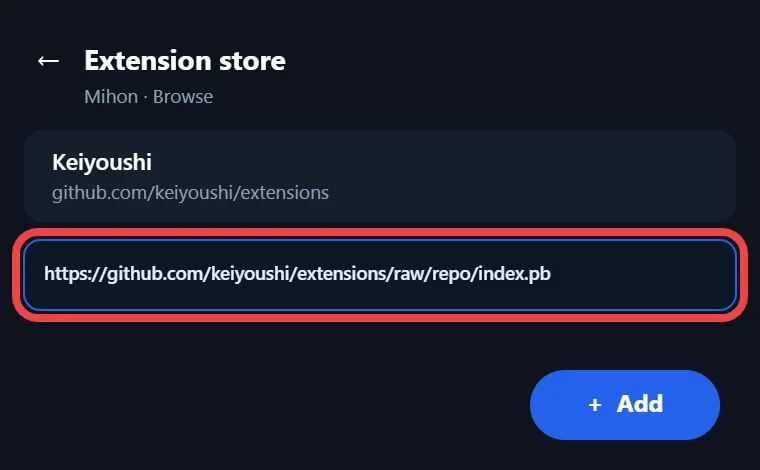
Once the store is saved, Mihon reads its index file and the new extensions appear in the Extensions tab. Mihon v0.19.7 also fixed a crash when adding a repo with an existing signature. Our full guide on how to add sources walks through every screen.
Install Extensions and Set Content Preferences
Adding a store from the Mihon extension repo list only lists the extensions, so you still need to install the ones you want. Open the Extensions tab, tap Install next to each source you read, and allow Mihon to “Install unknown apps” when Android 8.0 or newer asks for it. On Mihon v0.21 and later, set your content preferences to Safe, Mixed or 18+ so the list only shows what you want to see.
If you are moving from old Tachiyomi extensions, uninstall them first, restart Mihon, install fresh copies, and then use Browse → Migrate to move your library onto the new sources. Our guide on installing extensions covers each step in detail.
Verify
Mihon Extension Repo List Links: How to Verify a Repository URL
A Mihon repo URL is safe to paste only when it comes from the maintainer’s own README and matches the owner, file and branch named there. Tutorials, videos and old forum posts often copy links that later break or lead to a different project, so the README always wins whenever the two disagree.
| Check | What to look for |
|---|---|
| Where the link comes from | The maintainer’s README, not a blog or a video |
| Owner name | The same GitHub account that builds the extensions |
| File ending | The index file named in the README, such as .pb or .json |
| Branch | Usually the repo branch |
| Signing key | The same fingerprint the project publishes |
For Keiyoushi, the published signing key fingerprint is shown below. A copy signed with any other key did not come from the Keiyoushi team, even if its name and icon look identical. Run these five checks on every link in a Mihon extension repo list, including this one, because one wrong letter can lead to a stranger’s build.
Evaluate
How to Evaluate Any Mihon Extension Repo List Entry
A good repo is open, active and clear about who runs it, and any entry on a Mihon extension repo list should pass the checks below before you add it. Mihon’s FAQ warns that third-party repositories and extensions “will have full access to the app and may contain malware”, so a few minutes of checking is time well spent.
Green flags
- Recent commits show that someone still fixes broken sources.
- Stars and forks show how many people follow and copy the project.
- Open issues, and how fast they get answers, show whether the maintainers listen.
- Public source code lets anyone see what an extension really does.
- A clear README explains the add URL, the supported apps and where to ask for help.
- A published signing key lets you confirm that builds come from the real owner.
Red flags
- No closed-source APKs should be part of the download.
- No fake “Mihon+” style apps should be bundled or promoted.
Keiyoushi passes every point on this Mihon extension repo list, while tiny mirrors with only a few stars can fall short on activity or openness, so weigh those projects more carefully.
Official?
Are Mihon Extension Repositories Official?
No extension repository is official, because Mihon does not make, approve or host any of them. The Mihon FAQ says that “Mihon does not have, associate, or provide any repositories or extensions”, and it describes the app as “bring-your-own-content”. The same page adds that Mihon “isn’t responsible for slow, down, missing chapters, or subpar image quality of sources as it doesn’t host the content”, which explains why source problems never belong in Mihon’s bug tracker.
Many sources inside community repos point to unofficial websites, so the manga you read through them may not be licensed. For a fully legal setup, read your own files through Kavita, Komga or Suwayomi, or use MangaDex as your main source. No store on this Mihon extension repo list is run by Mihon, so the choice of what to install, and what to read, stays with you. Our list of best manga reading apps includes official options too.
Fixes
Mihon Extension Repo Fixes: Common Errors and Solutions
Most cases of Mihon extensions not showing or failing to install come down to an old app, an old link or a clash between two stores. The quick table points to the right fix for every store on the Mihon extension repo list, and our Tachiyomi troubleshooting guide covers problems outside extensions.
| Error | Cause | Fix |
|---|---|---|
| Only “Outdated App” | Old app or link | Update, use index.pb |
| No update | Other store | Reinstall from one store |
INSTALL_FAILED_UPDATE_INCOMPATIBLE | Different signature | Uninstall old copy |
| DISPLAY_NAME column is null | Corrupted APK | Reinstall |
| Install blocked | Permission or Shizuku | Grant, update |
| Cloudflare, 403, 429, 1020 | Site protection | WebView, clear data, wait |
| Orphaned | Removed from store | Migrate |
Only “Outdated App” or “Update to Mihon 0.20.1+” Shows Up
Seeing only “Outdated App” or “Update to Mihon 0.20.1+” means Keiyoushi is telling you that your app or your link is too old. The legacy index.min.json link now holds just those two placeholder entries, so any device still using it, or still running Tachiyomi, gets nothing else. To fix it, update to Mihon v0.21.3, open Extension stores, remove the old Keiyoushi entry, and add https://github.com/keiyoushi/extensions/raw/repo/index.pb in its place.
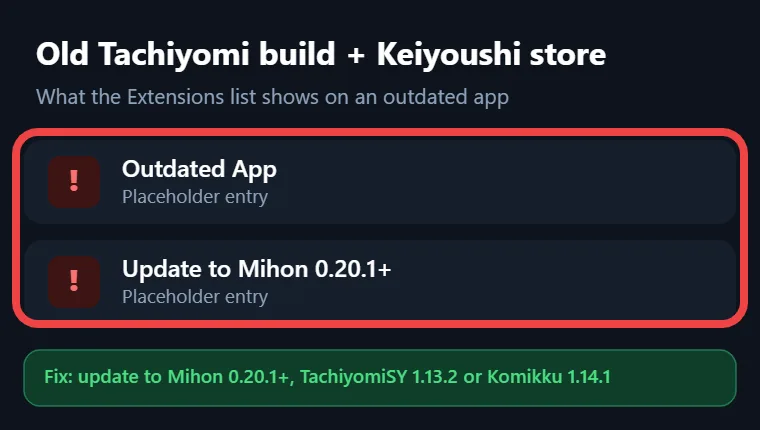
Fork users should also make sure they are on at least TachiyomiSY 1.13.2 or Komikku 1.14.1, since older fork builds show the same placeholders. The problem keeps coming back for many readers because outdated copies of the Mihon extension repo list still share the old link. Our guide on using Tachiyomi after the extension update explains this change in more depth.
Extensions Not Updating After Switching Repos
An extension that refuses to update after you switch between stores on the Mihon extension repo list is following a rule added in Mihon v0.21.0. Since that release, each extension only installs and updates from the store it first came from, so a copy installed from Yuzono will not accept an update from Keiyoushi, and the reverse is true as well. Open the extension details to see which store it belongs to, uninstall it, and then install it again from the store you want to keep. If any series lose their source afterwards, Browse → Migrate can move them to the new copy.
INSTALL_FAILED_UPDATE_INCOMPATIBLE
INSTALL_FAILED_UPDATE_INCOMPATIBLE appears when Android finds the same extension already installed with a different signature. This usually happens after switching between Keiyoushi and a fork or mirror, because each project signs its APK files with its own key. Android refuses to place one signed copy over another, so the fix is to uninstall the existing extension through Browse → Extensions and then install it again from the store you trust. After that, keep that extension tied to the same store, because switching back and forth will bring the same error straight back on the next update.
“DISPLAY_NAME Column Is Null” Error
The “DISPLAY_NAME column is null” error points to a corrupted APK file, which means Android received a file it cannot read properly. Clear the broken download and install the extension again from the Extensions tab, so Android gets a clean copy of the same build. If the error keeps coming back, Split APK Installer can show a clearer message that explains what went wrong during the install.
Install Blocked: Unknown Apps and Shizuku Issues
An install from the Mihon extension repo list that never starts usually means Android is blocking it, because every extension arrives as an APK from outside the Play Store. On Android 8.0 and newer, Mihon needs the “Install unknown apps” permission, which you can grant when Android asks for it during the first install.
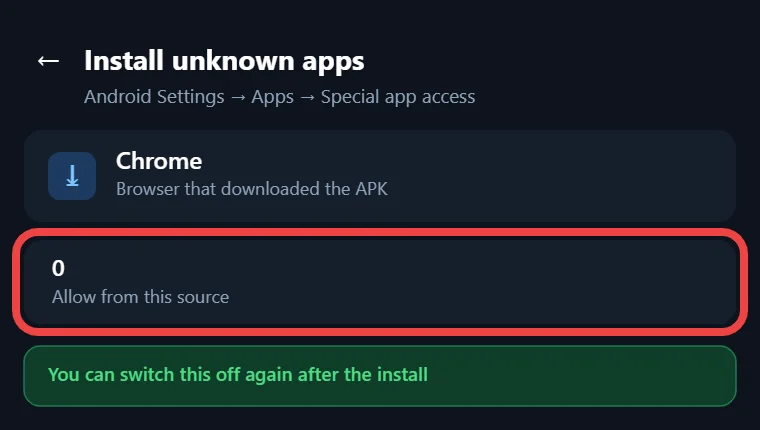
If you use the Shizuku installer, update Mihon, because v0.20.2 and v0.20.3 fixed extension installs through Shizuku, and since v0.20.2 the app also checks for app and extension updates on every cold start. Closing and reopening Mihon pulls new builds.
Cloudflare, HTTP 403, 429 and 1020 Errors
Cloudflare checks and HTTP errors come from the website behind a source, not from any store on the Mihon extension repo list or from Mihon itself. A 403 or 1020 error usually means the site blocked the request, while a Cloudflare check means the site wants proof that a real browser is visiting. Open the source in WebView from inside Mihon, pass the check there, and then go back to the source.
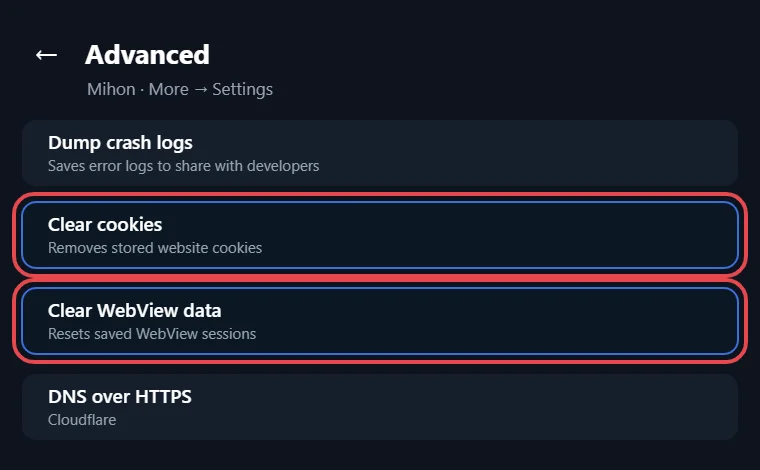
If that does not help, clear cookies and WebView data in Mihon and try again, or change the user agent so the site sees a normal browser. A 429 error means too many requests in a short time, so the only fix is to wait before loading more chapters.
Orphaned Extensions and Missing Sources
An orphaned extension is one that is still on your phone but no longer listed by its store, and Mihon used to call this state “obsolete”. It happens when a source is removed from the repo, which means that extension will never get another update. Use Browse → Migrate to move each series to another source that carries the same title, and then uninstall the orphaned extension.

If a source you want is missing from Keiyoushi, you can request it by opening an issue at github.com/keiyoushi/extensions-source, although requests are “volunteer-based” and nothing is promised. Before you file one, check the other stores on the Mihon extension repo list, since a fork may already carry that source.
Dead links
What If a Mihon Extension Repo List Entry Is No Longer Available?
When a repo from any Mihon extension repo list stops working, the usual causes are a moved URL, an archived project or a takedown. Start with the README, because some projects move their files but keep an old link alive, and Yuzono is a good example since it tells users to keep one URL no matter where the GitHub repository sits. An archived project often points to a replacement in its README, while a takedown is the hardest case because nothing is left to install.
Once you know a store is gone for good, remove it from Extension stores so Mihon stops trying to read it. Install the same sources from an active store on the Mihon extension repo list, such as Keiyoushi, and then use Browse → Migrate to reconnect your library. For news about a store’s status, the project’s Discord server or GitHub page is a far better guide than an old blog post or video, since those rarely get updated after a project moves.
Manga vs anime
Mihon Manga Extension Repo vs Anime Extension Repo
Mihon reads manga only, so anime extension repos do not belong in it. Anime extensions are built for Aniyomi, a separate app that uses the same store idea for video sources instead of manga sources. Both catalogs can look alike on GitHub because both apps come from the Tachiyomi family, yet a store made for Aniyomi gives Mihon nothing useful to open.
This mix-up mostly happens with aggregators like amrkmn/x, which lists both Mihon and Aniyomi extensions, so pick the manga link when you add it to Mihon and keep the anime link for Aniyomi. The same habit helps with any new repo you find later: read the README, check whether it says manga or anime, and only paste manga stores into Mihon. Apart from amrkmn/x, every entry on this Mihon extension repo list is a manga-only store.
Next update
Before the Next Mihon Update: Tachiyomi 1.4 Extensions and Backups
The next Mihon release after v0.21.3 will stop loading extensions made for Tachiyomi, so now is the time to clean up old installs. The v0.21.3 release notes say, “The next version will also drop compatibility with extensions made for Tachiyomi (1.4 extensions).” Every one of the 1,435 Keiyoushi extensions already uses extension lib 1.6, so reinstalling your extensions from the index.pb store removes this problem before it starts.
Backups: v0.21.3 is the last major version that supports Tachiyomi’s .tachibk format. If you still keep an old .tachibk file from Tachiyomi or an early fork, restore it in Mihon v0.21.3 now and then create a fresh backup from Mihon itself, so your library is saved in a format the app will keep reading. Our Tachiyomi backup guide shows every step.
Doing both steps now means any store you pick from the Mihon extension repo list will keep working after the update.
FAQ
Mihon Extension Repo List: Frequently Asked Questions
These questions come from real Reddit threads and Google’s “People also ask” box, answered with the facts from this Mihon extension repo list.
1. What is the URL for the Mihon repo?
Mihon has no repo of its own, so most readers add Keiyoushi with https://github.com/keiyoushi/extensions/raw/repo/index.pb. The older index.min.json link only returns placeholder entries now.
2. I’m new to Mihon, so which extension repos should I add?
Start with Keiyoushi, since it covers 1,435 extensions in many languages. Add Kavita or Suwayomi only if you run your own server, and add Yuzono if you use Komikku.
3. How do I install extensions in the Mihon app?
Add a store under Browse → Extensions → Extension stores, then open the Extensions tab and tap Install next to each source. Android will ask you to allow “Install unknown apps” the first time.
4. Which Keiyoushi extension is best?
No single extension suits everyone, because the right pick depends on your language and taste. Keiyoushi offers 491 English extensions, including MangaDex, MangaFire, Asura Scans and MangaPill.
5. Why don’t my extensions show up on my other phone?
The second phone is probably using the old index.min.json link or an older app, so it only sees “Outdated App”. Install Mihon v0.21.3 there and add the index.pb URL.
6. I reinstalled Tachiyomi and tried every repo, so why are there no sources?
Tachiyomi shut down in January 2024, and Keiyoushi no longer serves it. Move to Mihon 0.20.1 or newer, or to TachiyomiSY or Komikku, and your sources will appear.
7. Many Keiyoushi extensions look broken in Mihon, so how do I fix them?
The top Reddit answer is to uninstall your old extensions before installing the Keiyoushi versions. After that, open broken sources in WebView and migrate orphaned ones to a working source.
8. Why does Mihon call my extensions untrusted?
Mihon marks some extensions as untrusted until you approve them. Reddit users fix this by tapping Trust on the flagged extension, but only trust a store whose signing key matches its README.
9. What happens when two repos have the same extension?
Clashing copies were a real GitHub complaint. Since Mihon v0.21.0, each extension shows which store it came from and only updates from that store, so pick one source per extension.
10. Can I reuse my old Tachiyomi backup in Mihon?
Yes, Reddit users restore their .tachibk backups in Mihon and then migrate. Do it on v0.21.3, because the next major version drops .tachibk support.
11. Why can’t I ask for repos on r/mihonapp?
The subreddit bans requests for extension repos because Mihon is a bring-your-own-content app. That rule is one reason a checked Mihon extension repo list like this one is useful.
12. Where can I find repos for Tachiyomi extensions now?
Old Tachiyomi repos are gone, and the archive was DMCA’d. Keiyoushi is the main replacement, and it supports Mihon, TachiyomiSY and Komikku.
Final Thoughts
Final Thoughts on the Mihon Extension Repo List 2026
Keiyoushi remains the first store to add, with 1,435 extensions behind a single index.pb link, and the other repos cover specific needs such as Kavita or Suwayomi servers, Komikku users on Yuzono, and regional sources. Keep Mihon on v0.21.3, set your content preferences, and install each extension from one store so updates never clash. When something breaks, the fixes above cover the common errors, from “Outdated App” to orphaned extensions.
If a store stops loading, run the verification checks before pasting a new link, and favour projects with open code. For a legal setup, Kavita, Komga, Suwayomi and MangaDex remain the cleanest choices. Keep this Mihon extension repo list close at hand, because the next Mihon release will change extension support once again.