
Updated for Aniyomi v0.18.2.1 · November 2026
Aniyomi APK 2026: Download, Extension Repo Setup & Guide
The Aniyomi APK is the only way to install Aniyomi, because this free anime and manga app is not on the Google Play Store. The latest stable build is v0.18.2.1, released on September 14, 2026, and it runs on any phone with Android 8.0 or higher. You should get it from the official GitHub Releases page or from aniyomi.org, since fake copies with the same name show up on other app sites. This guide shows you how to pick the right Aniyomi APK file, install it, and add anime sources through the new Extension stores screen that replaced the old repo screen. It also explains why manga sources look empty right now and how you can fix that with Mihon.
- 5 APK files compared
- 3 working stores tested
- 4 error fixes
- 7 FAQs
Aniyomi Quick Facts
Key details from this guide, then jump to any section.
- Latest stable
- v0.18.2.1, September 14, 2026
- Needs
- Android 8.0 or higher
- Package name
xyz.jmir.tachiyomi.mi
- Download the right APK
- Spot fake versions
- Add an extension store
- Working repos in 2026
- Manga sources fix
- Common errors
Aniyomi APK details
Aniyomi APK at a Glance (2026)
Here are the key details you need before you download, checked against the official release page in November 2026. Use this table as a quick checklist when you compare any Aniyomi APK you find online with the real one.
| Detail | Value |
|---|---|
| Aniyomi latest version | v0.18.2.1 (September 14, 2026) |
| Developer | aniyomiorg on GitHub |
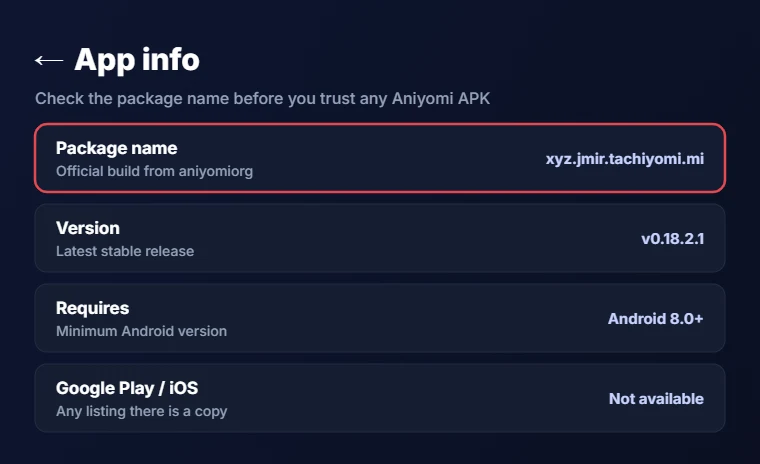
| Package name | xyz.jmir.tachiyomi.mi |
| Android version | Android 8.0 or higher |
| Aniyomi APK size | About 83 MB (arm64-v8a) to 283 MB (universal) |
| License | Apache-2.0, free and open source |
| Google Play and iOS | Not available on either |
| Preview build | r8135 (September 14, 2026) |
Aniyomi basics
What Is Aniyomi?
Aniyomi is a free, open-source Android app that lets you watch anime and read manga inside one library. It started in April 2021 as a fork of Tachiyomi, and after Tachiyomi shut down, the team moved its base over to Mihon. The Aniyomi APK and its code live on GitHub under aniyomiorg, where it has close to 7,900 stars and an Apache-2.0 license.
The app itself hosts zero content. On July 5, 2024, the team removed its own extension list, and since then Aniyomi has worked on a bring-your-own-content model, so you add third-party extensions that pull episodes and chapters from outside websites. This also means the developers do not give support for unofficial extensions on Discord or GitHub, so source problems go to each extension’s maintainer.
Key Features of Aniyomi
Video playback runs on mpvKt, a player built on mpv that replaced the older player in v0.18.0.0 in July 2025, and it brought video filters, video hosters, custom Lua buttons and a script editor with it. Since v0.18.1.0, the Aniyomi APK also groups shows into seasons and can create or restore backups that work between Mihon and Aniyomi.
On the library side, you also get these tools:
- Tracking with MyAnimeList, AniList, Kitsu, MangaUpdates, Shikimori, Simkl and Bangumi
- Categories, light and dark themes, and scheduled library updates
- Local backups and a local source for files already on your phone
- Torrent streaming, which arrived in the September 2026 update to the app
What’s New in Aniyomi v0.18.2
The Aniyomi APK for v0.18.2.0 and the hotfix v0.18.2.1 both came out on September 14, 2026, and the biggest change is on the extension screen. The anime “extension repos” page is now called Extension stores, with an “Add extension store” button, so older guides that mention “extension repos” are out of date for anime.
The new store screen also reads more link formats. It accepts a classic index.min.json link, a repo.json link, or the newer index.pb file, which is a compressed protobuf format, and saved repos move over on their own. Extensions that no longer belong to any store now carry an “Orphaned” label, and no longer get updates.
The same release added torrent streaming, related entries, thumbnail previews while you seek, and an HTTP server that extensions can use. It also fixed a player crash linked to Aniskip. The Aniyomi 0.18.2.1 hotfix then added support for extensions-lib v17, which newer extensions need.
Aniyomi APK download
How to Download the Aniyomi APK (Latest Version)
A clean Aniyomi APK download takes three steps: pick the file that matches your phone, grab it from an official page, and allow your phone to install it. Each step is quick, but skipping the first one is the most common reason people end up with an Aniyomi APK far bigger than they need, which wastes space on smaller phones.
Which Aniyomi APK File Should You Download?
The GitHub release page lists five Aniyomi APK files, and the difference between them is the processor type they are built for, not the features inside. Most phones sold in recent years use a 64-bit ARM chip, so the arm64-v8a file suits most people, and it is also the most downloaded one with about 188,000 downloads.
| File | Size | Best for |
|---|---|---|
aniyomi-arm64-v8a-v0.18.2.1.apk Best pick | ~83 MB | Most modern phones |
aniyomi-v0.18.2.1.apk (universal) | ~283 MB | Any device, if you are unsure |
aniyomi-armeabi-v7a-v0.18.2.1.apk | ~76 MB | Older 32-bit phones |
aniyomi-x86_64-v0.18.2.1.apk | ~94 MB | Emulators and Chromebooks |
aniyomi-x86-v0.18.2.1.apk | ~87 MB | Older emulators |
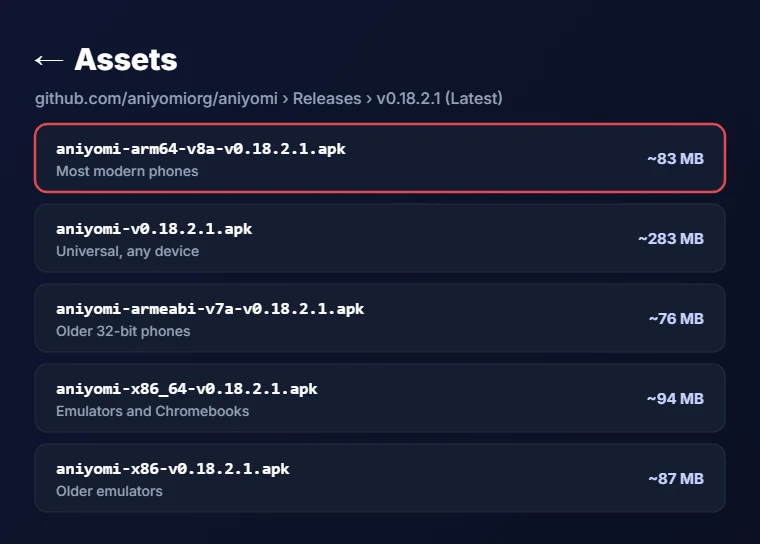
If you cannot find your phone’s chip type, the universal Aniyomi APK is the safe pick because it works on every device, although it is more than three times the size of the arm64-v8a file, so use it only when you need it.
Step-by-Step: Download Aniyomi from the Official Source
The Aniyomi latest version always appears first on GitHub, so that is the best place to download it.
- Open github.com/aniyomiorg/aniyomi/releases in your phone’s browser to start the Aniyomi APK download.
- Find the release marked “Latest”, which is v0.18.2.1 right now.
- Scroll down to the Assets section and tap the Aniyomi APK you picked from the table above.
- Wait for the download to finish, then open the Aniyomi APK from your notifications or your Downloads folder.
You can also visit aniyomi.org/download, which shows the same stable build and links to the same GitHub file, so both routes give you the official copy, and each one lists the release date.
Install the APK and Allow Unknown Apps
Android blocks apps from unknown sources by default, so the first time you open the Aniyomi APK, your phone will ask for permission. On Android 8.0 and newer, this permission is given per app, which means you only allow the browser or file manager you used to open the file.
- Tap the downloaded Aniyomi APK.
- When the warning appears, tap Settings and turn on “Allow from this source”, which some phones list under Install unknown apps.
- Go back and tap Install.
- Tap Open once the install finishes.
You only need to do this once for each app you install from, and you can switch it off again afterward.
Aniyomi APK safety
Is the Aniyomi APK Safe? How to Spot Fake Versions
The official Aniyomi APK is open source, and anyone can read its code on GitHub, which is a strong sign of trust. The risk comes from copies, because several lookalike apps use the same name on other sites.
When we checked search results in November 2026, we found apps called “Aniyomi” on the Google Play Store, APKPure, and AppBrain under package names such as com.aniyomi.animecartoonseries, com.animestraillerspaapp.moviesanaimes and com.aniyomi.apphdmyanyyyomi. None of them come from aniyomiorg. The official FAQ says the app will not be on Google Play because APK-based extensions clash with Play policy, so any Aniyomi Play Store listing is a copy. The same FAQ says there is no Aniyomi for iOS and no plan for one, and it calls any iPhone version a scam.
Even the real Aniyomi APK can be out of date on mirror sites, since APKPure still listed 0.18.1.2 when we checked. Extensions carry a separate risk too, as the app warns that a bad extension can read saved logins or run its own code.
Check the Package Name and SHA-256 Checksum
The official build uses the package name xyz.jmir.tachiyomi.mi, so if an app info screen or a package viewer app shows any other name, you have a copy. This takes a few seconds and catches every fake Aniyomi APK listed above.
For a stricter check, compare the file’s SHA-256 checksum with the one on the release page before you install. A file manager with a hash tool, or a free hash checker app, can show this code in a few taps. For v0.18.2.1, the values are:
If the codes match, the Aniyomi APK is exactly what the developers published on GitHub, and you can install it with confidence.
Aniyomi extension store
How to Set Up an Aniyomi Extension Repo (Extension Store)
Aniyomi ships with no sources after you install the Aniyomi APK, and there is no official Aniyomi extension repo, so the first thing to do after installing is add one from the community. Older guides call this an extension repo, while v0.18.2 calls it an Aniyomi extension store, but both names mean the same thing: a link that gives the app a list of extensions to install.
Keep the official warning in mind, because third-party extensions get full access to the app and may contain malware, so add only stores you trust.
Method 1: Add a Store With One Tap
Many repo pages, including wotaku.wiki and EverythingMoe, offer an install or “Add repository” button. On your phone, that button opens a link that starts with aniyomi://add-repo?url=, and Android passes it straight to the app.
- Open the repo page in your phone’s browser.
- Tap the add or install button.
- Aniyomi opens with a pop-up that shows the store link.
- Tap Add to save it to your list of stores.
This is the fastest method, but it only works on the phone where the Aniyomi APK is installed.
Method 2: Add the Extension Store Manually
If the one-tap link does nothing, adding the store by hand takes under a minute, and it is the simplest answer to how to add a repo in Aniyomi on the current build.
- Copy the store URL from the repo’s page.
- Open Aniyomi and go to More, then Settings, then Browse.
- Tap Extension stores.
- Tap Add, paste the URL, and tap Add again.
You can reach the same screen from Browse, then Extensions, then the menu icon at the top. The store screen accepts links that end in index.min.json, repo.json or index.pb, so copy the full link exactly as the repo gives it.
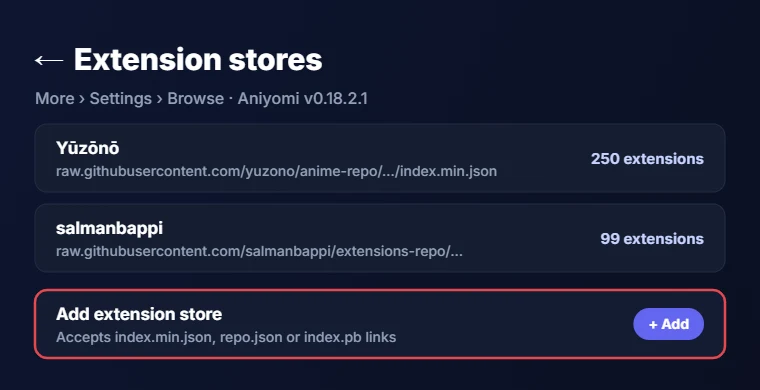
On any Aniyomi APK older than v0.18.2, the menu still says “Anime extension repos” and “Manga extension repos”, and it only takes links that end in index.min.json. The official aniyomi.org docs still describe this older screen, which is why so many guides show a menu you will not find anymore.
Install Extensions From Your Store
Once a store is added, the extensions it offers appear in the app’s extension list.
- Go to Browse, then Extensions, and pick the Anime tab.
- Pull down to refresh the list.
- Tap Install next to the extension you want.
The first time you install an extension from a new signer, Aniyomi asks if you trust it, because extensions run code inside the app. After you accept, Android may also ask you to allow installs from Aniyomi itself, which you only approve once. When the install finishes, the source shows up under Browse, and you can search it or add a show to your library.
Update or Remove Extensions
The Aniyomi APK checks your stores for newer extension versions, and an Update button appears next to any extension that has one. Extensions you installed as a loose APK file will not update on their own unless you also add the store they came from.
To remove one, open Browse, then Extensions, and tap Uninstall, or remove it like any other app in Android settings. If an extension shows the Orphaned label, its store is gone and it will not get fixes, so uninstalling it is the safer choice.
Tested stores
Working Aniyomi Extension Repos in 2026 (Tested)
Since the official list was removed, every Aniyomi extension comes from a community store. We checked the most shared store links on November 9, 2026, by loading each index file and counting the extensions inside, and three of them were working.
| Store | Link | What you get |
|---|---|---|
| Yūzōnō Start here | https://raw.githubusercontent.com/yuzono/anime-repo/repo/index.min.json | 250 extensions, 56 in English and 32 multi-language; updated November 8, 2026 |
| salmanbappi | https://raw.githubusercontent.com/salmanbappi/extensions-repo/main/index.min.json | 99 extensions, 59 in English; updated October 31, 2026 |
| Secozzi | https://raw.githubusercontent.com/Secozzi/aniyomi-extensions/refs/heads/repo/index.pb | 3 extensions: Jellyfin, Stremio and Torbox |
The Yuzono anime repo is the largest of the three and the best place to start. Its newer index.pb link works in the store screen too, and its website at yuzono.github.io lists everything it offers. The salmanbappi store was built mainly for Anikku, but it uses the same index.min.json format that the Aniyomi store screen reads.
Some links shared in older guides no longer work. The French repo from hollowshiroyuki and the Portuguese and Turkish repo from Claudemirovsky both return a 404 error, and Secozzi’s old index.min.json link now shows a single “Outdated App, switch to Animiru 0.20+” entry instead of real extensions.
Each Aniyomi extension store on this list is a free community project hosted on GitHub, so its status can change quickly. Once the Aniyomi APK is installed, start with Yūzōnō, and if a link stops loading later, check the repo’s GitHub page for a new address before you remove it from the app.
How to Pick the Right Extension
An extension is only as good as the website it reads from, so the same show can look sharp in one source and blurry or broken in another. When a site goes down, changes its layout or blocks you, its extension stops working until the maintainer fixes it.
A few habits help here. Filter the list by your language, install two or three sources for the same show, and keep the one that loads fastest. Extensions for small or less popular sites tend to break more often, so a popular source is usually the safer long-term choice.
Other Apps That Use Aniyomi Extensions
Aniyomi extensions are not locked to Aniyomi, because several other apps can read the same files:
- Animiru, an anime-only fork of Mihon and Aniyomi made by Aniyomi contributors
- Anikku, an open-source anime watcher from the komikku-app team
- AnymeX, a cross-platform app that also runs on desktop
- Dartotsu and Awery, two more Android apps that support these extensions
This matters if you ever look at Aniyomi alternatives, since your favorite stores may still work in the new app, and you will not need to find sources from scratch.
Manga sources
Why Manga Extensions Don’t Show in Aniyomi (and the Fix)
Aniyomi manga extensions are the weak spot in 2026. If you add the Keiyoushi link and see no manga sources, nothing is wrong with your phone, because the app simply cannot read the format that manga stores now use. Reinstalling the Aniyomi APK or clearing app data will not change this either.
The problem comes from two changes. Manga stores like Keiyoushi and Yuzono moved to the new index.pb format for Mihon 0.20.1 and newer, and they replaced their old index.min.json files with two placeholder entries named “Outdated App” and “Update to Mihon 0.20.1+”. Aniyomi updated its anime store screen, but the manga side still accepts only index.min.json links, so it receives the placeholders and nothing else. A pull request to add index.pb support for manga (#2381) was closed without being merged.
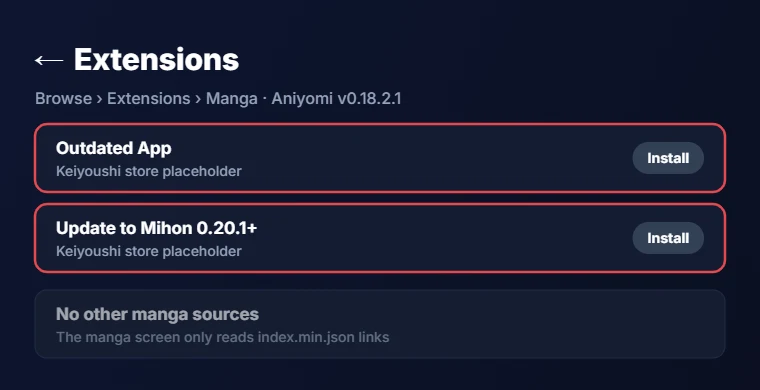
Users have reported this on GitHub in issues #2372, #2371, and #2401, and the last one was filed on v0.18.2.1 running Android 15, so the newest Aniyomi APK has the same problem.
The working fix is to split the job between two apps. Install Mihon (v0.21.2, Android 8.0 or higher) for manga and add the Keiyoushi store there, then keep Aniyomi for anime, where the extension store works as expected.
Troubleshooting
Common Aniyomi Repo and Extension Errors
Most problems with stores and extensions come down to a wrong link, a dead repo or a website that changed. The four errors below cover what users report most often on GitHub and Reddit, along with a fix for each.
“Invalid Repo URL”
An Aniyomi invalid repo URL message means the app did not accept the link you pasted. The anime Extension stores screen on the current build takes links ending in index.min.json, repo.json or index.pb, while the manga screen takes only index.min.json. Copy the full link again without extra spaces or missing letters, and make sure you pasted it into the right screen, since a manga store link will not load anime extensions.
“Failed to Fetch Available Extensions”
This error means Aniyomi asked the store for its list and got nothing back. The usual causes are a dead repo link, such as the old French and Portuguese repos, or a network or DNS block on your connection. Refresh the list, open the link in your browser, and switch from Wi-Fi to mobile data if it still fails, since older GitHub issues (#844, #894, #927) trace back to these causes.
Signature Mismatch or Install Failed
When an install fails, or Android reports a signature problem, you most likely have the same extension installed from a different store, which often happens after switching repos. Each store signs its files with its own key, so Android will not let one copy replace another. Uninstall the old extension first, then install it again from the store you want to keep, and future updates will come from that store.
Extension Installed but No Episodes Load
An extension that installs fine but shows no episodes usually points to the website behind it. The site may be down, it may have changed its layout, or it may block your region. Open the source in WebView to see what the site shows, try another source for the same show, wait for an extension update, and report lasting problems to the extension maintainer rather than to Aniyomi.
Release channels
Aniyomi Stable vs Preview: Which One to Install?
The stable Aniyomi APK, v0.18.2.1, is the one to use for daily watching. Aniyomi preview builds come from the aniyomi-preview repo on GitHub, and the newest one, r8135, also arrived on September 14, 2026. Preview builds show features before they reach stable, but the official FAQ warns that they are more likely to have bugs and crashes, so turn on auto-backup first if you want to try one. For most people, staying on stable is the better choice.
Project status
Is Aniyomi Still Maintained? (Animiru and Anikku)
Some sites now label Aniyomi as abandoned, but the official project has not said that. The GitHub repo is not archived, and both the latest stable Aniyomi APK and the latest code change are dated September 14, 2026, about two months before we checked.
Still, the pace has slowed, and some developers have moved their work to a newer app. Animiru, from the animiruorg team on GitHub, is an anime-only fork of Mihon and Aniyomi made by Aniyomi contributors, and it reached v0.20.1.1 on November 3, 2026, with Chromecast support and a new downloader. Secozzi, an Aniyomi developer, now points their old repo link to Animiru, which shows where some of that work has gone. Anikku, from komikku-app, is another open-source anime watcher that still gets regular updates.
Both are fair choices if you only watch anime. Download Animiru only from the animiruorg page, because several unrelated GitHub projects use the same name.
FAQ
Aniyomi APK FAQs
How do I add extensions to Aniyomi?
Learning how to add a repo in Aniyomi is the first step, because a fresh Aniyomi APK has no sources built in. Go to More, Settings, Browse, Extension stores, tap Add and paste a store link, then install extensions from Browse, Extensions.
Why are my Aniyomi extensions not showing for manga?
Manga stores now use a format that the manga screen in Aniyomi cannot read, so you only see placeholder entries. Use Mihon with the Keiyoushi store for manga, and keep Aniyomi for anime, where stores still load normally.
How do I fix “failed to get extension list”?
Check that the store link still opens in your browser, then refresh the list and try another network. Dead repo links, such as the old French and Portuguese ones, and DNS blocks cause most cases of this error.
Why does Aniyomi reject a .pb repo link?
The manga screen only accepts index.min.json links, which is why new Keiyoushi index.pb links fail there. The anime Extension store screen in v0.18.2 does accept index.pb links, so update the app if your anime store link gets rejected.
Is Aniyomi on the Play Store?
No, the developers keep it off Google Play because APK-based extensions break Play policy. Any Play Store app called Aniyomi is a copy, so get the Aniyomi APK from GitHub instead.
Is there Aniyomi for iPhone?
No, the Aniyomi APK runs only on Android, and the team has no plans for iOS or iPadOS. The official FAQ calls any iPhone version a scam, so ignore any site that offers one.
Can Aniyomi read light novels?
No, Aniyomi reads image-based manga and plays video, but it cannot open text-based light novels, since it is an image parser.
Final word
Final Thoughts
Getting Aniyomi running in 2026 comes down to a few careful choices. Download the Aniyomi APK from GitHub or aniyomi.org, pick the arm64-v8a file unless your phone needs the universal APK, and check the package name so you know you have the real app. After that, add a working store such as Yūzōnō through the Extension stores screen, install a few sources, and keep Mihon for manga until Aniyomi supports the new manga format. If updates stay slow, Animiru and Anikku are ready options for anime. Start with the official file, and the rest of the setup takes only a few minutes.