
Safety check · Verified on Mihon v0.21.3
Is Tachiyomi Safe to Download in 2026? (Full Safety Guide)
People still search “is Tachiyomi safe” every day, because the name lives on across download sites, YouTube videos and Reddit threads long after the app itself stopped. That gap between a famous name and a dead project is where fake APKs and copycat brands make their money. This guide checks every file you might find, from the last official 0.15.3 build to Mihon, so you can answer is Tachiyomi safe for your own phone with real facts.
- 7 APK checks
- 4 risk layers
- 10-point checklist
- 6 FAQs
Quick answer
The original Tachiyomi app was clean, but it has been frozen since January 13, 2024, and it gets no security fixes. Any “new” Tachiyomi build you see in 2026 does not come from its developers. The safe choice today is Mihon v0.21.3, downloaded only from mihon.app or its GitHub release page.
Get Mihon v0.21.3- Last Tachiyomi build
- 0.15.3, January 13, 2024
- Safe choice
- Mihon v0.21.3
- Needs
- Android 8.0 or higher
The short answer
Is Tachiyomi Safe? The Short Answer
The answer depends on which file you have, because the name “Tachiyomi” now covers clean archived builds, unknown re-uploads and outright fakes. The last official build was clean when it came out, but it has not received a single fix since January 2024. Only Mihon, downloaded from its own site or GitHub, is both clean and maintained in 2026.
| Option | Where it comes from | Safety level |
|---|---|---|
| Tachiyomi 0.15.3 | Archived official release | Clean, but no fixes since 2024 |
| Third-party mirror | Unknown re-upload site | Unknown until you verify it |
| Tachiyomi mod APK | Unknown modder | Risky, changes can’t be checked |
| Fake Tachiyomi APK | Impersonator | Unsafe |
| Mihon v0.21.3 | mihon.app or GitHub | Safe and maintained |
The backstory
What Happened to Tachiyomi? (Shutdown Explained)
On January 13, 2024, lead developer arkon announced that Tachiyomi would no longer be actively developed, with the unanimous support of the core contributors, after threats from Kakao Entertainment Corp. The official extensions had already been removed a few days earlier, and the core GitHub repositories were taken down soon after, so the project that millions of readers relied on simply stopped.
The goodbye notice still matters for safety today, because it warned: “Anything new called Tachiyomi or claiming to be its successor have no relation to the original developers. Always practice caution when downloading or installing anything from unknown sources.”
Every site that offers a “Tachiyomi 2026” download is working against that warning. Even the old home, tachiyomi.org, now redirects to the archived tachiyomiorg page on GitHub, which is the clearest sign that no official team stands behind any new Tachiyomi file.
Why people trusted it
Why Tachiyomi Was Considered Safe
Tachiyomi earned its good name over many years of daily use, and five features explain why most readers once answered is Tachiyomi safe with a simple yes. Each one still helps you judge a file today, but each one also has a limit that copycat sites like to skip.
Is Tachiyomi Safe Because It Is Open Source?
Open source helps, but it is not proof on its own. Tachiyomi was released under the Apache License 2.0, so anyone could read the code and spot hidden behavior. That only protects the code on GitHub, though, and a copy from another website may not match it, so you still have to check where your APK came from.
Public Development History
Every commit, issue and release was public on GitHub, which gave users a clear record to compare any file against. Mihon keeps the same open habit today, and its whole history sits on its own GitHub page, where it has about 25,000 stars and more than 1,700 forks.
No Built-In Account Requirement
The app worked without any sign-up at all, so it never needed your email address or a password just to open. Trackers such as MyAnimeList, AniList and Kitsu were optional extras that you could link later if you wanted.
No Built-In Advertising Model
The original app never showed ads, and it was always free for everyone to use. That makes ads a useful warning sign, because a copy that suddenly shows banners or pop-ups has clearly been changed by someone (see Tachiyomi without ads).
It Does Not Host Manga on Its Own Servers
The app is only a reader, and Mihon’s README says it “hosts zero content” and has no link to any content provider. Every page you read comes through an extension, which is where most of the real risk sits.
The 2026 reality
Is Tachiyomi Still Safe to Use in 2026?
An old Tachiyomi install is not malware, but it is aging software with no one fixing it. Since January 2024 it has not received a single bug fix or security patch, while Android, Android System WebView and the manga sites around it keep changing every month.
The bigger problem for most readers is that the app no longer gets working extensions. Keiyoushi, the main community extension project, now serves old Tachiyomi 0.15.x only two placeholder entries named “Outdated App” and “Update to Mihon 0.20.1+.” So if you add Keiyoushi to the old app, you will not get a single working source, and that pushes many people toward random repo links that are far less safe.
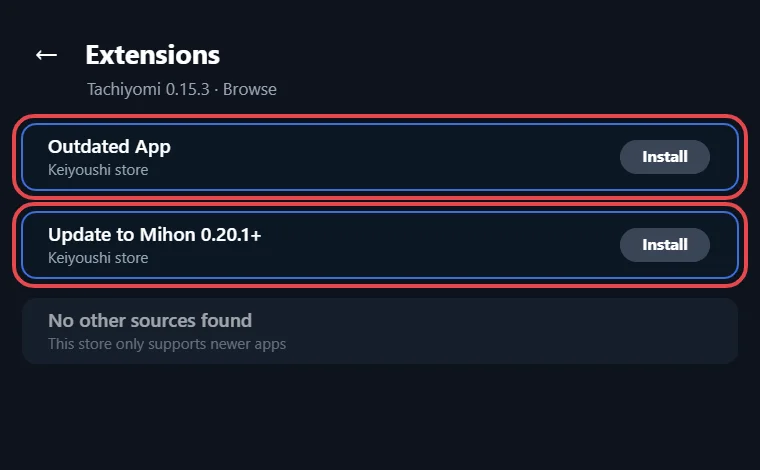
So is Tachiyomi safe to keep in 2026? It is safe enough to open an old library, but it is not a safe daily reader anymore. Discontinued software slowly breaks, and broken software tempts users into risky fixes. The better path is to move your library to a maintained app, which the Mihon sections below explain.
Know the layers
Where the Real Risk Actually Comes From
Most people think of Tachiyomi as one app, but four separate layers decide how safe your reading setup is. A clean app can still leak data through a bad extension, so it helps to see who controls each layer.
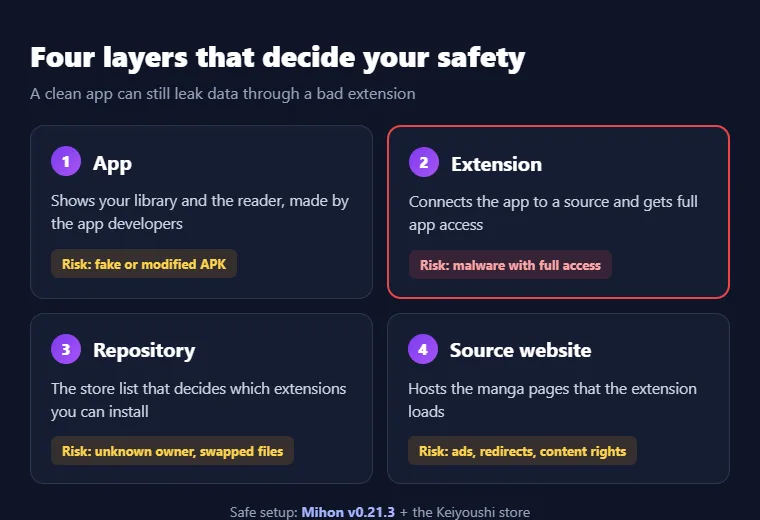
| Layer | What it does | Who controls it | Main risk |
|---|---|---|---|
| App | Shows your library and reader | App developers | Fake or modified APK |
| Extension | Connects the app to a source | Extension maintainers | Malware with full app access |
| Repository | Lists extensions to install | Repo owner | Unknown owner, swapped files |
| Source website | Hosts the manga pages | Site owner | Ads, redirects, content rights |
When someone asks is Tachiyomi safe, they usually mean only the first row, yet the second row is where the worst damage can happen.
Check the file
Is the Tachiyomi APK Safe to Download?
A Tachiyomi APK is only as safe as the place it came from. An archived copy of the official 0.15.3 release is the same file the developers shipped in January 2024, while a third-party mirror can be swapped or changed without you ever knowing.
Fake files are the third group, and they often copy the name, icon and screenshots exactly. There is no official Tachiyomi build from 2025 or 2026, so any “Tachiyomi 2026” or “latest Tachiyomi” download is either an old file with a new label or a fake. A site that ranks first on Google is not proof of anything, because copycat sites are built to rank. If a page cannot show you the original release it copied from, treat the file as unknown and skip it.
Tachiyomi APK vs. “Mod APK”: Safety Comparison
A Tachiyomi mod APK is a copy that someone changed, and you have no way to see what they changed. The original app was always free and ad-free, so labels like “Premium,” “Pro” or “VIP” only mean that unknown code was added. Anyone wondering is Tachiyomi safe in its mod form should look at this side-by-side view first.
| Feature | Original APK | Mod APK |
|---|---|---|
| Code changes | None | Unknown |
| Ads | Never | Often added |
| Trackers | Nothing added | Unknown |
| Extra permissions | None | Possible |
| Can you verify it? | Yes, with GitHub records | No |
A mod has nothing to offer that the free original or a public fork does not already give you. If you want extra features, TachiyomiSY and Komikku are public forks with open code and their own release pages.
How to Tell if a Tachiyomi APK Is Genuine
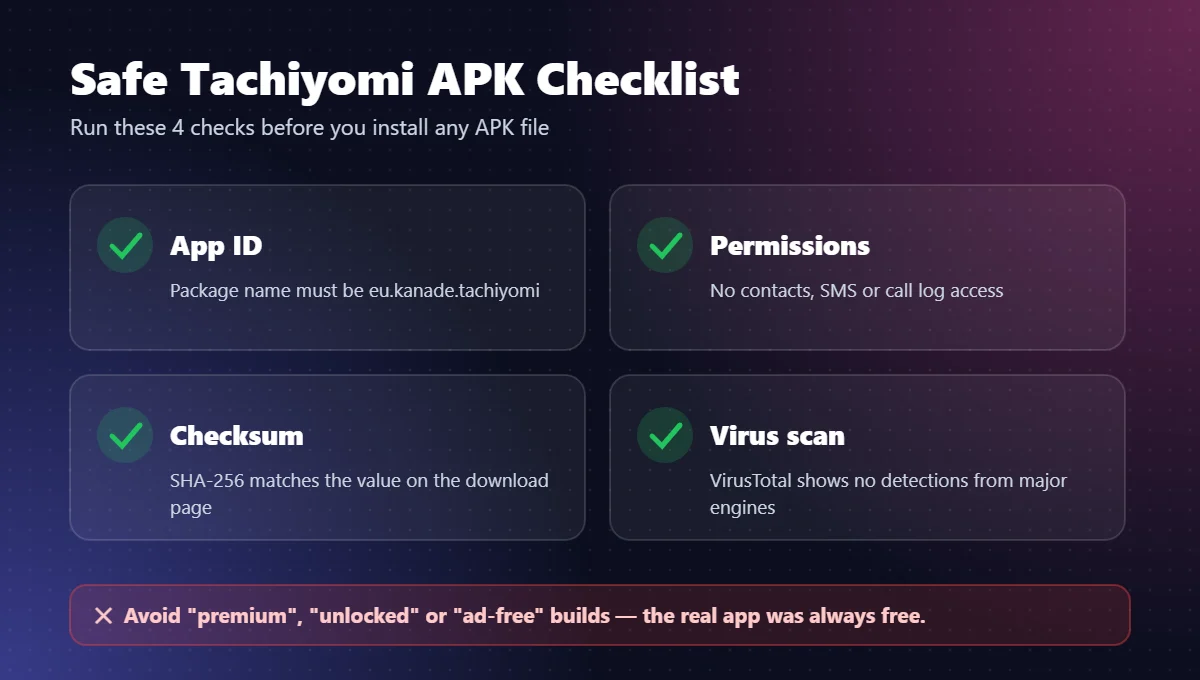
A genuine APK passes every one of these checks, and a single failure is enough reason to delete the file. These seven checks settle is Tachiyomi safe for the exact file sitting in your downloads folder.
- Check the publisher. The file should come from mihon.app or the official GitHub release page, not from a blog, a Telegram channel or a comment link.
- Check the version. Mihon’s current stable version is v0.21.3, released on October 25, 2026, so an unknown version number is a red flag.
- Check the file name. Official Mihon files are named like
mihon-v0.21.3.apkormihon-arm64-v8a-v0.21.3.apk. - Check the checksum. Compare the SHA-256 value, which the next section explains.
- Scan the file. Upload it to VirusTotal or let Google Play Protect scan it before you install.
- Check the permissions. Camera, contacts or SMS requests mean the file is not real.
- Watch the download page. Several download buttons, forced redirects or a request to install another app first are signs of a fake page.
How to Check the SHA-256 Checksum
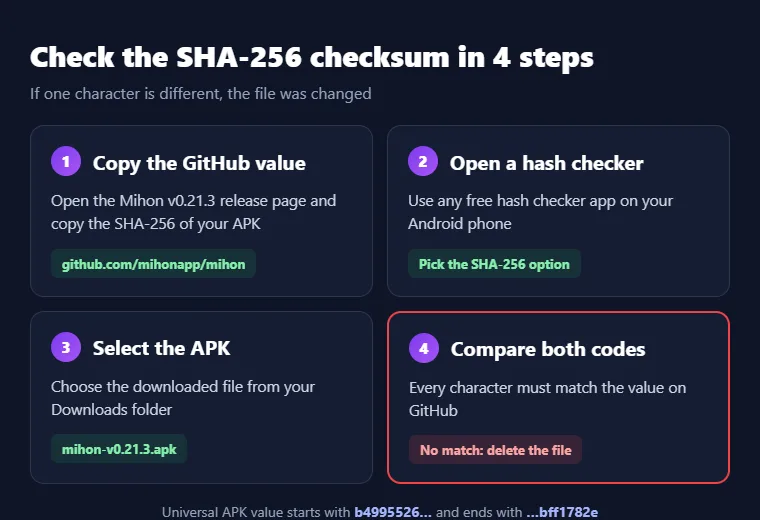
A SHA-256 checksum is a long code that changes completely if even one byte of a file changes, which makes it the surest test for is Tachiyomi safe at the file level. GitHub lists one for every Mihon APK, and the universal mihon-v0.21.3.apk should show this value:
SHA-256 of mihon-v0.21.3.apk
To compare it, open a free hash checker app on your phone, choose the downloaded APK and match the result with the GitHub value. If even a single character is different, delete the file and download it again from GitHub.
Read the manifest
Permissions Tachiyomi Requests, Explained
Permissions are one of the fastest ways to spot a fake Tachiyomi APK, because a reader needs little access, so this list answers is Tachiyomi safe before you open it. Here is what Mihon’s AndroidManifest file lists, in plain words.
| Permission | What it means | Why it is needed |
|---|---|---|
| Internet and network state | Go online and check your connection | Load manga and updates |
| Wi-Fi state | See if you are on Wi-Fi | Wi-Fi-only downloads |
| Storage | Save files | Downloads and backups |
| Foreground service and wake lock | Keep working in the background | Library updates and downloads |
| Ignore battery optimization | Not be stopped by battery saver | Long downloads |
| Notifications | Show alerts | Update and download progress |
| Install, delete and update apps | Handle other APKs | Install extensions |
| Query all packages | See installed apps | Find your extensions |
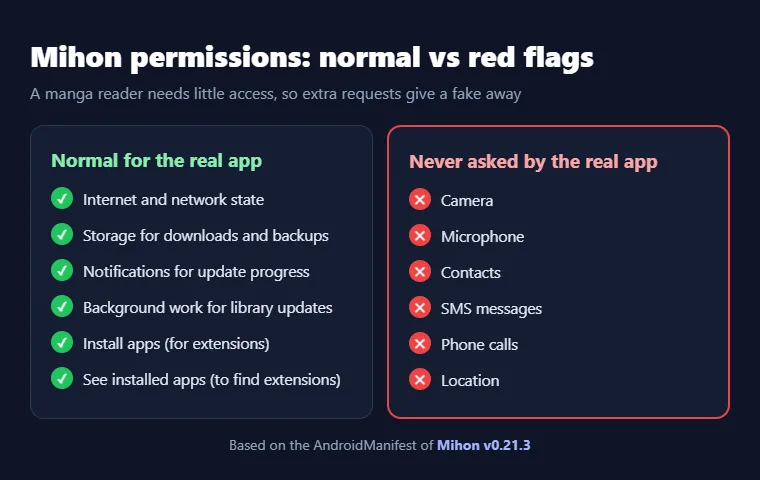
Red flag: A real copy never asks for your camera, microphone, contacts, SMS, phone calls or location. If an APK wants any of these, it is not Tachiyomi or Mihon, no matter what the icon says.
Sideloading
Is Tachiyomi Safe for Android?
People who ask is Tachiyomi safe for Android are really asking about sideloading, which means installing outside Google Play, and it is safe if you control the file’s source. Android asks you to allow “Install unknown apps” for the browser or file manager you used, so turn that switch on only for that one app and turn it off again after the install.
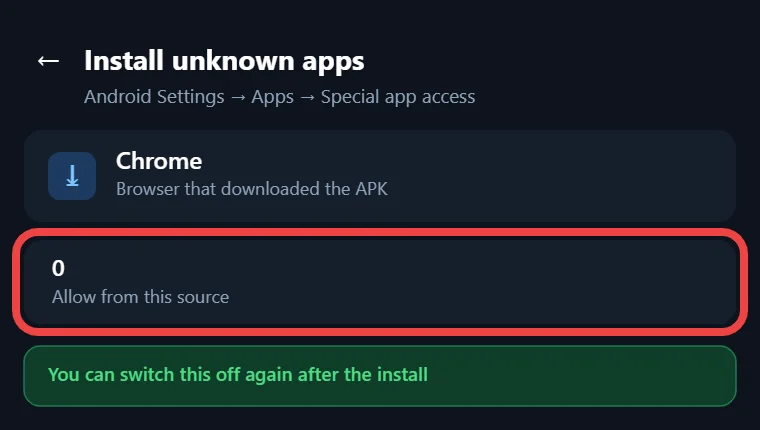
Keep Google Play Protect on, because it can scan sideloaded apps, and keep Android System WebView updated, since the app uses it to open sites. Mihon needs Android 8.0 or higher, so if your phone cannot run it, that is not a reason to grab a random APK instead (if the install fails, try these install fixes).
The riskiest layer
Are Tachiyomi Extensions Safe?
Extensions are the riskiest part of the whole setup, because each one is separate code written by someone other than the app’s developers. Mihon’s own FAQ is blunt about this: “Beware that any third-party repositories or extensions will have full access to the app and may contain malware.”
That warning means an extension can see anything the app can see, including logins you saved for trackers or sources. Install only the extensions you really read from, and remove the ones you stopped using. Each extension installs like a normal app, and Android asks you to allow “Install unknown apps” the first time, so you can also uninstall it from Browse → Extensions in Mihon or from Android settings. Mihon itself does not make, host or recommend any extensions, so a site that calls an extension “official Tachiyomi” is not telling the truth. For most readers, the honest answer to is Tachiyomi safe comes down to how careful they are with this one layer.
What the “Untrusted Extension” Warning Means
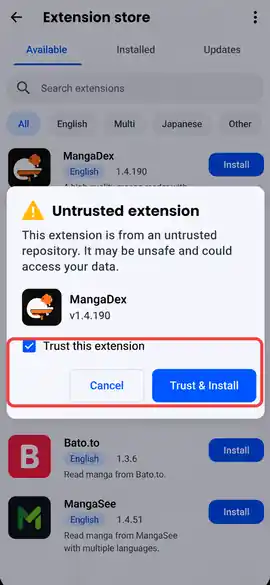
Mihon checks the signature of every extension, and any signature it does not know shows the extension as “Untrusted.” Tapping Trust brings up this warning: “Malicious extensions can read any stored login credentials or execute arbitrary code.” An extension with no signature at all gets its own note saying there is no signature to check it against, so treat it like code from a total stranger and skip it. Trust only an extension whose source you know, and use “Revoke trusted unknown extensions” if you change your mind later.
Are Tachiyomi Extension Repositories Safe?
A repository is the list that tells the app which extensions exist, so whoever runs it decides what you can install. Keiyoushi is the best-known one, with open code on GitHub, about 15,400 stars and updates as recent as November 2, 2026. It supports Mihon 0.20.1+, TachiyomiSY 1.13.2+ and Komikku 1.14.1+, while forks like TachiyomiJ2K, Yokai and Neko get no support from it. Since Mihon v0.21.0, an extension can only install and update from the store it came from, so a different store cannot push its own version over it. Never paste a repo link you found in a comment, a Discord screenshot or a random blog, because that is how most people end up asking is Tachiyomi safe after something already went wrong.
Spot the copycats
Fake Tachiyomi Sites, Look-Alike Brands and Play Store Copies
The most organized copycat is a group called iiTachiyomi, which now also uses the name “Miyomi: Tachiyomi and Mihon community.” In a post on November 5, 2025, Mihon developer Antsy and TachiyomiSY developer jobobby04 explained that this group reposts Mihon release notes and repo updates without credit and even sells fake Mihon merchandise.
They also said that when P.CoK, Kakao’s anti-piracy division, asked for extensions to be removed, iiTachiyomi kept sharing them, which helped bring on the legal pressure that ended Tachiyomi. Mihon has no connection to iiTachiyomi or Miyomi.
Google Play is another trap, because Mihon is not on Google Play by design, so any listing there that asks is Tachiyomi safe and then offers a download is fake.
Your data
Is Tachiyomi Safe for Privacy?
Mihon is private by default, because it needs no account and only sends anonymized data if you agree. Its privacy policy names Google Analytics for usage data and Firebase Crashlytics for crash reports, and both are opt-in during setup through the “Allow analytics” and “Send crash logs” switches. You can change them later in Settings → Security and privacy, which is the menu to check if you are asking is Tachiyomi safe with your reading habits.
The same menu has a fingerprint or PIN lock, Secure screen, which blocks screenshots, and Hide notification content, while Incognito mode pauses your reading history. Version v0.21.3 also added “Redact sensitive headers,” which is on by default and hides login tokens from shared logs.
Quick answers
Is Tachiyomi Safe for Kids?
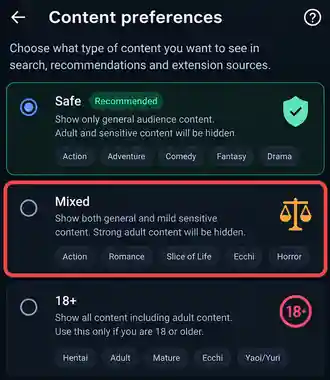
Parents asking is Tachiyomi safe for a child should know the app has no built-in manga, so what a child sees depends on the extensions installed. Since v0.21.0, Mihon has replaced the old NSFW switch with Safe, Mixed or 18+ content preferences, which hide the extensions that do not match your choice. Mihon also warns that unofficial or wrongly flagged extensions can still show 18+ content, so parents should set the preference to Safe and pick every extension themselves.
Is Tachiyomi Safe for iPhone?
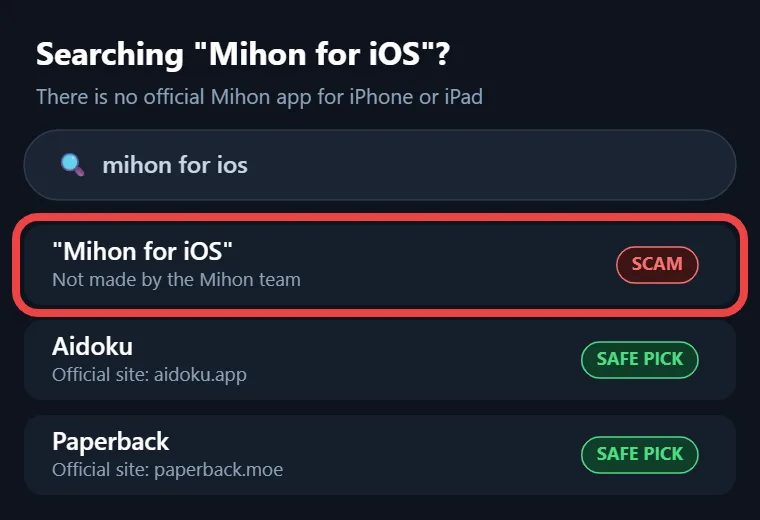
No, because there is no Tachiyomi or Mihon app for iPhone or iPad, and Mihon says it has no plans to make one. Its FAQ states that any app calling itself “Mihon for iOS” is not theirs and “should be treated as a scam,” so never install an IPA file or a profile from a site that claims to offer one, because those files did not come from the Mihon team.
Tachiyomi vs. Aniyomi: Are They the Same?
No, they are not the same app, because Aniyomi is a separate fork that adds anime to manga reading, with its own developers and releases. Mihon is not built for anime, and its FAQ says projects using the Mihon name for anime streaming are not linked to it, so check any Aniyomi download on its own page.
The better choice
Is Mihon Safer Than Tachiyomi?
Mihon is safer than the old Tachiyomi app, mainly because someone still fixes it. It started from Tachiyomi’s code in January 2024, released v0.16.0 on January 16 that year, and has kept shipping fixes ever since, while the old app has stayed frozen, which is why the answer to is Tachiyomi safe keeps getting weaker over time.
| Factor | Tachiyomi 0.15.3 | Mihon v0.21.3 |
|---|---|---|
| Maintenance | Ended January 2024 | Active |
| Latest release | January 2024 | October 25, 2026 |
| Security fixes | None | Yes, including an OkHttp update that blocks compromised eMudhra certificates |
| Keiyoushi extensions | Placeholders only | Fully supported |
| Official GitHub repo | Taken down | Public |
| Android version | 6.0+ | 8.0+ |
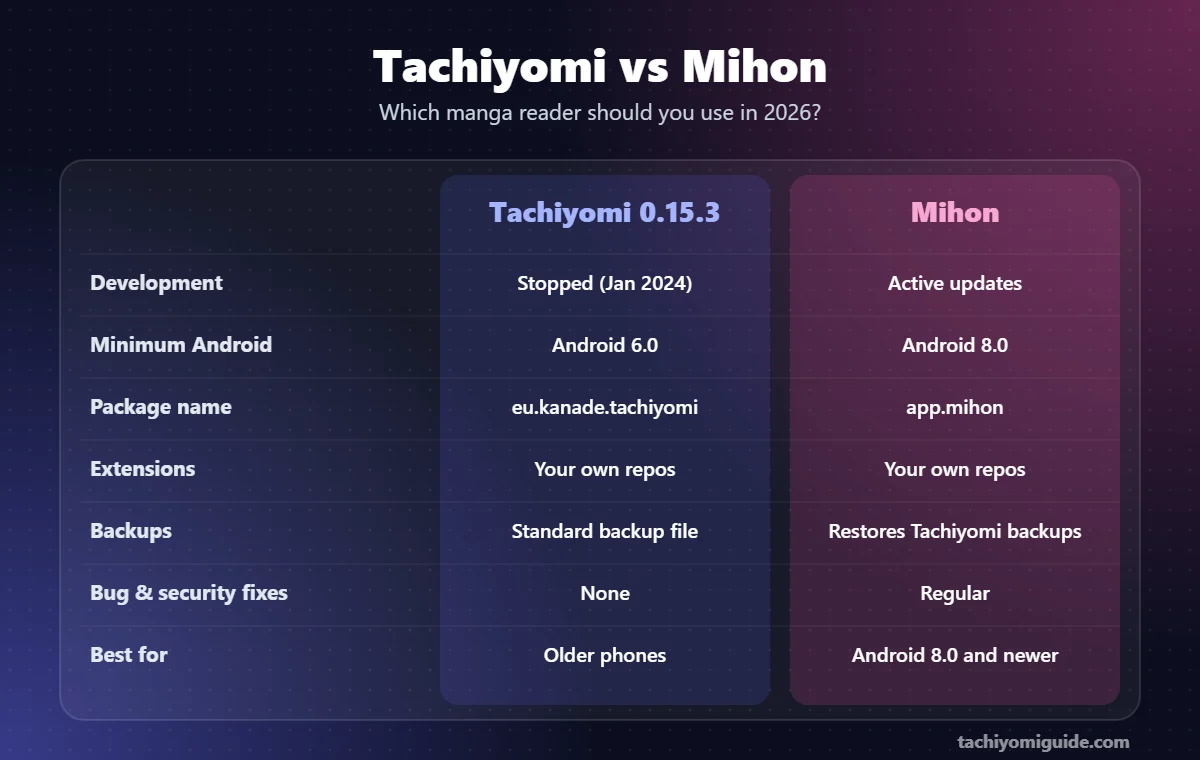
So is Mihon safe? Yes, as long as you download it from mihon.app or GitHub, but it does not make bad extensions safe. Extension risk is the same in both apps, because an extension gets the same full access in Mihon that it had in Tachiyomi, so the extension rules above still apply.
Do it right
How to Download Tachiyomi Safely in 2026
The safest way to get Tachiyomi today is to install Mihon, its maintained successor, because that is the only build still made by an active team. If you want a one-line answer to is Tachiyomi safe to download, these five steps are it.
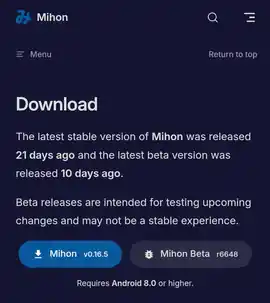
- Open mihon.app/download or github.com/mihonapp/mihon/releases in your browser.
- Pick
mihon-v0.21.3.apkif you are not sure, ormihon-arm64-v8a-v0.21.3.apkfor most modern phones. A FOSS build is offered too, and GitHub’s own release notes suggest the universal file whenever you are unsure which one fits. - Compare the SHA-256 checksum with the value on GitHub.
- Allow “Install unknown apps” for your browser, install the APK, then turn the switch off.
- Add the Keiyoushi store from More → Settings → Browse → Extension store → Add, or use the one-tap Add store button in Mihon 0.21.2+ (full walkthrough here).
If you keep the old app
How to Stay Safe if You Still Want Tachiyomi
If you still want the old app, use only an archived copy of the official 0.15.3 release and never a mirror that may have changed the file. Do not add new repo links to it, because Keiyoushi now serves only placeholders and other links come from unknown owners.
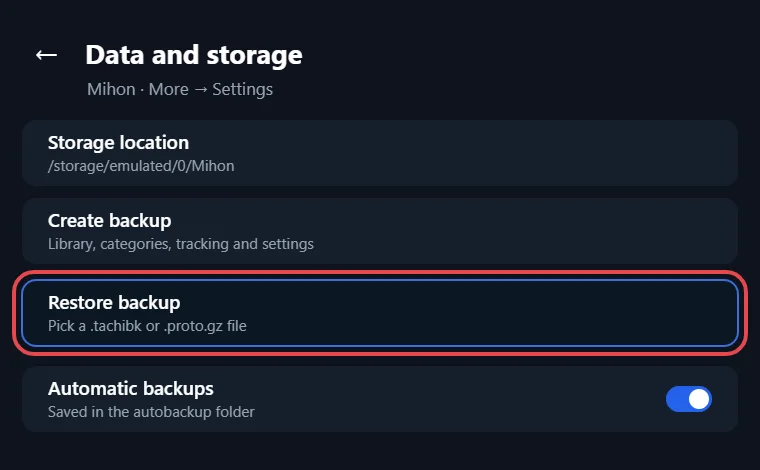
Make a backup of your library first, then restore that .tachibk file on Mihon v0.21.3, which is the last version that can read it before the next update drops support. That way you keep every series and category while leaving the frozen app behind, which is the safest way to handle is Tachiyomi safe for an old library.
Common Tachiyomi Safety Mistakes to Avoid
Most problems people run into after asking is Tachiyomi safe come from a handful of habits, and every one of them is easy to break once you can spot it in your own routine.
- Downloading from the first search result without checking who runs the site
- Installing a mod APK for “premium” features that never existed
- Ignoring a permission request for contacts, SMS or location
- Adding repo links from comments or screenshots
- Trusting an extension that Mihon marks as Untrusted
- Treating a fork or a look-alike brand as “official Tachiyomi”
Is Tachiyomi Legal?
The app itself is legal software, because it is a reader that hosts zero content. Whether using it is legal depends on which sources you read from and the laws where you live, and those rules are not the same in every country. So the legal side of is Tachiyomi safe is about the sources you pick, not the reader app itself, because the same app can be used in very different ways.
This is general information, not legal advice, so check your local rules if you are unsure.
Before every install
Tachiyomi Safety Checklist Before Installing Any APK
Run this list on every install or update, because it turns is Tachiyomi safe into ten quick checks you can finish in one go.
- The file came from mihon.app or GitHub
- The version matches the latest release
- The file name matches the official name
- The SHA-256 checksum matches
- Google Play Protect or VirusTotal found nothing
- No camera, contacts, SMS or location requests
- No “mod,” “premium” or “2026 Tachiyomi” labels
- “Install unknown apps” turned off after installing
- Extensions come only from a known store
- Your library backup is saved
Reader questions
FAQs
Is Tachiyomi safe if anyone can see and change the code?
Yes, because public code is reviewed in the open, so hidden tricks are hard to slip in. Anyone can change their own copy, though, so a downloaded file is only as safe as its source, and the checksum proves it.
Does Tachiyomi have a virus or a RAT?
The official builds never contained a virus or remote access tool. A Tachiyomi virus usually comes from a fake or mod APK, or from an untrusted extension, so the source of each file matters more than the name.
Is downloading chapters in Tachiyomi safe?
Yes, downloaded chapters are just image files on your phone, so the feature itself is harmless. The risk comes from the extension and the source site behind it, and the old Tachiyomi app no longer gets fixes for either of them.
Should I switch to Mihon or keep using Tachiyomi?
Switch to Mihon, because Tachiyomi gets no fixes and no working Keiyoushi extensions anymore. Make a backup in Tachiyomi first, then restore that .tachibk file on Mihon v0.21.3, because it is the last version that can still read it.
TachiyomiSY or Mihon: which is safer?
Both are maintained, open source and supported by Keiyoushi, with TachiyomiSY supported from version 1.13.2. Mihon is the main project and TachiyomiSY adds extra features on top, while the extension risk is equal in both, so pick the one whose features you need.
Is Mihon the same as Tachiyomi 0.15.3?
Not anymore, because Mihon started from Tachiyomi’s code with v0.16.0 in January 2024 and has changed a lot on its way to v0.21.3. Today it is a different project built on the same idea, and it is the one that still gets updates.
Final word
Final Verdict
The original app was clean, but it has been frozen since January 2024, so the safest answer to is Tachiyomi safe in 2026 is to move to Mihon v0.21.3 from mihon.app or GitHub and take extensions only from the Keiyoushi store. Every fake, mod and “Tachiyomi 2026” download you skip removes one more way for a stranger to get into your phone and your saved logins. Check the SHA-256 checksum, watch the permission list and keep a fresh backup of your library, and you will have the same reading experience Tachiyomi gave you, with an active team still fixing the app and shipping new releases.