
Updated for Tachimanga v5.3 · November 2026
Tachimanga Extensions 2026: Best Sources & How to Add Them
You install Tachimanga on your iPhone, open the Browse tab and find nothing to read, because the app ships without a single source. That empty screen confuses many people who move over from Mihon or the old Tachiyomi app on Android, since the app never tells you what to do next. Tachimanga extensions are the missing piece, and you get them by adding one repository link that still works in 2026. Many older guides share a dead link, so readers paste it, see nothing useful and give up on the app. This guide gives you the working Keiyoushi link, the exact steps to add it and a tested list of the best sources by type. You will also learn how to fix Tachimanga extensions when they stop showing up or fail to load manga after an update.
- 1 working repo
- 4 setup steps
- 1,463 extensions
- 8 FAQs
Quick Answer: How to Add Extensions to Tachimanga
To add extensions to Tachimanga, open Browse, go to Extensions, open its settings, tap Extension Repos, tap +, paste https://github.com/keiyoushi/extensions/raw/repo/index.pb and tap Add. After you refresh the list, tap Install next to any source you want. Tachimanga extensions from Keiyoushi then appear under your sources, and this Tachimanga repo URL works with the current v5.3 app. The whole setup takes two minutes and lets you read manga free on iOS from hundreds of sites.
- Working repo URL
- https://github.com/keiyoushi/extensions/raw/repo/index.pb
- Latest app
- Tachimanga v5.3, October 31, 2026
- Needs
- iOS 15.0+, extension lib 1.6 (app 4.16+)
The basics
What Are Tachimanga Extensions?
Tachimanga extensions are small plugins that connect the app to a manga website, so each one lets Tachimanga load titles, chapters and pages from that site. The app itself only reads files, which means that without these plugins you can open nothing except your own Local source folder or a Komga server.
Tachimanga is an iOS reader that its GitHub page calls “an unofficial port of Tachiyomi for iOS,” and that history explains why it uses the same extension system as Mihon on Android. There is one key difference, though, because Tachimanga loads extension files in the .jar format while Mihon uses .apk files. The Keiyoushi project builds both a .jar and an .apk for every extension it publishes, so one repository can serve both apps.
Tachimanga extensions also need to match the extension lib version that the app understands. Version 4.16, released on June 30, 2026, added support for extension lib 1.6, and version 4.17 fixed the problems that followed on July 4. Since every Keiyoushi extension now runs on lib 1.6, you need one of those versions or newer before anything installs.
Extensions, Repos and Sources: The Difference
A repository is a list hosted online, an extension is the plugin you install from that list, and a source is the actual website you browse inside the app. When you add a Tachimanga extension repository, you only add the list, so nothing shows in Browse until you install at least one extension from it.
One extension can also hold many sources. MangaDex is the best example, because its single extension contains 61 language sources, which is why the Keiyoushi list has 1,463 extensions but 2,388 sources in total. Tachimanga extensions with many languages can fill your sources list quickly, so keep the language filter set to the languages you read.
Working link
Tachimanga Repo URL That Works in 2026
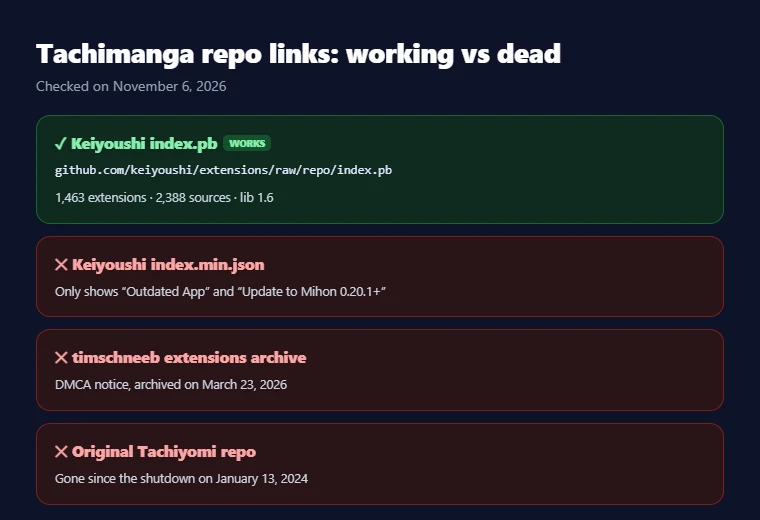
The Tachimanga repo URL that works in 2026 is the Keiyoushi link below, and it ends in index.pb, which is the format that Tachimanga’s own help pages say a repository URL usually uses.
Keiyoushi repo URL for Tachimanga
Copy the link exactly as shown, because a single missing letter or an extra space stops the app from reading the list. Keiyoushi is the main community repository for Mihon and its variants, and its GitHub project has around 15,000 stars. Here is what the list held when we checked it on November 6, 2026:
- Total: 1,463 Tachimanga extensions covering 2,388 sources.
- English: 423 extensions with 506 English sources between them.
- Other big languages: Japanese with 140 extensions, multi-language with 139, Portuguese with 117 and Spanish with 104.
- Content labels: 567 Safe, 497 Mixed and 399 NSFW, so you can see what kind of material a source holds before you install it.
Why the Old index.min.json Link Stopped Working
The old link stopped working because Keiyoushi replaced the contents of that file with warning placeholders. If you open https://raw.githubusercontent.com/keiyoushi/extensions/repo/index.min.json today, you will see only two entries called “Outdated App” and “Update to Mihon 0.20.1+”, and neither of them is a real source.
Many guides written in 2024 still share this exact link, which is why so many readers add it and then find their list holding those two strange items. Tachimanga extensions now come only through the newer index.pb file, so if you added the old link earlier, replace it with the working URL from the box above and refresh the list so the real extensions load.
Old Repos You Should Not Use
Two other links still show up in search results, but neither of them will give you a single working source:
- The timschneeb tachiyomi-extensions-archive on GitHub: it received a DMCA notice and was archived on March 23, 2026, so it is now read-only and only points visitors to Keiyoushi.
- The original Tachiyomi extension repository: it went away when the Tachiyomi project shut down on January 13, 2024.
Any guide that still sends you to these two links has not been updated in a long time, so skip it.
Step by step
How to Add Extensions to Tachimanga (Step-by-Step)
You can add extensions to Tachimanga in about two minutes, and the four steps below follow the order the app expects. The menu names match Tachimanga v5.3, so update the app first if your screens look different, because older builds cannot install the current Tachimanga extensions. Copy the repository link from the section above before you start.
Step 1: Update Tachimanga to the Latest Version
Open the App Store, search for Tachimanga and tap Update if it shows, so that you get version 5.3, which came out on October 31, 2026. Your device also needs to meet these requirements:
- iPhone and iPad: iOS or iPadOS 15.0 or later.
- Mac: macOS 13.0 and an Apple M1 chip or newer.
- Only builds from 4.16 onward can read lib 1.6 extensions.
Step 2: Add the Keiyoushi Repository
This step adds the extension repository, and you only need to do it once on each device, or once in total if you use the app’s sync feature, which carries repositories over to your other devices.
- Open the Browse tab and switch to Extensions.
- Open the settings for that screen and tap Extension Repos.
- Tap the + button in the top right corner.
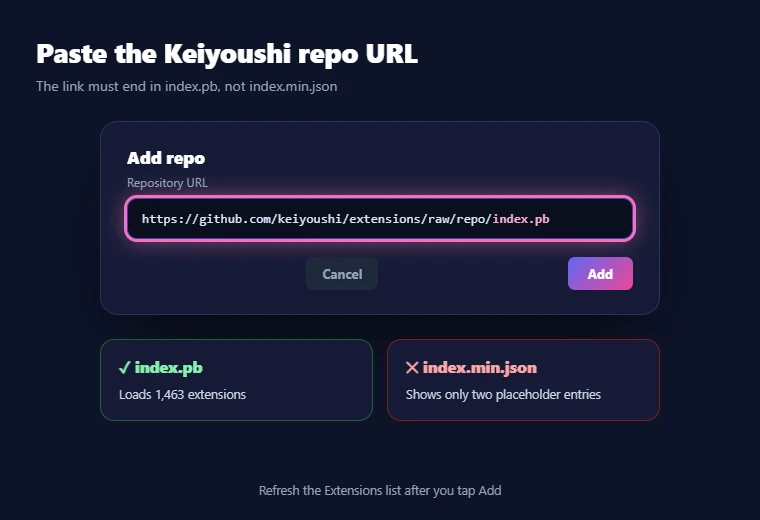
- Paste
https://github.com/keiyoushi/extensions/raw/repo/index.pband tap Add.
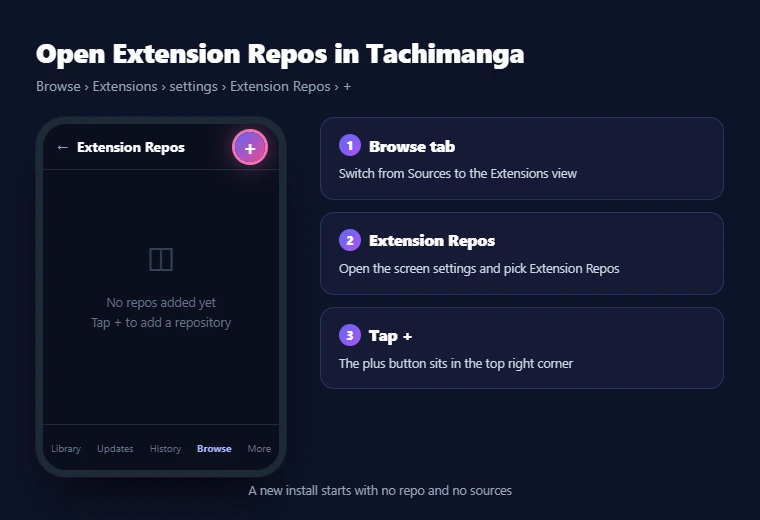
After you tap Add, go back to the Extensions list and refresh it so the new list loads. If the screen still looks empty, check that your link ends in index.pb and not the older index.min.json address.
Step 3: Install the Extensions You Want
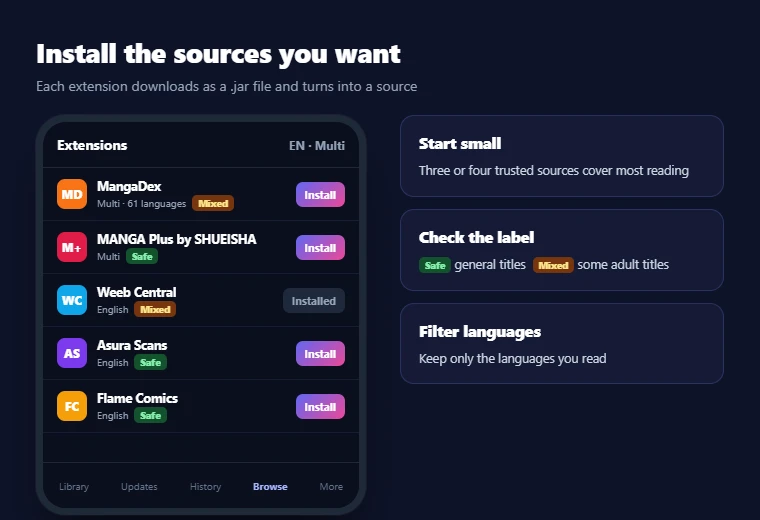
Once the list loads, you will see every extension in the repository with an Install button next to each name. Tap Install on the ones you want, and each extension downloads as a .jar file and appears in your sources. Most readers do not need hundreds of Tachimanga extensions, so start with three or four well-known sources such as MangaDex, MANGA Plus and Weeb Central. The content label on each one tells you whether it is Safe, Mixed or NSFW, which helps if you share your iPad with younger readers.
Step 4: Open Your Sources in Browse
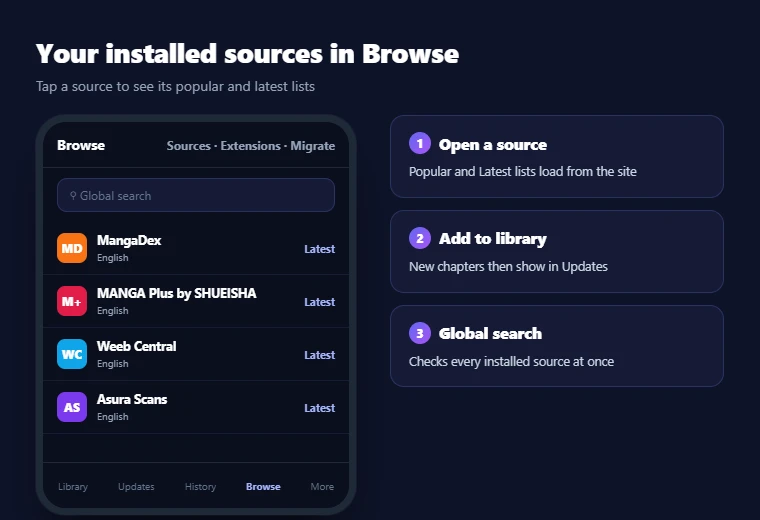
Installed Tachimanga extensions appear as sources under the Browse tab, and tapping one opens its popular and latest lists. From there you can search for a title, open it and add it to your library, after which its new chapters show up in your updates. The global search also checks every installed source at once, which saves time when one site does not carry the series you want.
How to Add a Single Extension File
Tachimanga can also load a single extension file saved on your device, which helps when you test a custom one. The official help pages describe this path:
- Open the Browser tab.
- Switch to the Extensions section.
- Tap the + button in the top right corner.
- Select the .jar file.
Local extensions do not sync between devices, so you need to repeat these steps on each one.
Top picks
Best Tachimanga Sources in 2026
The best Tachimanga sources depend on what you read, so the picks below are grouped by type, and every one of them was live in the Keiyoushi list on November 6, 2026. Official sources give you licensed chapters, all-round sites cover a wide range of manga, and scanlation groups focus mostly on manhwa. The Mixed and NSFW labels come from Keiyoushi itself and describe the whole site rather than one title. Picking at least one source from each group gives you official chapters, wide fan coverage and manhwa in the same library.
| Source | Language | Content rating | Best for |
|---|---|---|---|
| MANGA Plus by SHUEISHA | Multi-language | Safe | Official Shueisha manga |
| Webtoons.com | Multi-language | Safe | Official webtoons |
| MangaDex | 61 languages | Mixed | Fan translations in many languages |
| Weeb Central | English | Mixed | English manga |
| MangaFire | Multi-language | Mixed | Wide manga range |
| Asura Scans | English | Safe | Manhwa |
| Flame Comics | English | Safe | Manhwa |
| TCB Scans | English | Safe | One Piece |
| Komga | Multi-language | Safe | Your own server |
Official and Legal Sources
These sources come from publishers and creators rather than fan uploads, so they suit readers who want to support the people who make the series:
- MANGA Plus by SHUEISHA: the first extension to install for legal reading, because it comes straight from Shueisha, the Japanese publisher behind many of the biggest manga series, and it is rated Safe in every language it supports.
- Webtoons.com: official vertical webtoon comics with a Safe rating across several languages.
- Comikey: licensed manga in more than one language with a Safe label.
- GlobalComix: publisher titles mixed with work from independent creators under a Mixed label.
- J-Novel: English light novel and manga releases with a Safe label.
- Mangamo: licensed manga in English with a Safe label.
- INKR: English comics with a Mixed label.
- Tapas: English webcomics and novels with a Mixed label.
Most of these Tachimanga extensions carry a Safe label, which makes them a good fit for shared devices.
Best All-Round Manga Sources
MangaDex is the best all-round pick because its single extension covers 61 language sources, so one install gives you fan translations in almost any language you read. It carries a Mixed label, which means the site holds both general and adult titles, so keep that in mind if other people use your device. These other all-round sources are worth adding next:
- MangaFire: a multi-language source with a Mixed label.
- Weeb Central: a popular English source with the same rating.
- Comix, Atsumaru, MangaPill and MangaKatana: more English choices from the Keiyoushi list.
- Kagane: several languages from one extension.
- Manganato: an older reader site that now runs on the natomanga.com address.
- Mangakakalot, Mangago, Mangatown and Mangahere: older English sites that are still in the list.
All of these Tachimanga extensions carry a Mixed label, and it helps to install two or three of them instead of one, because a series that is missing on one site often appears on another, and switching sources later takes only a few taps with the migrate tool.
Best Manhwa and Webtoon Sources
These English scanlation sites below post translations of Korean manhwa, which most people usually read in the long vertical webtoon style:
- Asura Scans, Flame Comics, Drake Scans and Vortex Scans: the four manhwa sources worth adding first, and each one carries a Safe label in the Keiyoushi list.
- Toonily: a fifth English option for manhwa, but it carries a Mixed label, so check its titles before you hand the device to someone else.
- TCB Scans: a useful extra if you follow One Piece, because it focuses on that series and other Shonen Jump chapters and holds a Safe rating.
Installing these Tachimanga extensions together with MangaDex gives you a good spread of manhwa and manga in English, and the five manhwa sources above sit together in the English section of the Extensions list.
Self-Hosted Sources: Komga and Cubari
Both picks below read from a server or links you control instead of a public manga site:
- Komga: a self-hosted manga server that you run on your own computer, and Tachimanga reads from it through its built-in support as well as through the Safe-rated Komga extension in Keiyoushi.
- Cubari: another Safe extension that opens manga people share through Cubari links.
Tachimanga also supports Komga, Kavita and Suwayomi as enhanced trackers, which keeps your reading progress in step with your own server. These two Tachimanga extensions suit readers who keep their own manga collection.
Popular Sources That No Longer Work
Several Tachimanga extensions that older guides still recommend are no longer in the Keiyoushi list, so searching for them only wastes time:
- MangaSee and Manga Life: both are gone from the list.
- Bato.to: gone as well, with only an unofficial “Bbato” copy left in its place.
- MangaBuddy: no longer listed either.
- Comick: the original extension has disappeared, and the two Comick names you may still see, “Comick (Unoriginal)” and “ComicK Fanmade,” are not the original site. Comick now lives on as a tracker in Tachimanga version 5.2 and later, so you can still sync your reading progress with it.
- Kavita and Suwayomi: not missing at all, since they were never in the list and work only as enhanced trackers.
Maintenance
How to Update and Manage Tachimanga Extensions
Tachimanga extensions get updates whenever the sites they read from change, so checking for updates every week or two keeps your sources working. These Tachimanga app features make the job much easier:
- Update all at once (v4.12, November 11, 2025): updates every extension in a single go, which saves you from tapping through each one.
- View a site without installing (v4.14): handy when you want to check that a site is online before you add its extension.
- Faster engine (v4.5 and v4.6): the new extension engine made sources load 50 to 100 percent faster, which gives you one more reason to keep the app current.
- Sync: carries your library, history, bookmarks, repositories and extensions across your devices.
Sync does not cover local extensions, extension settings or downloads, so any setting you change inside an extension must be set again on each device you use.
Safety
Are Tachimanga Extensions Safe?
Tachimanga extensions are third-party code written by community developers, so a few simple habits keep you safe:
- Use one trusted repository: install from Keiyoushi instead of random files you find online.
- Stick to signed builds: Keiyoushi signs its extensions with a signing key, which separates its builds from copies posted by unknown people.
- Read the content labels: Safe sources hold general titles, while Mixed and NSFW sources include adult material that you may not want on a shared iPad.
Tachimanga itself carries a 16+ age rating on the App Store, so parents should keep that in mind before setting it up for younger readers.
Troubleshooting
Tachimanga Extensions Not Showing or Not Working?
Tachimanga extensions not showing up, or showing up but loading nothing, are the two most common problems after setup. Each problem below has a clear cause, and most of them take less than a minute to fix once you know where to look, so match what you see on your screen to the heading that fits. Tachimanga extensions not working after an app update is a third issue, and it has its own fix further down this section, along with Cloudflare checks.
Repo Added but No Extensions Appear
When the repository is added but the list stays empty, the cause is usually one of these three things:
- Wrong link: the old index.min.json URL only shows the two placeholder entries, so make sure your link ends in index.pb and not index.min.json.
- No refresh: the list has not been refreshed since you added the repo, which you fix by going back and refreshing the Extensions screen.
- Language filter: the filter can hide every extension outside your chosen languages, so turn on English or the language you read.
Extension Installed but Loads No Manga
If an extension installs but shows no titles, the website behind it is usually down or has moved to a new address. Open the source in WebView to see whether the site loads there, and if it shows an error in WebView too, the problem sits on the website’s side. In that case, you can move your titles to another source through Browse → Migrate and then pick the original source. Downloaded chapters do not carry over between sources, so download them again after the move if you read offline. Our Tachiyomi troubleshooting guide covers more source errors in detail.
Cloudflare Verification Errors
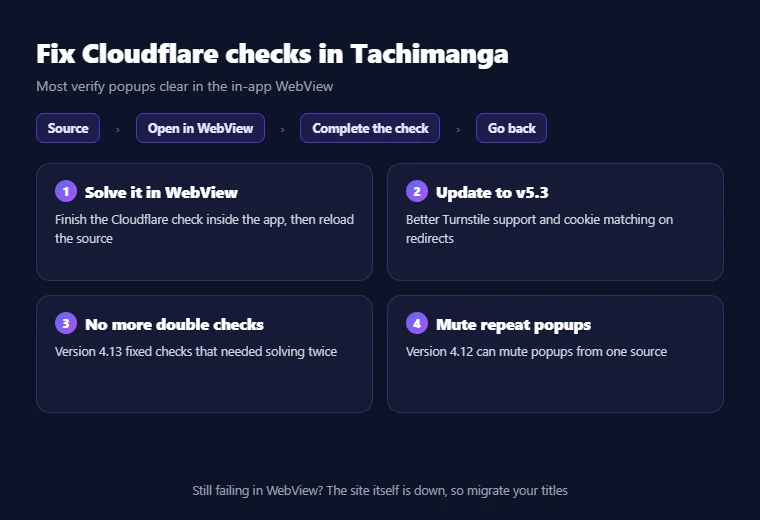
Some manga sites protect themselves with Cloudflare, which shows a check page before it lets the app load chapters. Tachimanga Cloudflare errors usually appear as a popup asking you to verify, and these fixes clear most of them:
- Solve it in WebView: open the source in the in-app WebView and complete the check there.
- Update to v5.3: this version improved support for Cloudflare Turnstile checks and fixed cookie matching when a site redirects to a different check page.
- Older double checks: some builds needed checks solved twice, which version 4.13 fixed in January 2026.
- Mute repeat popups: if one source asks again and again, version 4.12 added an option to mute popups from specific sources.
Extension Stopped Working After an Update
An extension that worked last week and fails after an update usually has a lib version mismatch. Every Keiyoushi extension now uses extension lib 1.6, which needs Tachimanga 4.16 or newer, and version 4.17 fixed the early bugs with it. Update the app first, then use the option to update all extensions at once so every source moves to the same version. If Tachimanga extensions still fail after that, the site itself may be down, which the section above covers.
Switching apps
Moving Extensions from Mihon or Tachiyomi to Tachimanga
You can bring your library over from Mihon or the old Tachiyomi app by making a backup on Android and opening it in Tachimanga through Settings → Backup & Restore → Import Tachiyomi Backup. Here is what the import brings over:
- Included: titles, categories, read chapters, tracking, history, settings and the list of extensions you used.
- Not included: downloaded chapters.
The backup only remembers which extensions you had, so you still need to add the Keiyoushi repository and install the same Tachimanga extensions again before your library can load new chapters. After that, use the migrate tool for any title whose source has shut down, such as one from MangaSee:
- One title: open the title’s more menu and tap Migrate.
- Many titles: long-press in your library and migrate them in bulk.
- Matching: the basic method comes with the free app, while matching by the source with the most chapters is a Premium feature.
FAQ
Tachimanga Extensions FAQs
Does Tachimanga come with a default extension repo?
No, Tachimanga ships with no extensions and no default repository, so the Browse tab stays empty until you add one. The working link in 2026 is the Keiyoushi URL that ends in index.pb, and once you add it and refresh, you can install sources from the Extensions screen.
Do I need Tachimanga Premium to add extensions?
Adding a repository and installing extensions are not listed among the Premium features, so the free version handles them. Premium costs $1.99 a month, $9.99 a year or a one-time Lifetime price, and all three plans give the same extras, such as migration matching by the source with the most chapters.
Can Tachimanga use Mihon or Tachiyomi extensions?
Yes, as long as they come from a repository that offers .jar builds, because Tachimanga loads .jar files while Mihon uses .apk files. Keiyoushi publishes both formats for every extension, so the same repository works in both apps, but the extensions must use lib 1.6.
How many extensions can I install on Tachimanga?
The Keiyoushi repository listed 1,463 extensions and 2,388 sources on November 6, 2026, including 423 English extensions. You can pick from all of them, although most readers find that a handful of reliable sources covers what they read, and fewer extensions means fewer updates to manage.
Does MangaDex work on Tachimanga?
Yes, MangaDex is in the Keiyoushi list as one extension with 61 language sources and a Mixed content label. After you add the repository, install MangaDex from the Extensions screen and its languages appear as separate sources, so you can keep only the languages you read.
Is there a working Comick extension for Tachimanga?
The original Comick extension is gone from Keiyoushi, and the two names left, “Comick (Unoriginal)” and “ComicK Fanmade,” are not the original site. Tachimanga added Comick as a tracker in version 5.2 on October 19, 2026, so you can still sync your reading progress with your Comick account.
Do Tachimanga extensions work on iPad and Mac?
Yes, Tachimanga runs on iPad with iPadOS 15.0 or later and on Mac with macOS 13.0 and an Apple M1 chip or newer. Repositories and extensions sync across devices when you use the app’s sync feature, although local extension files must be added again on each device.
Is Tachimanga available on Android or Windows?
No, Tachimanga is an Apple app for iPhone, iPad, Mac and Apple Vision Pro, and it has no Android or Windows version. Android readers use Mihon instead, which adds the same Keiyoushi repository but installs the .apk version of each extension.
Final word
Final Thoughts
One working link is all you need to fill Tachimanga with manga, and in 2026 that link is the Keiyoushi index.pb URL not the old index.min.json address many guides still share. Keep this checklist in mind:
- Add the Keiyoushi repo once and install a few trusted sources such as MANGA Plus, MangaDex and Asura Scans.
- Keep the app on version 5.3 or newer so that lib 1.6 extensions and Cloudflare checks work as expected.
- When Tachimanga extensions stop loading, check the website in WebView first, update everything at once and migrate your titles away from sources that have shut down.
Sites come and go, so check your source list again after every app update.