
Updated for SY 1.13.2 · November 2026
TachiyomiSY Guide 2026: Download, Features & Setup
Many readers moved to Mihon after Tachiyomi shut down, but a large group wanted more control over their library, their sources and the reader itself. TachiyomiSY gives them that control, because it keeps the familiar Mihon layout and then adds tools such as the Latest tab, merged manga and autoscroll. This guide covers the right APK for your phone, the install steps, the extension store setup and every feature worth knowing, so you can go from a blank phone to reading your first chapter in about ten minutes.
- 5 APK files
- 5 install steps
- 20+ SY-only tools
- 15 FAQs
Quick answer
TachiyomiSY is a free, open-source manga reader for Android 8.0 and newer. The latest stable version is 1.13.2, released on July 13, 2026, and it is built on Mihon 0.20.1. You should download it only from the official GitHub releases page.
Get SY 1.13.2- Latest stable
- 1.13.2, July 13, 2026
- Based on
- Mihon 0.20.1
- Needs
- Android 8.0 or higher
The basics
What Is TachiyomiSY?
TachiyomiSY is a manga reader that lets you read manga, manhwa and webtoons from online sources or from files saved on your phone. It started as a fork of TachiyomiAZ, and today it pulls its core code from Mihon while also borrowing ideas from other forks such as TachiyomiJ2K and Neko. Because of that history, calling it “just a fork of Mihon” is not quite right, since it came from a different branch and later lined up with Mihon as its base. The project is released under the Apache-2.0 license, so anyone can read the code on GitHub. The app does not ship with any manga, which means you add sources yourself through extensions, the same way you would in Mihon. Many readers still search for it as Tachiyomi SY, or call it SY for short.
How It Differs From the Original Tachiyomi
The original Tachiyomi stopped on January 13, 2024, and its last version was v0.15.3. Since that day it has received no fixes, so it cannot keep up with new Android versions or with changes on manga websites. Old Tachiyomi apps now show only “Outdated App” entries when you add the Keiyoushi extension store, which makes them almost useless for reading. SY took a different road, because it kept getting releases and moved its base to Mihon, the community project that carried the Tachiyomi code forward. On top of that base, SY adds extra library tools, extra reader options and deeper support for some sources.
Who Builds TachiyomiSY?
The app is created and maintained by jobobby04, who has worked on it since the GitHub repo opened on March 30, 2020. Two other names appear in the official credits: she11sh0cked built the extra tracking, filters and recommendations, and az4521 wrote the base recommendations and TachiyomiAZ itself. Volunteers translate the app on Weblate, and Mihon lists this SY fork as endorsed, next to TachiyomiJ2K, TachiyomiAZ, Yōkai and Komikku.
2026 status
Is TachiyomiSY Still Working in 2026?
Yes, SY is still active in 2026, and the code on GitHub was last updated on November 1, 2026. The project has over 4,200 stars, and new preview builds come out almost every week, which shows that the developer is still fixing bugs and adding tools. The stable version is a little behind, though, because it is based on Mihon 0.20.1 while Mihon itself has reached v0.21.3. In daily use this gap rarely matters, since sources and extensions keep working on the stable build, but it does mean some newer Mihon features reach SY later than they reach Mihon users.
TachiyomiSY Latest Version and Release History
The TachiyomiSY latest version is 1.13.2, and the table below shows how the app has moved forward since the Tachiyomi shutdown in early 2024.
| Version | Release date | Based on |
|---|---|---|
| 1.10.0 | January 10, 2024 | Tachiyomi code, before the shutdown |
| 1.10.5 | March 2, 2024 | First months after the shutdown |
| 1.11.0 | October 28, 2024 | Mihon 0.17.0 |
| 1.12.0 | May 11, 2025 | Mihon 0.18.0 |
| 1.13.0 | July 9, 2026 | Mihon 0.20.1 |
| 1.13.1 | July 13, 2026 | Mihon 0.20.1, last build for Android 6 and 7 |
| 1.13.2 | July 13, 2026 | Mihon 0.20.1, Android 8.0+ |
Version 1.12.0 has around 375,000 downloads on GitHub, and 1.13.2 has already passed 166,000. The long gap between 1.12.0 and 1.13.0 is normal for this project, because big jumps in the Mihon base take time to merge.
Official download
TachiyomiSY Download: Official APK Files
The only official place for a TachiyomiSY download is the releases page of the SY repo that jobobby04 runs on GitHub. Plenty of websites offer copies or “mod” versions, but those files can be changed by anyone, so they are not worth the risk. SourceForge does keep a mirror of the same files, although it is not linked to the project, and its page still says the app needs Android 6.0, which is no longer true. Since 1.12.0 the release notes skip SHA-256 checksums, so getting the file from GitHub is the safest choice.
Which TachiyomiSY APK Should You Choose?
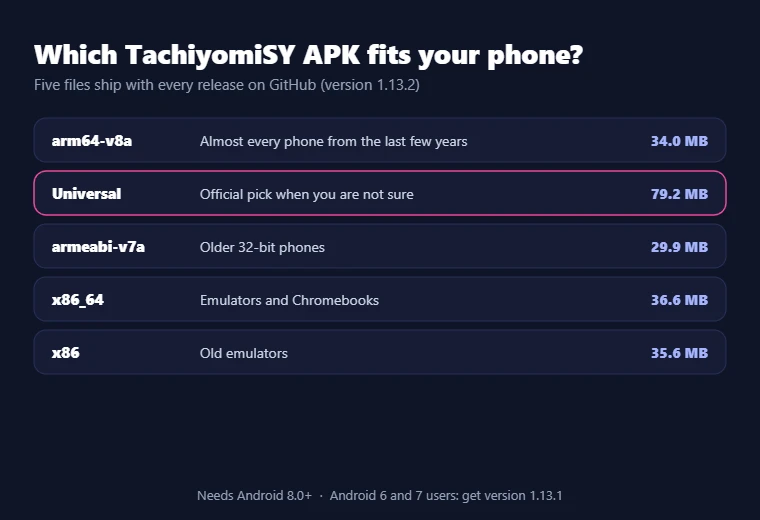
Each release on GitHub comes with five APK files, and the right TachiyomiSY APK depends on the chip inside your device.
| APK type | Size | Who should use it |
|---|---|---|
| arm64-v8a | 34.0 MB | Almost every phone made in the last few years |
| Universal | 79.2 MB | Anyone who is not sure about their chip |
| armeabi-v7a | 29.9 MB | Older 32-bit phones |
| x86_64 | 36.6 MB | Emulators and Chromebooks |
| x86 | 35.6 MB | Old emulators |
The official release notes say to pick the universal file if you are unsure. The file names on GitHub end in “.apk.apk”, which is a small naming slip and does not mean the file is broken.
Stable vs Preview Builds
Stable builds are tested releases, while each TachiyomiSY preview is made from the newest code and lives in a separate repo called TachiyomiSYPreview. The latest preview is build 615 from October 28, 2026, and its number matches the commit count of the project. Preview builds are already based on Mihon 0.21.2, so they get newer extension store support, clearer install errors for extensions and a fix for Mihon backup compatibility. They also carry fresh SY tools, such as manual merging inside the library, feed backups and gesture controls for autoscroll. The trade-off is that previews can have new bugs, and one maintainer told a user to update the preview by hand, so check for new builds yourself.
Still on Android 6 or 7? Use Version 1.13.1
TachiyomiSY 1.13.2 dropped support for Android 6 and 7, so phones running those versions need 1.13.1 instead. It is the last build for them, and its update checker is turned off, which means it will not tell you about newer releases. Keep that APK saved in case you reinstall later.
Step by step
How to Install TachiyomiSY on Android
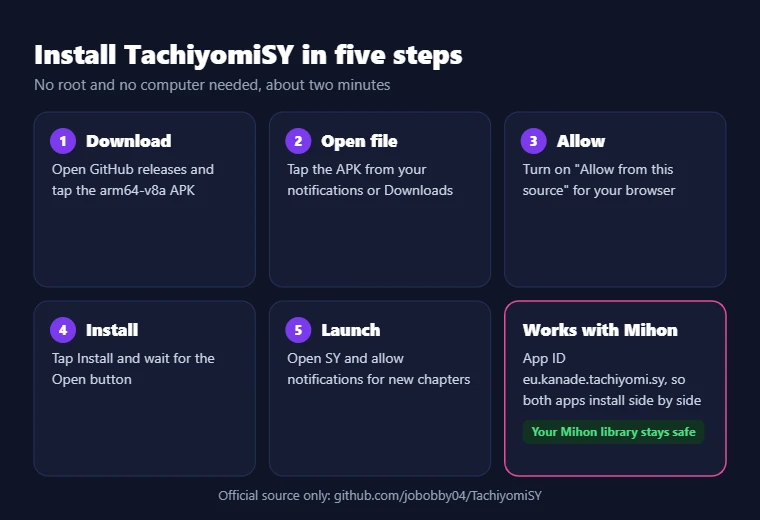
Installing takes about two minutes and needs no root access or computer.
- Open the GitHub releases page on your phone and tap the APK that matches your device, which is arm64-v8a for most people.
- Wait for the download to finish, then tap the file from your notification bar or your Downloads folder.
- When Android blocks the install, tap Settings on the pop-up and turn on “Allow from this source” for your browser or file manager.
- Go back and tap Install, then wait until Android shows the Open button.
- Open the app and allow notifications if you want alerts for new chapters.
The app ID of SY is “eu.kanade.tachiyomi.sy”, which is different from the ID used by Mihon. Because of that, both apps can live on the same phone, and installing SY will not replace or touch your Mihon library. Many people keep both for a while and move their library over only after they feel at home in SY.
First setup
TachiyomiSY Setup: Add the Extension Store
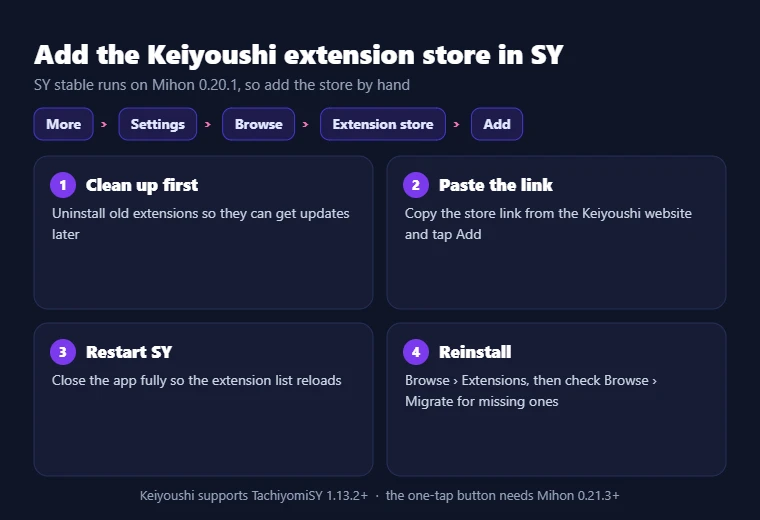
A fresh install has an empty Browse tab, so the first part of TachiyomiSY setup is adding an extension store. Keiyoushi is the most used store, and it officially supports SY from version 1.13.2 onward. Since Mihon v0.20.0, the app calls these lists an “extension store” instead of a “repo”, so look for that name in the menu.
- If you used extensions before, uninstall all of them first, because old extensions from another source will not get updates.
- Copy the store link from the official Keiyoushi website.
- In SY, go to More, then Settings, then Browse, and open Extension store.
- Tap Add, paste the link and confirm it.
- Close the app fully and open it again so the extension list reloads.
Keiyoushi also has a one-tap “Add store” button on its website, but that button needs Mihon 0.21.3 or newer, and SY stable is based on 0.20.1. That is why the manual steps above are the reliable way to add the Keiyoushi extension store in SY. Our Mihon extension repo list covers other stores and their links.
Install Your First Extensions
After the restart, open Browse and switch to the Extensions tab, where you will see every source from the store. Tap Install next to the sources you use, and they will show up under Sources a moment later. If you moved from another app, the Migrate tab in Browse lists the extensions your library still needs. When a series is hard to find, search for its Japanese title in English letters, such as “Boku no Hero Academia” rather than “My Hero Academia”. Our guide on how to install extensions shows every step.
Turn On Optional Hentai Features (18+)
SY includes adult-focused tools, including a built-in E-Hentai and ExHentai source, but they stay off until you enable them. The switch sits in the advanced settings, so you only see these features if you choose to turn them on yourself. If you never touch that switch, SY works as a normal manga reader for readers of all ages.
What you get
TachiyomiSY Features
The TachiyomiSY features fall into two groups. The first group comes from Mihon and covers online reading, offline reading, categories, themes, scheduled updates, trackers and backups. The second group is exclusive to SY, and it is the main reason people install this app instead of plain Mihon or older forks, so the sections below focus on those extra tools.
Latest Tab and Source Shortcuts
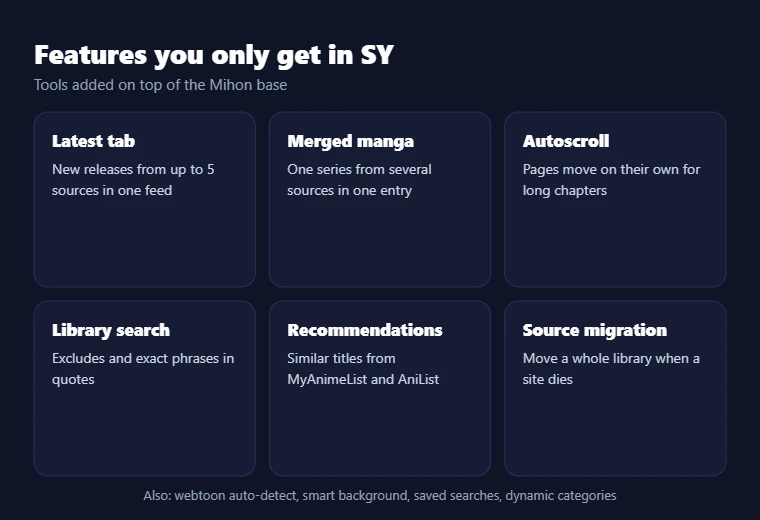
The Latest tab, which newer builds label Feed, lets you pick up to five sources and see their newest releases in a single feed. Without it, you would open each source one by one to check what came out today, which gets slow when you follow many sites. SY also lets you build custom source categories, which work like pinned sources, but you choose the groups and the names yourself. One group could hold English scanlation sites and another official publishers. Saved searches round this out, because you can store a search with its filters and run it again later with one tap.
Reading and Library Features
Merged manga is the feature heavy readers talk about most, because it joins the same series from different sources into one library entry. When one source is missing a chapter, SY can pull it from another source in the same merge, so you stop jumping between entries. The library also has its own search engine, which supports excludes and quotes for exact matches, and that helps a lot once your library holds hundreds of titles. Dynamic categories let you view the library in different ways, for example by source or by tracking status. A continue reading button takes you straight to your next chapter, drag-and-drop sorting lets you order titles by hand, and you can edit manga details or save and share a cover. The lewd filter and the tracking filter also help you hide or show parts of your library in seconds.
Tracking and Recommendations
SY keeps every tracker from Mihon, which includes MyAnimeList, AniList, Kitsu, MangaUpdates, MangaBaka, Shikimori, Bangumi and Hikka. Once you link an account, your read chapters sync to that service as you go. SY then adds a recommendations screen that pulls similar titles from MyAnimeList and AniList, and for MangaDex titles it also uses the “Similar Manga” data first built for Neko. This makes it much easier to find your next series without leaving the app or opening a browser. You can also search your library by tracking status, which shows which titles are linked and which are not.
Reader Customization
The SY reader starts with everything Mihon offers and then adds several extra controls. Automatic webtoon detection notices when you open a long-strip webtoon and switches to webtoon mode for you, so you do not have to change it for every manhwa. Autoscroll moves the pages on its own, which is handy for long chapters when you want to read without touching the screen. The smart background changes the color around the page to match the page itself, and that makes paged reading look cleaner. You can also turn off webtoon zoom completely, choose how many pages load ahead of you and set how much space the image cache can use on your phone.
Advanced Source and Extension Support
Source migration is one of the most useful tools here, because it moves your whole library from one source to another when a site dies or slows down. An advanced source settings page lets you search your sources and turn all of them on or off at once. You can also import custom sources and featured extensions in a batch, which saves time on a new phone. Tags on a manga page work as shortcuts, since a tap searches your library and a long press searches every source. SY also adds richer support for MangaDex and handles LANraragi, NHentai and Hitomi.la with extras such as batch adding and custom descriptions.
Features Added Beyond Standard Mihon
This table sums up the main tools that Mihon does not have, and who gets the most out of each one.
| SY feature | What it does | Best for |
|---|---|---|
| Latest tab | Shows new releases from up to 5 sources | Daily readers |
| Merged manga | Joins one series from several sources | Readers chasing missing chapters |
| Library search engine | Searches with excludes and exact phrases | Large libraries |
| Autoscroll | Scrolls pages without touching the screen | Long webtoon chapters |
| Recommendations | Suggests similar titles from MyAnimeList and AniList | Finding new series |
| Source migration | Moves all manga to a new source | Readers whose source shut down |
What’s New in TachiyomiSY 2026
The 1.13.0 update in July 2026 brought the biggest changes of the year, starting with the move from Mihon 0.18.0 to 0.20.1. Sync with SyncYomi became more reliable, since deleted “ghost chapters” no longer come back and endless sync loops were fixed. Migration also got better, because it now copies the last page you read and your chapter history to the new source. Downloads gained a setting for the chapter URL hash, and duplicate chapters now get deleted properly when they are marked as read. Source fixes covered MangaDex, NHentai and E-Hentai, and LANraragi now works as a built-in delegated source. The update also stopped the screen from staying awake while you sit in the Library.
Daily use
How to Use TachiyomiSY
Once your sources are set up, daily use follows the same flow as Mihon, with a few extra shortcuts on top. The sections below walk through each part of the app in the order most new users need them.
Navigating the Interface
The bottom bar holds five main areas: Library, Updates, History, Browse and More. Library shows the titles you saved, Updates lists new chapters, and History shows what you read last. Browse is where your sources, extensions and the migration tool live, while More holds settings, backups and downloads. SY adds a Feed tab inside Browse for its Latest tab feature, so new releases from your chosen sources are always one tap away.
Finding Manga
Open Browse, pick a source and use the search bar to look for a title, or scroll through its popular and latest lists. If you are not sure which source has a series, use global search, which checks all your installed sources at once. Sources carry different titles and sometimes different chapter counts, so trying a second source is often the quickest fix when a series is missing.
Adding Manga to Your Library
On any manga page, tap Add to library, and SY will ask which category the title should go into. Categories such as Reading, Plan to read and Completed keep a growing library easy to scan from day one. Saved titles also get checked for new chapters during each library update.
Reading Chapters
Tap any chapter to open the reader, and swipe or tap the sides of the screen to turn pages. Standard manga works best in paged mode, while manhwa and webtoons work best in vertical mode, and SY usually picks the right one by itself. You can still change the mode for one series without affecting the rest of your library.
Managing Downloads
You can download single chapters, a range of chapters or every unread chapter for offline reading from the manga page. Downloading over Wi-Fi saves your mobile data, and the option to delete chapters after reading keeps your storage free. Check the download folder in the settings as well, because a large library can fill your phone faster than you expect. The download queue in the More tab shows what is still waiting.
Using Categories
Categories split your library into groups, and you can choose which of them refresh during updates to keep them short. Dynamic categories go one step further, because SY can sort titles into views by source, status or tracking without any manual work from you. Both kinds work together, so your own groups stay while dynamic views add a second way to browse.
Tracking Your Progress
Open a manga page and tap the tracking button, then sign in to a service such as AniList or MyAnimeList and pick the matching title. After that one-time setup, every chapter you finish updates your list on that service right away, even when you read offline and sync later.
Updating the Library
SY can check for new chapters on a schedule, or you can pull down on the Library screen to refresh it right away. A huge library refreshed too often can hit HTTP 429 errors, which means a source got too many requests from you, so a few scheduled updates a day are enough for most readers with large libraries.
Reader Settings
Open the reader menu while reading to change the reading mode, screen orientation, page transitions, zoom and background color. Autoscroll speed is set here as well, so you can test it on a long chapter until it feels right. Each change can apply to one series or to every series, depending on the option you pick. Spending a few minutes on these settings once will improve every chapter you read after that.
Moving Your Library From Mihon or Tachiyomi
You can move your whole library to SY with a backup file, and you keep your read history in the process. In Mihon, open Settings, go to Data and storage and create a backup, which saves a .tachibk file on your phone. Then open SY, go to the same screen, choose Restore and pick that file. After the restore, add the Keiyoushi store and use the Migrate tab to reinstall missing sources. On 1.13.2, some users see a database error during the restore, and the fix is to close SY fully and try again. Back up very large libraries without chapters to avoid memory crashes. Our Tachiyomi backup guide explains each option.
Sources
TachiyomiSY Extensions and Repositories
TachiyomiSY extensions work the same way as Mihon extensions, so the whole setup depends on which stores you add and which sources you install from them inside the app. Knowing how the pieces fit together makes most extension errors much easier to fix when they show up on your phone.
What Extensions Do
Each extension connects the app to one website or service, and it tells the app how to read that site’s manga list, covers and chapters. When a website changes its layout or adds Cloudflare protection, its extension can break until the store releases an update. This is why one source can stop working while every other source in your library still loads fine.
Why Repositories Matter
An extension store decides which code can run inside your app, so trusting the store matters as much as trusting the app. Newer builds also check the signing key of each store, which means an extension only installs or updates from the store it came from. This protects you from a fake copy of an extension replacing the real one, and it also explains why mixing stores causes install errors.
Where SY Fits in the Ecosystem
SY sits in the group of forks that Keiyoushi officially supports, together with Mihon 0.20.1+ and Komikku 1.14.1+. Other forks such as TachiyomiJ2K, Yōkai and Neko may still run the same extensions, but Keiyoushi does not give them official support. This is one of the strongest reasons to pick SY over older forks if you want a feature-rich app that still has full extension support. Keep SY on 1.13.2 or newer, because older SY builds fall outside that support window and may lose access to new extensions.
Common Extension Problems
Extensions that will not install or update are the most common SY complaint on GitHub this year. To fix it, go to More, Settings, Advanced and Extensions, then switch the installer between Legacy, PackageInstaller and Shizuku, or install the AppManager app and use it as the installer. The error INSTALL_FAILED_UPDATE_INCOMPATIBLE means the same extension is already installed from another store, so uninstall it first and then install it again. A “DISPLAY_NAME column is null” error means the downloaded extension file is corrupted, and downloading it again usually fixes it.
Compare
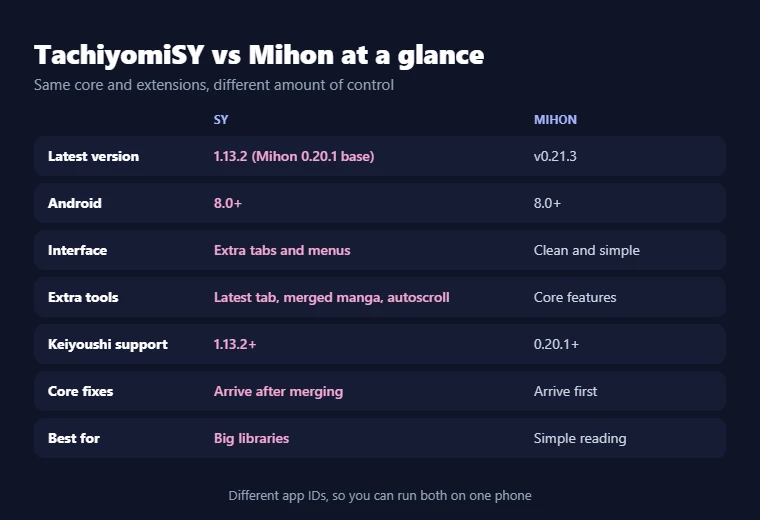
TachiyomiSY vs Mihon
TachiyomiSY vs Mihon is the question most readers ask before they install, and the answer depends on how much control you want.
| Area | SY | Mihon |
|---|---|---|
| Base | Started from TachiyomiAZ, now built on Mihon | Continues the Tachiyomi code |
| Latest version | 1.13.2 (Mihon 0.20.1 base) | v0.21.3 |
| Android support | Android 8.0+ | Android 8.0+ |
| Interface | Mihon layout with extra tabs and menus | Clean and simple |
| Extra features | Latest tab, merged manga, autoscroll, recommendations | Core features only |
| 18+ tools | Optional E-Hentai and ExHentai support | No built-in adult source |
| Extension support | Keiyoushi supports 1.13.2+ | Keiyoushi supports 0.20.1+ |
| Update speed | Gets Mihon changes after they are merged | Gets core fixes first |
| Best for | Big libraries and power users | Readers who want a simple app |
The table shows that the two apps share the same core, so reading, extensions and trackers feel almost the same in both. The real gap is in the extra tools, since SY adds a lot of menus that Mihon leaves out on purpose to stay simple.
Which One Should You Pick?
Pick SY if you follow many series across several sources, because merged manga, the Latest tab and the library search engine save real time every day. Pick Mihon if you like a cleaner app that gets core fixes first and you rarely need more than the basic reader. Since both apps can sit on one phone, you can install both, restore the same backup in each and test them side by side for a week before you decide.
Old vs new
TachiyomiSY vs Original Tachiyomi
The difference here is simple, because one app is maintained and the other is not. Tachiyomi stopped in January 2024, so it gets no fixes for new Android versions or broken sources. Extension stores have moved on as well, and Keiyoushi now tells old Tachiyomi users to update to Mihon 0.20.1 or newer. SY, on the other hand, still receives stable releases and weekly preview builds. It also has every feature the old app had, plus many more, so moving to SY loses you nothing and gains a lot. If you want a list of every option, our guide to the best Tachiyomi alternatives compares them all.
Computers
Does TachiyomiSY Work on PC?
SY is an Android app, so it does not have a Windows, Mac or Linux version. The only way to use it on a computer is through an Android emulator, and that is where the x86_64 APK comes in handy, because it matches the chip that most emulators use. Expect some trade-offs, since performance depends on your computer and reading with a mouse feels different from swiping on a phone. Our guide on how to install Tachiyomi on PC explains the emulator setup step by step.
Safety
Is TachiyomiSY Safe?
SY is safe when you download it from the official GitHub page, and there are good reasons to trust it. The code is open source under the Apache-2.0 license, so anyone can check what the app does, and Mihon itself lists SY as an endorsed fork. The real risks come from outside the project, such as mod APKs on copy websites and extension stores you do not know. Only add stores you trust, because extensions run code inside the app on your phone. One open GitHub issue reports that analytics stayed on after a user turned them off, so keep an eye on your privacy settings until it is fixed. Our full guide on whether Tachiyomi is safe covers permissions and fake APKs in more depth.
Fixes
Common TachiyomiSY Problems and Fixes
These are the real problems SY users reported on GitHub in 2026, along with the fixes that worked for them.
| Problem | What to try |
|---|---|
| Extensions won’t install or update | Switch the installer in Advanced settings to Legacy, PackageInstaller or Shizuku, or uninstall the extension and install it again |
| Backup restore fails on 1.13.2 | Close SY fully and restore again, since the error comes from the app’s own database and not from your file |
| App crashes at startup | Share the full crash log, because the cause is often an extension, and update the preview by hand if you use it |
| MangaDex shows a 400 error or mixed-up chapters | Use another source for that title, because these issues are still open |
| Backup crashes with a memory error | Create the backup without chapters |
| Cloudflare blocks a source | Open the source in WebView, then clear cookies and WebView data |
| Library update errors | Refresh less often to avoid HTTP 429 errors |
If none of these work, the SY team asks users to look for help in the Mihon Discord, where many of these problems have been solved before. You can also check our Tachiyomi troubleshooting guide and the list of fixes for when you can’t install Tachiyomi.
FAQ
Frequently Asked Questions About TachiyomiSY
What is TachiyomiSY?
It is a free Android manga reader that adds extra features, such as merged manga and the Latest tab, on top of the Mihon base.
Is TachiyomiSY a fork of Mihon?
People often call it a Mihon fork, but it started from TachiyomiAZ and only later moved to Mihon as its base.
Is TachiyomiSY still working in 2026?
Yes, the stable 1.13.2 release works on Android 8.0 and newer, and preview builds still come out almost every week on GitHub.
Is SY based on Tachiyomi?
Yes, it comes from the Tachiyomi family through TachiyomiAZ, and its current Mihon base continues the original Tachiyomi code.
What is the difference between TachiyomiSY and Mihon?
SY adds library, reader and source tools that Mihon does not have, while Mihon stays simpler and receives core fixes a bit earlier.
Is SY better than Mihon?
SY is better for large libraries and readers who like extra options, while Mihon is better for people who want a clean, simple app.
Does SY support extensions?
Yes, SY uses the same extensions as Mihon, and the Keiyoushi store officially supports SY from version 1.13.2 onward.
Does TachiyomiSY work on PC?
Not directly, because it is an Android app, but you can run it on a computer with an Android emulator and the x86_64 APK.
Is TachiyomiSY safe?
It is open source and endorsed by Mihon, so it is safe when you download it from GitHub and avoid mod APKs from other sites.
What is the difference between TachiyomiSY and TachiyomiJ2K?
SY focuses on library tools and source features, while J2K changes the design, and our TachiyomiJ2K guide explains it fully.
Does SY still receive updates?
Yes, the code on GitHub was updated in November 2026, and the latest preview build arrived on October 28, 2026.
Where is the official TachiyomiSY download link?
The official link is the releases page of the jobobby04 repo on GitHub, and every other site is only a mirror or a copy.
Can I install SY and Mihon on the same phone?
Yes, both apps use different app IDs, so they install side by side without touching each other’s library or settings.
Is SY only for 18+ content?
No, its adult features stay off by default, so SY works as a normal manga reader unless you turn them on yourself.
Does SY work on Android 7?
The latest version needs Android 8.0, so Android 6 and 7 users should install version 1.13.1, which is the last build for them.
Final word
Final Thoughts for 2026
SY is the right choice for readers who have outgrown a simple reader, because it keeps the Mihon base and adds tools that save time with a big library. Download the arm64-v8a or universal APK from GitHub, add the Keiyoushi store by hand and spend a few minutes in the reader settings before you start. Then move your Mihon backup over and try merged manga on a series you already follow. If you read many series every week, TachiyomiSY will likely become the only manga app you need on Android.