
Checked against the Keiyoushi store · 11 Nov 2026
Mihon Extensions 2026: Best Extensions & How to Install Them
Mihon is a free manga reader for Android, but the first time you open it, the Browse tab is empty because the app does not ship with a single manga source. Everything you read comes from Mihon extensions, which are small add-ons that connect the app to sites such as MangaDex, MANGA Plus, and Webtoons. This guide shows you how to add the right store, install and update each source, and fix common errors. It also lists the Mihon extensions worth installing in 2026, with every pick checked against what the Keiyoushi store offers today.
- 1,587 extensions in the store
- 150 languages
- 12 top picks compared
- 8 FAQs
Quick answer
Add the store, then install your sources.
- Go to More → Settings → Browse → Extension store and tap Add.
- Paste the link below and restart Mihon.
- Install sources from Browse → Extensions.
- Latest Mihon
- v0.21.3 (25 Oct 2026)
- Checked
- Against Keiyoushi’s index on 11 Nov 2026
Mihon extensions basics
What Are Mihon Extensions and How Do They Work?
Each extension is a small APK file that teaches Mihon how to read one website, so the MangaDex extension knows how to search MangaDex, open its chapters and load its pages inside the app. Mihon stays neutral on purpose, and its own FAQ says the project “does not have, associate, or provide any repositories or extensions.” Because of that rule, every reader has to bring their own content by adding a third-party extension store before anything shows up in Browse.
A store is a list of Mihon extensions that the app can read and install from, and the app treats each store as a separate, trusted place. Three terms changed over time:
- Extension store: Mihon v0.20.0 renamed the old “Extension repos” screen to the Mihon extension store.
- Orphaned: extensions removed from their store are now marked “orphaned” instead of “obsolete.”
- 1.6 format: the same release added support for the newer 1.6 extension format, which every extension in the Keiyoushi store now uses.
After you install one, its sources appear in the Browse tab, where you can search titles, read chapters and add series to your library.
Compatible apps
Which Apps Can Use Mihon Extensions?
Keiyoushi builds its store for “all modern variants of Mihon,” which means the main app and the forks that follow Mihon’s code closely. Older forks can sometimes load the same Mihon extensions, but Keiyoushi does not offer help when something breaks on them, so switching to Mihon or a supported fork saves you trouble later.
| App | Keiyoushi support |
|---|---|
| Mihon | Supported |
| TachiyomiSY | Supported |
| Komikku | Supported |
| TachiyomiJ2K, Yōkai, Neko | May work, no support |
| Tachiyomi | Shows only “Update to Mihon” placeholders |
All of these apps run on Android only, and Mihon itself needs Android 8.0 or higher, so Mihon extensions cannot be installed on an iPhone or a desktop computer. Any app on those platforms that uses the Mihon name has no link to the real project, even if it looks the same in screenshots.
Keiyoushi setup
How to Add the Keiyoushi Extension Store
Keiyoushi is the community group that runs the biggest extension store for Mihon and its forks, with its code and builds kept on GitHub. Adding this one store gives you most of the Mihon extensions people use every day, and you can add it in two ways depending on your app version. Both methods end with the same store in your list.
Before You Start: Remove Old Extensions
If you used Tachiyomi or another store before, do this first:
- Uninstall every extension you already have, because the Keiyoushi team warns that you will not get extension updates otherwise.
- Why: Mihon only updates an extension from the store it was installed from.
- Your library stays safe: it remains in the app during this step, and Browse → Migrate will later show which Mihon extensions you still need to reinstall.
Method 1: One-Tap “Add Store” Button
The fastest way to add the store is the one-tap button on the Keiyoushi website:
- Open keiyoushi.github.io on the same Android phone where Mihon is installed.
- Go to the Getting Started page and tap the “Add store” button.
- The button uses a special
mihon://extension-storelink, so Android opens Mihon right away and asks you to confirm the new store. - Confirm it, and Keiyoushi shows up in your store list without any copying or pasting.
The button only works on Mihon 0.21.3 or newer, so update the app from the official download page first if you are on an older release, or use the manual method below.
Method 2: Add the Store Manually
The manual method works on every supported version, and it takes about a minute once you know where the setting lives in the app.
- Tap More in the bottom bar, then open Settings from the menu.
- Open Browse, then tap Extension store on that screen.
- Tap Add at the bottom of the screen.
- Paste the Mihon extension repo URL
https://github.com/keiyoushi/extensions/raw/repo/index.pband confirm it. - Restart Mihon so it reloads the extension list, and then reinstall the Mihon extensions you removed earlier.
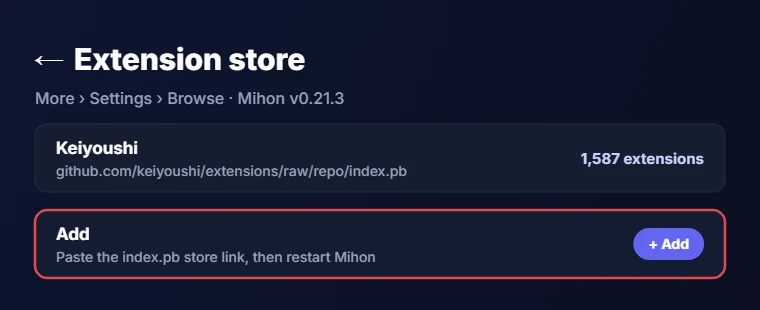
Use this exact Keiyoushi repo link, because some older guides still share index.min.json addresses that now return only two placeholder entries instead of the full list. Those same guides also tell you to look for “Extension repos,” which is the name Mihon used before v0.20.0.
Install and update
How to Install Mihon Extensions
With the store added, installing Mihon extensions works the same way for every source on the list, and keeping them updated takes even less effort once you know where each button sits inside the app and what each one does.
Install an Extension Step by Step
- Open Browse and switch to the Extensions tab, where the app now lists all the Mihon extensions the Keiyoushi store offers.
- Tap the search icon, type the name of a source and tap Install next to it.
- The first time you do this, Android asks whether Mihon may install unknown apps, so turn that permission on for Mihon and go back to finish the install.
- When the install finishes, open the Sources tab under Browse, where the new source waits for your first search.
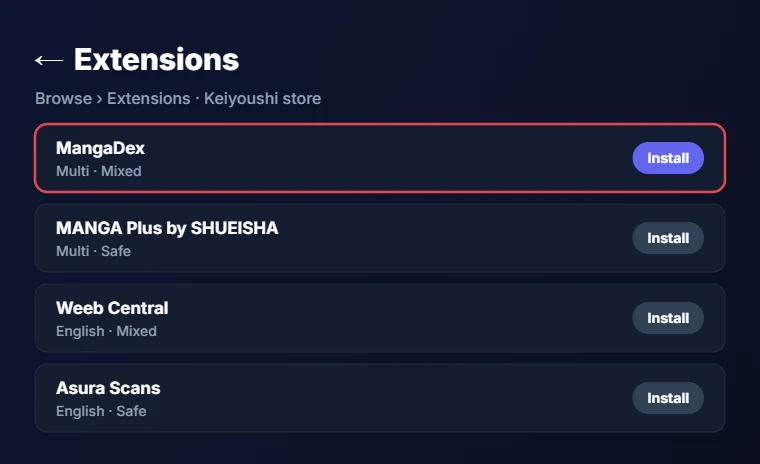
If installs keep stopping halfway on your phone, the Shizuku installer in Mihon’s settings is another option that many readers use. Tapping an installed extension opens its details page, which shows the store it came from along with a link to that store’s website, so you always know where each one was installed from.
Example: Installing the MangaDex Extension
MangaDex is a good first install because a single extension covers the site in many languages, and setting it up takes three steps:
- Search for “MangaDex” in the Extensions tab and tap Install, and once it finishes, MangaDex appears in your Sources list.
- Tap the extension in the Extensions tab to open its details.
- Turn on only the languages you read so your searches stay clean.
The MangaDex Mihon extension carries a Mixed content rating in the Keiyoushi store, which matters once you set your content preferences. Since MangaDex hosts chapters uploaded by scanlation groups, it also gives you series that no official publisher has released in English yet.
How to Update Mihon Extensions
When a site changes its layout, its extension usually needs an update before it works again, so keeping Mihon extensions current prevents most reading problems.
- Automatic checks: the app checks for updates every time it starts, and since v0.21.0 new updates show up right after launch.
- Updating: open Browse → Extensions and tap Update all to refresh all your Mihon extensions, or update a single extension from its own row.
- Store-locking: since v0.21.0, an extension can only install and update from the store it came from, which keeps tampered copies off your phone.
- Settings: changes in an extension’s settings now apply straight away.
Set Your Content Preferences (Safe, Mixed, 18+)
Mihon v0.21.0 replaced the old NSFW toggle with three content preferences called Safe, Mixed and 18+. All Mihon extensions in the store carry one of these labels, and your choice decides which Mihon extensions the app shows you. Right now the Keiyoushi store lists:
| Content rating | Extensions in the store |
|---|---|
| Safe | 598 extensions |
| Mixed | 540 extensions |
| 18+ | 449 extensions |
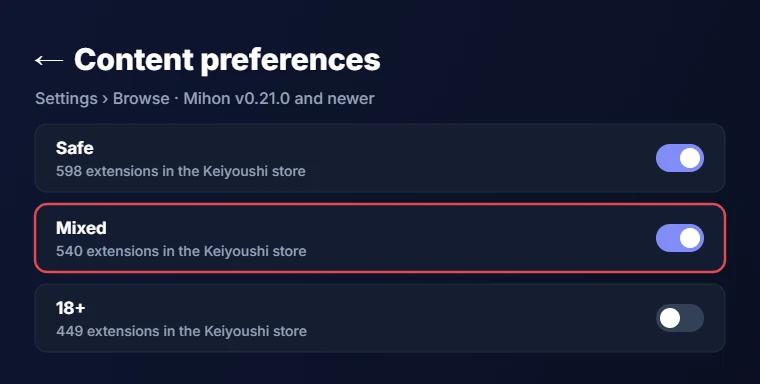
This one setting changes your list a lot. If you already installed an extension that falls outside your new preference, Mihon gives you an option to keep using it instead of losing access. Set this first, because it saves you from scrolling past sources you never wanted.
Top picks for 2026
Best Mihon Extensions in 2026
The Keiyoushi store currently lists 1,587 extensions with 2,572 sources in 150 languages, and 463 of those extensions are in English, so the hard part is picking a few good ones. Every pick below was checked against Keiyoushi’s live index on 11 Nov 2026, which means each one is installable today. This Mihon extensions list is split by type, because official publisher sources and community sites solve different problems, and most readers end up using a few of each. The label in brackets next to each of these Mihon extensions is its content rating in the store.
Quick picks:
- MANGA Plus for official Shueisha releases
- MangaDex for reading in many languages
- Weeb Central for English manga
- Asura Scans for manhwa
Best Official Sources
Official sources come straight from the publishers or platforms that own the series, so the chapters are licensed and these Mihon extensions tend to break less often than community ones. The trade-off is a smaller catalog, since each platform only carries its own titles. If you want to support the creators of the series you read, these are the sources to start with.
MANGA Plus by SHUEISHA (Safe) is Shueisha’s own reading platform, and its extension carries sources in English, Spanish, French and other languages, which makes MANGA Plus in Mihon a strong pick for readers outside Japan.
- Best for: official Shueisha releases straight from the publisher.
- Skip if: you want series from other publishers, since it only carries Shueisha titles.
Webtoons.com (Safe) brings the Webtoons platform into Mihon, with sources in English, Indonesian, Thai and several other languages.
- Best for: original vertical-scroll webtoon series.
- Skip if: you only read Japanese manga in page format.
VIZ connects Mihon to VIZ, the publisher behind many official English manga releases in North America.
- Best for: licensed English translations of popular manga.
- Skip if: you mostly read manhwa or manhua.
Tapas (Mixed) is a webcomic platform built around original series from independent creators, so its catalog looks very different from a manga site.
- Best for: indie webcomics and creator-owned stories.
- Skip if: you want translated Japanese manga.
Tappytoon (Mixed) publishes licensed Korean webtoons, and its extension carries English, French and German sources.
- Best for: official manhwa translations in those three languages.
- Skip if: you need a language Tappytoon does not offer.
Best Community Mihon Extensions for Manga
Community Mihon extensions connect the app to scanlation sites and aggregators, which carry far more series than official platforms but can stop working whenever the website behind them changes its layout or its protection.
MangaDex (Mixed) is the safest starting point for most readers, because one extension gives you dozens of languages and work from many scanlation groups in one place.
- Best for: reading the same series in several languages.
- Skip if: you want every chapter from one English aggregator.
Weeb Central (Mixed) is an English-only source that comes up often on Reddit when readers share their main sources, and the Weeb Central Mihon extension is easy to find with a quick search in the Extensions tab.
- Best for: English readers who want one large main source.
- Skip if: you read in other languages.
MangaFire (Mixed) covers English, Spanish and several other languages, and Reddit users saw it break once and then work again after an extension update.
- Best for: a multi-language backup to MangaDex.
- Skip if: you do not want to keep an eye on updates.
Manganato and Mangakakalot (both Mixed) are long-running English sources, and Manganato now loads from natomanga.com instead of its old address.
- Best for: older and completed series.
- Skip if: speed matters, because some Reddit users say both have slowed down this year.
Good backup Mihon extensions are all in the store right now and work well as second options:
- MangaHub, MangaKatana, Atsumaru and Comix cover English readers who want a fallback source.
- Kagane is worth a look if you read in Japanese or Korean as well as English, because its extension carries sources in all three languages.
If a main source misses a chapter, searching one of these backups through global search usually finds it, and Browse → Migrate can then move the series over for good.
Best Mihon Extensions for Manhwa
Korean manhwa readers have strong choices in the store, and the best Mihon extensions for manhwa mostly come from English scanlation groups that focus on that format. Most of these Mihon extensions carry a Safe rating, which makes them easy to keep even with strict content preferences.
Asura Scans (Safe) is one of the most popular English manhwa groups, best known for action and fantasy series with regular releases, and it is often the first manhwa source readers add.
- Best for: popular action manhwa.
- Skip if: you want romance or slice-of-life titles.
Flame Comics (Safe), formerly Flame Scans, translates manhwa and manhua into English, so search for the new name when you look for it in the store.
- Best for: fantasy and martial arts series.
- Skip if: you only read Japanese manga.
Vortex Scans (Safe) is another English group, and it works well as a second source next to Asura Scans when one of them falls behind on a series.
- Best for: a backup for action and fantasy series.
- Skip if: you only need one manhwa source.
Toonily and Hiperdex (both Mixed) carry large manhwa libraries, but parts of their catalog are meant for adult readers only.
- Best for: readers who want a wide manhwa catalog.
- Skip if: you share your phone with family, so keep your content preference on Safe.
Best Mihon Extensions for Your Own Library
Some Mihon extensions do not connect to a public website at all, because they read from files or links you control:
- Komga (Safe) connects Mihon to a Komga server that you run at home, so your own comic and manga files appear as a normal source. This suits readers who already keep their own CBZ files and want to read them in the same app.
- Cubari (Safe) reads from links, which makes it handy when a scanlation group shares chapters through a Cubari page.
- Kavita and Suwayomi offer their own separate extension stores, so you add their store URL in the same Extension store screen and install their extension from there, just like you did for Keiyoushi.
Best Mihon Extensions Comparison Table
This table sums up the main picks so you can compare type, rating and language in one place before you start installing anything.
| Extension | Type | Rating | Language | Best for |
|---|---|---|---|---|
| MANGA Plus | Official | Safe | Multi | Shueisha releases |
| Webtoons.com | Official | Safe | Multi | Webtoons |
| Tappytoon | Official | Mixed | EN/FR/DE | Licensed manhwa |
| MangaDex | Community | Mixed | Multi | Many languages |
| Weeb Central | Community | Mixed | English | Main English source |
| MangaFire | Community | Mixed | Multi | Backup source |
| Manganato | Community | Mixed | English | Completed series |
| Asura Scans | Manhwa | Safe | English | Action manhwa |
| Flame Comics | Manhwa | Safe | English | Fantasy manhwa |
| Toonily | Manhwa | Mixed | English | Big catalog |
| Komga | Self-hosted | Safe | Any | Your own files |
| Cubari | Self-hosted | Safe | Any | Shared links |
Pick one row from each type and you end up with a balanced setup.
Smart setup
How to Choose the Right Mihon Extensions
Installing dozens of sources sounds useful, but it slows down global search and gives you more Mihon extensions to keep updated. These habits keep your setup clean and reliable:
- Keep it small: three to five main sources plus one or two backups cover almost every series without clutter.
- Add one official source: pick at least one if the series you follow is licensed, because those chapters are the most reliable.
- Wait after big updates: give an updated extension a little time before you report a problem, since fixes often arrive within days.
- Back up first: before you move a large part of your library to a new source, make a backup in Mihon so you can roll back if anything goes wrong.
- Use Browse → Migrate: when a source stops updating a series, it moves that series to another source while keeping your reading progress.
- Set content preferences: they hide Mihon extensions you would never pick.
Removed sources
Popular Mihon Extensions You Won’t Find Anymore
Older lists still recommend sources that are no longer in the Keiyoushi store, which is why many readers search for them and find nothing. Any guide that still ranks these among the best Mihon extensions is out of date:
- Missing from the current index: MangaSee, MangaLife, Luminous Scans, Manga Air, Comic Kiba, MangaBuddy and ReadComicOnline.
- Bato.to only appears as “Bbato,” which points to bato1.com.
- MangaPark only appears as “MangaPark.tv (unoriginal),” which carries an 18+ rating.
If an old favorite is gone, global search will show which current source carries your series.
Comick causes the most confusion, because there is no official Comick extension in the store. Keiyoushi only lists “Comick (Unoriginal)” and “ComicK Fanmade,” which are separate projects from the original site. Since v0.21.0, Comick is built into Mihon as a tracker, similar to AniList and MangaUpdates, so you can track your reading progress there without installing anything.
Moving from Tachiyomi
Switching From Tachiyomi: What Happens to Your Extensions
Tachiyomi shut down on 13 January 2024, and its old extensions no longer work with the current store. If you add Keiyoushi to an old Tachiyomi install, you only see two placeholder entries called “Outdated App” and “Update to Mihon 0.20.1+,” which is the store telling you to move to Mihon. To switch over cleanly:
- Install Mihon and restore your backup.
- Uninstall any leftover extensions.
- Add the Keiyoushi store and reinstall your Mihon extensions from there so they keep getting updates.
The next Mihon update makes the timing important for anyone with an old backup. Mihon v0.21.3 is the last major version that supports Tachiyomi’s .tachibk backup format and Tachiyomi 1.4 extensions, and the next version drops both. If you still have an old Tachiyomi backup, restore it on v0.21.3 first and then update the app.
Safety
Are Mihon Extensions Safe?
Mihon extensions are as safe as the store you install them from, and the Mihon team says so directly in its FAQ. The FAQ warns that third-party extensions “will have full access to the app and may contain malware,” because each extension is an APK that runs inside Mihon. Mihon v0.21.0 also added a real safety feature, since Mihon extensions now only install and update from the store they came from, so a copy from a different store cannot quietly replace the extension you already trust.
To stay safe, follow these simple rules:
- Stick with well-known stores such as Keiyoushi, which publishes its source code openly on GitHub where anyone can check it.
- Avoid random APK files shared in comments or chat groups.
- Remove any store you no longer recognize from the Extension store screen.
Troubleshooting
Troubleshooting Mihon Extensions
Most problems with Mihon extensions come from an old store link, a mixed setup or a change on the website itself, so the fixes below are grouped by what you actually see on the screen. Start with the section that matches your error, and move to the next one only if the first fix does not work.
Extensions Tab Is Empty
When Mihon extensions are not showing at all, the cause is almost always that no store has been added yet, since the app ships with none.
- Open More → Settings → Browse → Extension store and add the Keiyoushi URL if the list is blank.
- If the store is already there, restart Mihon so it reloads the extension list, and then open the Extensions tab again.
- Check your content preference, because a Safe setting hides a large part of the store.
Store URL Won’t Add
When Mihon refuses the URL, one of these fixes usually solves it:
- Check the link: compare it letter by letter with the
index.pblink above, because a typo or an oldindex.min.jsonaddress is the usual cause. - Paste it again: this also removes hidden spaces.
- Update Mihon: check your version under Settings → About, since older releases cannot read the current store format.
Extensions Show as “Orphaned”
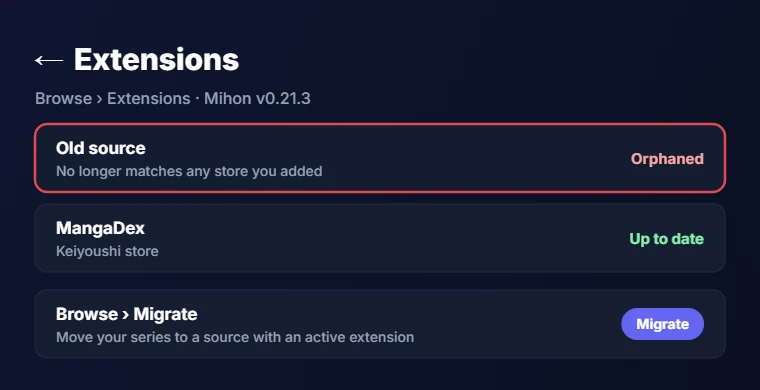
An orphaned extension is one that Mihon cannot match to a store anymore, usually because it was removed from that store or because you deleted the store it came from. It may keep working for a while, but it will never get updates again.
- Spot it: the Extensions tab marks orphaned Mihon extensions, so check it during your weekly update.
- Fix it: open Browse → Migrate to move your series to a source that still has an active extension.
Extension Won’t Install or Update
Try these fixes in order:
- Restart Mihon, because Keiyoushi lists a known bug where the app does not notice freshly updated Mihon extensions.
- Switch the installer: Reddit users suggest opening Settings → Advanced and switching the extension installer, or trying the Shizuku installer instead.
- Do not mix stores: Keiyoushi and Yuzono offer the same extensions and clash with each other.
- Use Split APK Installer for a clearer error message, which the Keiyoushi docs recommend because it shows the exact reason an install failed.
The two common errors mean different things:
INSTALL_FAILED_UPDATE_INCOMPATIBLEmeans the same extension is already installed from another store, so uninstall that copy first.DISPLAY_NAME column is nullmeans the APK file is corrupted and needs a fresh download.
Cloudflare, HTTP Errors or Blank Pages
Some sources use Cloudflare protection, and a few make it stronger on purpose to block apps like Mihon.
- Open the source, tap the WebView icon, finish the CAPTCHA and close the page with the X button.
- Repeat the WebView step if the source asks again, or open the site in the browser from the WebView menu and solve the CAPTCHA there.
- Go to More → Settings → Advanced, tap Clear cookies and Clear WebView data, and keep Android System WebView updated.
- Change the default user agent on that same Advanced screen, which helps with some sources.
When nothing works, waiting a day or switching sources is the last option left.
A Source Suddenly Stopped Working
When one source fails while others still load, check for an extension update first, since a site change usually needs a new version of the extension. Reddit users saw this with MangaFire, which worked again right after its update arrived.
- Restart: Mihon shows new updates right after launch, so a quick restart often reveals the fix.
- Migrate: if no update shows up after a few days, move the affected series to another source.
Extensions Missing After Restoring a Backup
A Mihon backup saves your library and settings, but it does not include the extension files themselves.
- Add the Keiyoushi store again and reinstall your Mihon extensions.
- Use Browse → Migrate to see which ones are still missing from your setup.
- If you restored an old Tachiyomi
.tachibkbackup, do it on Mihon v0.21.3, since later versions cannot read that format.
Other stores
Do You Need Another Extension Store?
Most readers never need more than Keiyoushi, since it already covers 1,587 extensions across 150 languages.
- Yuzono runs a store that offers the same Mihon extensions, so adding both only creates install errors and duplicate entries in your list.
- Kavita and Suwayomi are different, because they publish their own extensions for their own server apps, and you only need them if you run those servers at home.
Whichever store you add, never keep two stores that carry the same Mihon extensions, because Mihon’s store-locking rule will block updates that come from the second one. You can see every store behind your Mihon extensions under Settings → Browse → Extension store.
FAQ
Frequently Asked Questions
What is the Keiyoushi store URL for Mihon?
The current Keiyoushi store URL is https://github.com/keiyoushi/extensions/raw/repo/index.pb, and you add it under More → Settings → Browse → Extension store. On Mihon 0.21.3 or newer, you can tap the “Add store” button on the Keiyoushi website instead of pasting the link yourself.
Why is Mihon not showing any extensions after I added the store?
Restart Mihon first, since the app needs to reload the extension list after you add a store. If the list stays empty, check that the URL ends in index.pb and not index.min.json, and also check that your content preference is not hiding most of the extensions.
Why can’t I install extensions in Mihon? It doesn’t continue.
Make sure Android lets Mihon install unknown apps, because the install stops without that permission. If it still hangs, switch the extension installer in Settings → Advanced, try the Shizuku installer, or install the APK through Split APK Installer to see the real error message.
Why do my Mihon extensions show “orphaned” even when they work?
Mihon marks an extension as orphaned when it no longer matches any store you have added, often after you removed a store or the extension left it. It may keep working for now, but it will not get updates, so migrate those series to an active source.
What is the best Mihon extension for manhwa?
Asura Scans is the most popular choice for English manhwa, and it carries a Safe rating in the Keiyoushi store. Flame Comics and Vortex Scans make good second sources, while Toonily and Hiperdex offer bigger catalogs that include some adult titles.
Is there a Comick extension for Mihon?
There is no official Comick extension in the Keiyoushi store right now, only “Comick (Unoriginal)” and “ComicK Fanmade,” which are separate projects. Since Mihon v0.21.0, Comick works as a built-in tracker, so you can sync your reading progress without installing any extension.
Are Mihon extensions the same as Tachiyomi extensions?
They started from the same system, but current Keiyoushi extensions use the newer 1.6 format and target Mihon 0.20.1 and newer. Old Tachiyomi installs only see two placeholder entries, and Mihon v0.21.3 is the last version that still loads Tachiyomi 1.4 extensions.
Are Mihon extensions safe to install?
They are as safe as the store they come from, because Mihon’s FAQ warns that third-party extensions get full access to the app. Keiyoushi publishes its code on GitHub, and Mihon now blocks updates from other stores, which keeps tampered copies off your phone.
Final word
Conclusion
Getting Mihon ready to read only takes a few minutes once the Keiyoushi store is added, either with the one-tap button on Mihon 0.21.3 or through the Extension store screen in settings. From there, a small set of sources covers most readers, such as MANGA Plus and Webtoons for official releases, MangaDex and Weeb Central for wider libraries, and Asura Scans for manhwa. Websites change often, so open Browse → Extensions every week or two and update your Mihon extensions to keep chapters loading without errors. If something still breaks, the troubleshooting steps above cover the errors readers report most.